avit macrumors regular Original poster Jul 8, 2010 107 0 Over there Jul 20, 2011 #1 I used to have iStat and I uninstalled it through TrashMe, which i guess I wasn't supposed to do because now there's two iStat daemons in Activity Monitor. When I kill them, they just come back. How do I get rid of them?
I used to have iStat and I uninstalled it through TrashMe, which i guess I wasn't supposed to do because now there's two iStat daemons in Activity Monitor. When I kill them, they just come back. How do I get rid of them?
simsaladimbamba Guest Nov 28, 2010 22,670 31 located Jul 20, 2011 #2 Best way to FULLY DELETE a program
avit macrumors regular Original poster Jul 8, 2010 107 0 Over there Jul 20, 2011 #3 simsaladimbamba said: Best way to FULLY DELETE a program Click to expand... Yeah, but searching yields no results except for one file that's from macports, whatever the hell that is :\
simsaladimbamba said: Best way to FULLY DELETE a program Click to expand... Yeah, but searching yields no results except for one file that's from macports, whatever the hell that is :\
r0n1n macrumors member Sep 1, 2010 42 1 127.0.0.1 Jul 20, 2011 #4 Delete the following files and reboot. /Library/LaunchDaemons/com.bjango.istatlocaldaemon.plist ~/Library/Preferences/com.bjango.istatlocal.plist ~/Library/Preferences/com.bjango.istatmenus.plist ~/Library/Preferences/com.bjango.systemuiserver.plist ~/Library/Caches/com.bjango.istatmenus ~/Library/LaunchAgents/com.bjango.istatlocal.plist
Delete the following files and reboot. /Library/LaunchDaemons/com.bjango.istatlocaldaemon.plist ~/Library/Preferences/com.bjango.istatlocal.plist ~/Library/Preferences/com.bjango.istatmenus.plist ~/Library/Preferences/com.bjango.systemuiserver.plist ~/Library/Caches/com.bjango.istatmenus ~/Library/LaunchAgents/com.bjango.istatlocal.plist
avit macrumors regular Original poster Jul 8, 2010 107 0 Over there Jul 20, 2011 #5 r0n1n said: Delete the following files and reboot. /Library/LaunchDaemons/com.bjango.istatlocaldaemon.plist ~/Library/Preferences/com.bjango.istatlocal.plist ~/Library/Preferences/com.bjango.istatmenus.plist ~/Library/Preferences/com.bjango.systemuiserver.plist ~/Library/Caches/com.bjango.istatmenus ~/Library/LaunchAgents/com.bjango.istatlocal.plist Click to expand... This sorta solved it, only one of them is gone
r0n1n said: Delete the following files and reboot. /Library/LaunchDaemons/com.bjango.istatlocaldaemon.plist ~/Library/Preferences/com.bjango.istatlocal.plist ~/Library/Preferences/com.bjango.istatmenus.plist ~/Library/Preferences/com.bjango.systemuiserver.plist ~/Library/Caches/com.bjango.istatmenus ~/Library/LaunchAgents/com.bjango.istatlocal.plist Click to expand... This sorta solved it, only one of them is gone
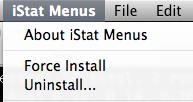
r0n1n macrumors member Sep 1, 2010 42 1 127.0.0.1 Jul 20, 2011 #6 Can you open up activity monitor and tell me who the process user is? You, or root? Edit. An easier solution to your problem is to re-download istat menus, install, launch the app, click on istat menus>uninstall. Attachments Screen shot 2011-07-20 at 8.40.04 PM.png 16.6 KB · Views: 1,096 Last edited: Jul 20, 2011
Can you open up activity monitor and tell me who the process user is? You, or root? Edit. An easier solution to your problem is to re-download istat menus, install, launch the app, click on istat menus>uninstall.
avit macrumors regular Original poster Jul 8, 2010 107 0 Over there Jul 21, 2011 #7 r0n1n said: easier solution to your problem is to re-download istat menus, install, launch the app, click on istat menus>uninstall. Click to expand... Yes! This fixed it! Thanks so much
r0n1n said: easier solution to your problem is to re-download istat menus, install, launch the app, click on istat menus>uninstall. Click to expand... Yes! This fixed it! Thanks so much