Become a MacRumors Supporter for $50/year with no ads, ability to filter front page stories, and private forums.

abetzolt

macrumors newbie
Original poster
Jan 24, 2008
4
0
Hi,
I hope anyone can help. I just went everything Mac back in May and put all of my photos in iphoto.

Now I just got Photoshop CS3 (classroom in a book is on it's way!) and I can't seem to open my library in photoshop when you go to file open and find it, it is completely grayed out. I have tried to save as photos to do a contact sheet and it still wont recognize the photos? Is there a simple solution?
I should also state that any photos that i transferred from my windows application will open but new photos that i took with my canon and let iphoto organize and keep I can not open with photoshop.

I sure can use anyones help! thanks in advance.

hugs,
anna
 
hi anna

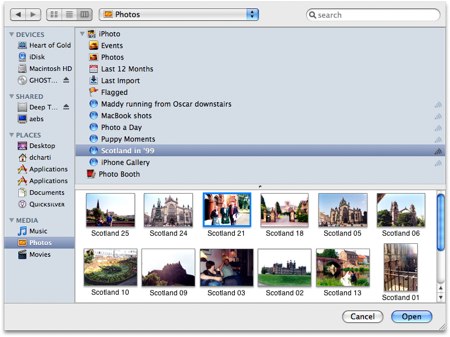
im not sure what you mean by your iPhoto library is greyed out in Photoshop? do you mean the media browser (as seen below) in Photoshop's open window is greyed out? also are you using Leopard as this isnt a feature in Tiger.

LeopardMediaPhotos-1.jpg


or are you trying to open the iPhoto library with Photoshop in your pictures folder? because this wont work. try dragging the photo from iPhoto into Photoshop's dock icon then it will open.
 
hi Rich,

When I am in photoshop and I go to file>open > then choose either applications the iphoto is grey or if i choose pictures then iphoto library is grey out too!.

Obviously i am a newbie. I used to work with a PC and took a few classes on photoshop cs. So maybe i am even going about it wrong. See when you say the photoshop dock I don't even know what you mean by that :(. So I will try to find that.

I did sign up for some help at the apple store so I should ask for their help too!
thanks,
anna
 
The problem is the way that iPhoto stores your pictures. It puts all your pictures inside a package called iPhoto Library. That makes it hard for other applications to access them.
 
thanks for your help. on some of the photos that did work! some said i needed quicktime to open.

what i was going to do is make a contact sheet of 9 photos for a birthday party invitation. but it wouldn't let me open those from the folder like you thought.

thanks,
anna
 
it worked it worked! it finally worked!

oh! man thanks for everyone's help!!!

hugs,
anna
 
i can not open iphoto in photoshop cs3

I just got a macbook pro and everything was fine i was able to open my iphoto fine ( i transferred from a external hard-rive) then i opened iphoto for the 1st time to upload photos.. .everything was fine just thrown off by the new features.. then i went to open iphoto in photoshop and the open button was faded out.... i tried on the another account and i could do it. it was just on the main account.... how can i get this working again???

thanks

cameragirl
 
Also mac newbie, but found an easy way out

Just open the library of iPhoto and make an Alias (by "right" clicking) of the originals folder in there. I made one in the photos section of my user thingie. After that anything you import through iPhoto will be accessible through any other aplication.

I registered just to post this. I've had a mac for less than week, I love it, but could have not survived with these amazing forums. THANX to all of you for making my mac experience even better. (I wonder why I stuck with a PC for so many years.)

may the summer come to the north.
 
hassiton,

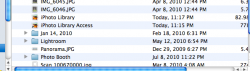
Hey could you explain how you did that alias thing again? i tried to make an alias of the actual iphoto library but it was still grayed out in cs3...i called it 'iphoto library access'

where did you find the originals folder?
 

Attachments

  • Screen shot 2010-08-11 at 11.23.33 PM.png
    Screen shot 2010-08-11 at 11.23.33 PM.png
    47 KB · Views: 185
The easiest thing to do would be to make Photoshop the external editor. In iPhoto, go to Preferences, and set Photoshop as your external editor. Then, work in iPhoto and when you want to edit a photo, Photoshop will open automatically, you can edit the photo, and when you save your work, it will put the photo back into iPhoto exactly where they should be.
 
I decided to choose Photoshop CS5 as my external editor and it works great. Thank you all for your helpful information.
 
Not the complete answer

Setting Photoshop (PS) as the default editor for iPhotos is not the complete answer. I prefer to use iPhoto editor (or Picasa) for 'first look' editing and only use a major editor like PS for pictures I want to print or complex editing like stitching a panorama. So I don't want to set PS as my editor, although this does work. There are many other image related programs which need to have access to the library. Also iPhoto does not display all the earlier images in my library.
What I (?we) would like would be for Finder to have access to the whole of the library (not through iPhoto) so I can browse the library and import a file to the programme of my choice. I can do this, but only by using the search function of Finder, for example searching the Pictures folder for '2008' brings up a folder containing all the images entered to iPhoto that year. Then I can trace down the image I want and open it 'with' the application I want to use. (Ass backwards IMO). I can also drag an image from iPhoto to the PS icon in the dock, but I don't have all my apps available like that.
So I have two questions, can Finder be tweaked to show the library folders and files so that all applications can open them? How do I adjust iPhoto so it will bring up events from several years ago?
My OS is SnowLeopard.
 
Register on MacRumors! This sidebar will go away, and you'll see fewer ads.