Become a MacRumors Supporter for $50/year with no ads, ability to filter front page stories, and private forums.

jdw13

macrumors regular
Original poster
Oct 2, 2015
203
58
Boston, Maine, Chile
Now, when I delete an iCloud email message, it appears to disappear completely instead of being move to the Trash Mailbox.
It does not seem to matter if I use the delete key on my Apple keyboard or select delete from the pulldown that appears when I press right mouse button.

I cannot find the 'deleted' emails anywhere...
 
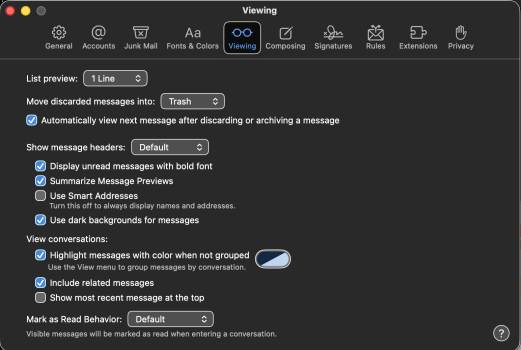
There is a setting on the mail app - viewing section and where to put discarded emails. Have you checked that setting?
 
There is a setting on the mail app - viewing section and where to put discarded emails. Have you checked that setting?
I am not sure what you are talking about. The "Mailbox Behaviors" is set to "Trash Mailbox". Where is the setting you are talking about?
I am running latest Tahoe with Mail Version 16.0 (3864.300.41.1.7)

In the "Viewing" it has move discarded messages to Trash, which I assume is the Trash Mailbox that deleted messages have always gone into until now...
 

Attachments

  • Screenshot 2025-12-25 at 7.03.06 PM.png
    Screenshot 2025-12-25 at 7.03.06 PM.png
    235.6 KB · Views: 1
  • Screenshot 2025-12-25 at 7.06.57 PM.png
    Screenshot 2025-12-25 at 7.06.57 PM.png
    241.9 KB · Views: 1
Is this something that happens ONLY in your iCloud mail?
Does the same disappearing act happen when you delete an email from a normal mail account?
 
Register on MacRumors! This sidebar will go away, and you'll see fewer ads.