Become a MacRumors Supporter for $50/year with no ads, ability to filter front page stories, and private forums.

MOM20xx

macrumors member
Original poster
Aug 24, 2021
65
14
Hi,
i bought a brand new iPhone 17 Pro which was shipped with iOS 26.2. On my old iPhone 14 Pro which i updated from iOS 18.7.2 to iOS 26.2 the clock app appears in icloud settings.

on the brand new 17 Pro shipped with iOS 26.2 this does not happen. is this normal or a bug. How to I get the clock app to appear in iCloud Settings?
 
IMG_0013.PNG

I have this only in German. But here on my old iPhone i had also Uhr (for geman) or Clock with the slider for on and off. On the new Iphone 17 Pro this is missing. Uhr would be between Übersetzen and Unterstützung
 
Right I see. I have clock in mine on my iPhone 17 Pro Max but…I am running the latest dev beta of 26.3. Perhaps that’s why I have it? Sorry, I can’t help any more. I don’t really know why you would need clock in there though.
 
Have you changed any settings in the clock app from the default settings? Like added a country or something similar.

I imagine if you haven’t changed anything it won’t back up any settings for the app.
 
  • Like
Reactions: chabig
I've created new alarms, timer were running, changed locations in world clock, … but clock will not showing up in icloud settings.

edit: deleting and installing clock app did not change anything
 
Last edited:
Clock data isn't sync'd via iCloud, you won't find it there, It's just going to be a plist somewhere in system preferences saved in the 'Backups' database.
 
Clock data isn't sync'd via iCloud, you won't find it there, It's just going to be a plist somewhere in system preferences saved in the 'Backups' database.
but why have some people the setting in icloud and other not? All my Devices make local Backups no iCloud Backup but some of them have this setting some not.
 
The Clock app in recent iOS versions (starting with iOS 18 in 2024 and continuing through iOS 26 in 2025) includes an optional iCloud sync toggle in Settings > [Your Name] > iCloud > Show All (or Saved to iCloud). When enabled, this syncs the following data across your signed-in Apple devices (iPhone, iPad, and where applicable):
  • World Clock — Favorite cities and their order.
  • Alarms — Alarm times, labels, sounds, and schedules (including Sleep/Wake Up alarms from the older Bedtime feature, now integrated).
  • Timers — Preset timers, active timers (with better cross-device notification support), and related preferences.
Note that macOS does not have a full Clock app equivalent, so sync is limited to iOS/iPadOS devices.

In your case, I suspect that because your phone is new, it might have completed syncing to iCloud and the toggle might appear in a few days. But you did post a photo of a pretty complete list of iCloud synced apps, so maybe that's not it. Try restarting your phone, and if that doesn't work sign out of iCloud and back in. That should surely enable clock syncing.
 
The Clock app in recent iOS versions (starting with iOS 18 in 2024 and continuing through iOS 26 in 2025) includes an optional iCloud sync toggle in Settings > [Your Name] > iCloud > Show All (or Saved to iCloud). When enabled, this syncs the following data across your signed-in Apple devices (iPhone, iPad, and where applicable):
  • World Clock — Favorite cities and their order.
  • Alarms — Alarm times, labels, sounds, and schedules (including Sleep/Wake Up alarms from the older Bedtime feature, now integrated).
  • Timers — Preset timers, active timers (with better cross-device notification support), and related preferences.
Note that macOS does not have a full Clock app equivalent, so sync is limited to iOS/iPadOS devices.

In your case, I suspect that because your phone is new, it might have completed syncing to iCloud and the toggle might appear in a few days. But you did post a photo of a pretty complete list of iCloud synced apps, so maybe that's not it. Try restarting your phone, and if that doesn't work sign out of iCloud and back in. That should surely enable clock syncing.
Tried this now - but this does not fix the issue. Clock still not showing up in icloud - settings
 
I didn't realize they added clock syncing, but that makes sense why I started seeing things on my other iOS devices. I agree with chabig, usually these kinds of delays are attributable to iCloud still getting syncs up and running on a new device.
 
  • Sad
Reactions: _Mitchan1999
Would anyone mind posting a screenshot of their clock app in iCloud please?

Sleep data is sync'd via the health app (healthdb.sqlite).

Clock "app" is just a user friendly name for the user facing MediaTimer app (the actual clock app). It associated daemon (mediatimerd) maintains time for the device. The app itself is inaccessible by the user, if you use a file manager you won't find a clock or mediatimer app. Mediatimerd leveraged by anything that needs time, including routined which triggers anything that is activated by time.

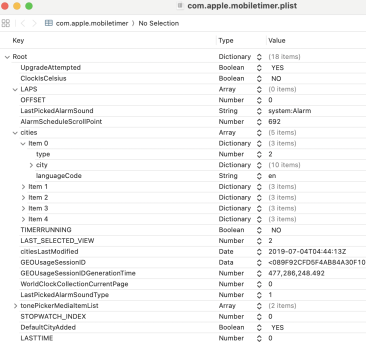
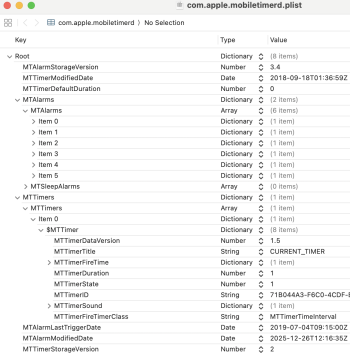
You can find all the user data (world clock cities, timers, alarms, timer and alarm sound selections, stopwatch laps) in plist located at /HomeDomain/Library/Preferences/com.apple.mobiletimer and /HomeDomain/Library/Preferences/com.apple.mobiletimerd.

Screenshot 2025-12-26 at 3.07.39 PM.pngScreenshot 2025-12-26 at 3.08.55 PM.png
(ClockIsCelsius - NO) Does that make it imperial? Weird....

That image above is pulled from a backup snapshot I made earlier today before I got distracted.

Screenshot 2025-12-26 at 5.28.09 PM.png

The reason I specifically point that out is because backups do not contained sync'd data and vice versa. It's either sync'd OR in the backup file, not both. This is for the same reason Messages and Photos will sync via iCloud OR go into the backup file on iCloud. Sync'd data is generally newer than the data in the backup. If you were to restore a device you'd likely put older data on it, this would then sync with your other devices causing data loss. That's if your lucky, could cause all sorts of issues...
 
Hi,
i bought a brand new iPhone 17 Pro which was shipped with iOS 26.2. On my old iPhone 14 Pro which i updated from iOS 18.7.2 to iOS 26.2 the clock app appears in icloud settings.

on the brand new 17 Pro shipped with iOS 26.2 this does not happen. is this normal or a bug. How to I get the clock app to appear in iCloud Settings?
I have the same iPhone as you on 26.2

I have a clock App switch in my Saved to iCloud settings.

I don’t know why you do t
 
Register on MacRumors! This sidebar will go away, and you'll see fewer ads.