

Become a MacRumors Supporter for $50/year with no ads, ability to filter front page stories, and private forums.

rph105

macrumors 6502
Original poster
Jul 21, 2007
266
0
I'm sure a few of us in this forum own a 360, have any of you managed to play any REAL HD content without purchasing the HD-DVD player or converting your .mkv's to .wmv's

I've noticed that if i download a 1080p trailer from apple.com/trailers in .mov format it works FLAWLESSLY, perfect image and audio. Is there a (quick) way to convert a .mkv to .mov and have it play perfectly with no hitch, on the 360.

If trailers off apple.com can play there must be a workaround.

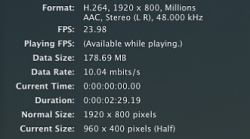
Below I've posted a screen of the downloaded trailers info that i got off of apple tv, if anyone has any ideas please contribute, I know a couple of people that would love to get this working, including myself

Thanks in Advance
 

Attachments

  • Picture 1.png
    Picture 1.png
    71.9 KB · Views: 32,434
so if the 360 can play .mov try opening the .mkv in QuickTime (must have Pro & perian installed) and saving it as self-contained movie. this will give it the .mov extension.
 
so if the 360 can play .mov try opening the .mkv in QuickTime (must have Pro & perian installed) and saving it as self-contained movie. this will give it the .mov extension.

Tried that, doesn't work
 
i am trying to do this too. i tried to convert .mkv with visual hub to an mp4 but it lost a lot of the quality. surely there is some way? anyone?
 
Is there no XBox Media Center for the 360 out there yet?

I am LOVING the new OS X port of the XBox Media Center, OSXBMC. Of course it has full MKV support (as well as about 10 other file formats). Strangely, at this moment it is the ONLY media player out there that will play flawlessly smooth, hiccup-free 1080P content on my iMac. VLC stutters on some movies as do MPlayer OSX and Quicktime. It has yet to have one glitch in any HD content I've thrown at it.

I'm even thinking of getting a Mac Mini to use as a dedicated media server with OSXBMC.

Sorry, I realize this doesn't answer your question though. If you have a Mac you can hook up to your HDTV you could use it with OSXBMC in place of the 360 for your MKV movies though. ;)
 
Visual hub works. I've done it before. Although you may not have the paid software, I would think handbreak could do it also.

Give it a shot...
 
Visual hub works. I've done it before. Although you may not have the paid software, I would think handbreak could do it also.

Give it a shot...

*bump*

How long does it take to convert a 8GB mkv file in Visual Hub? Is it easier to stream the HD movies from Mac via app such as 360 connect (is lagging an issue?) or is it better to copy the movie onto an external HDD and play it from there?

One more question, does everything still work on the latest 360 dashboard update, the NXE?

Many thanks
 
I tried to convert a .mkv file that's almost 8 GB to .avi using Visual Hub to play on my Xbox, but it cut off about half the file after the conversion. Any suggestions?
 
From forum se7ensins, I known:

Xbox 360 has strict requirement for the input formats and only WMV, AVI, H.264 and MPEG-4 are compatible with Xbox 360. In other words, it's impossible to directly play MKV on Xbox 360. It is pity since MKV is an open standard free container format and very popular so far.

To play MKV on Xbox 360, you'd better to convert MKV to Xbox 360 more compatible formats.
 
Register on MacRumors! This sidebar will go away, and you'll see fewer ads.