Become a MacRumors Supporter for $50/year with no ads, ability to filter front page stories, and private forums.

Antoni Nygaard

macrumors 6502a
Original poster
Jun 23, 2009
807
896
Denmark
I have this grey colour background in my dashboard on my macbook pro 4,1, but on my iMac i have same colour but with small squares on. i just installed mavericks on top of my clean install, but it didn't change it to the one with squares. Which one is the right?
 

Attachments

  • Screen Shot 2013-11-04 at 19.42.56.png
    Screen Shot 2013-11-04 at 19.42.56.png
    1 MB · Views: 378
I have the squares too on my mid 2011 mac mini with a fresh install of 10.9.
 
If you want to have iStat Pro displaying your IP address instead of "Updating…." : link

Remove the old widget from the Dashboard, then replace the old iStat Pro with the new one in :

Users / yourusername / Library / Widgets.

(~/Library/widgets).

Then add iStat Pro to the Dashboard.
 
If you want to have iStat Pro displaying your IP address instead of "Updating…." : link

Remove the old widget from the Dashboard, then replace the old iStat Pro with the new one in :

Users / yourusername / Library / Widgets.

(~/Library/widgets).

Then add iStat Pro to the Dashboard.


Thx for that one:D
 
I have this grey colour background in my dashboard on my macbook pro 4,1, but on my iMac i have same colour but with small squares on. i just installed mavericks on top of my clean install, but it didn't change it to the one with squares. Which one is the right?

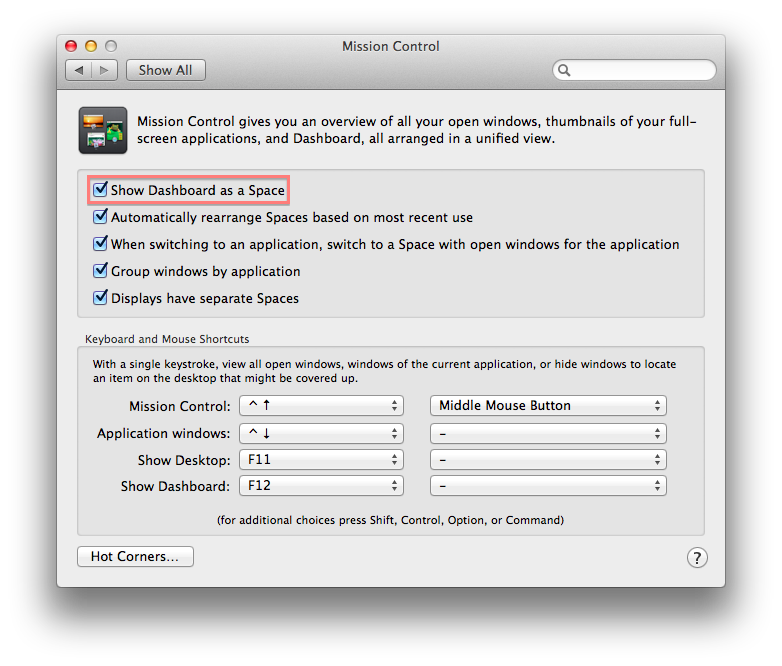
OP- from my experience, this issue was present in the first beta of Mavericks where sometimes the dashboard background will revert from the squared pattern to the plain grey color seen in Mission Control, Notification Center, etc. Every once in a while, this will still happen on my MBA, and the way I fix this is to simply go to System Preferences, Mission Control, and to un-tick and re-tick the box labeled "Show Dashboard as a Space."

2ynqjqc.png
 
OP- from my experience, this issue was present in the first beta of Mavericks where sometimes the dashboard background will revert from the squared pattern to the plain grey color seen in Mission Control, Notification Center, etc. Every once in a while, this will still happen on my MBA, and the way I fix this is to simply go to System Preferences, Mission Control, and to un-tick and re-tick the box labeled "Show Dashboard as a Space."

Image

thx it worked
 
Register on MacRumors! This sidebar will go away, and you'll see fewer ads.