Hi Everyone,
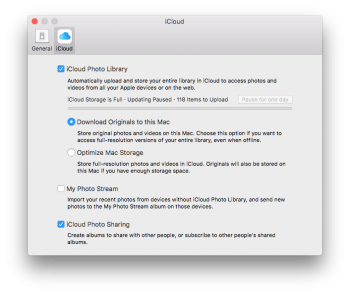
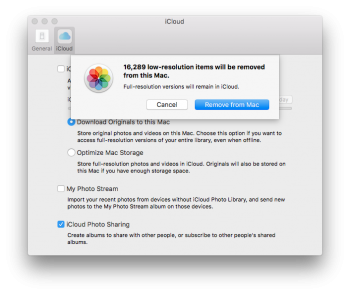
My aunt and her husband have moved away from the Apple Ecosystem. They now have android phones and do not require an iCloud subscription. So they have just the free account right now. However, when they had iPhones she had her iCloud Photo Library turned on. I am on her macbook and trying to turn off the photo iCloud Library. However, it is warning me that low-res photos will be deleted. Although she always had "download originals to this Mac" enabled. Do I have to upgrade her storage in order to turn off iCloud and ensure she keeps all her photos locally on her macbook?
**I'm posting here because every solution I have found assumed "optimize Mac storage" was enabled. This is not true in her case.
My aunt and her husband have moved away from the Apple Ecosystem. They now have android phones and do not require an iCloud subscription. So they have just the free account right now. However, when they had iPhones she had her iCloud Photo Library turned on. I am on her macbook and trying to turn off the photo iCloud Library. However, it is warning me that low-res photos will be deleted. Although she always had "download originals to this Mac" enabled. Do I have to upgrade her storage in order to turn off iCloud and ensure she keeps all her photos locally on her macbook?
**I'm posting here because every solution I have found assumed "optimize Mac storage" was enabled. This is not true in her case.