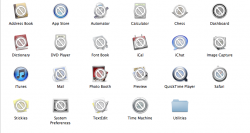
Hi, first time poster on the forums, just got a new MBP.
So before switching to a Mac I didn't know that you shouldn't move around the default apps that came preinstalled, so I moved them into folders and what not to sort them.
However upon finding out that they may not update correctly or display in the Mac App Store as installed, I was wondering if anyone could post an image of what the DEFAULT newly installed Mac Applications folder looks like so I can put those files back.
As well as iWork and iLife packages in addition to the Utilities folder in Applications (I forgot I moved those around too..)
Thank you in advance!
So before switching to a Mac I didn't know that you shouldn't move around the default apps that came preinstalled, so I moved them into folders and what not to sort them.
However upon finding out that they may not update correctly or display in the Mac App Store as installed, I was wondering if anyone could post an image of what the DEFAULT newly installed Mac Applications folder looks like so I can put those files back.
As well as iWork and iLife packages in addition to the Utilities folder in Applications (I forgot I moved those around too..)
Thank you in advance!

 excuse the non-compatible icons, the applications folder is from my Lion install.