Become a MacRumors Supporter for $50/year with no ads, ability to filter front page stories, and private forums.

Dr. McKay

macrumors 6502a
Original poster
Jan 20, 2010
862
116
Belgium, Europe
Yesterday, I uninstalled Cubase completely and installed Ableton 12.3. (Mac OS Sequioa)

In my plugin list, Spectralayers from Steinberg is still there, even though I deleted everything.
It's a VST3 plugin but I can't get rid of it. Oddly, in Reaper, Spectralayers is not there...

I have cleaned the cache of my SSD, even reinstalled Ableton, didn't help.
Any suggestions ?

Edit : I have made sure that all preferences, plugins and files from Steinberg and Spectralayers have been deleted. Still, Spectralayers continues to show up in the Ableton VST3 list and there's no way of removing it...
 
Last edited:
Did you check the ~/Library/Audio/Plug-Ins folder?
Yep, checked just about any folder manually.

Searched the disk with FindAnyFile, no trace of anything related to Steinberg or Spectralayers.

Did a complete maintenance with Onyx aa well, still no help…
Completely removed Ableton as well, with all preferences, etc. No go…

Strangely, Spectralayers is not visible in Bitwig ; in Reaper, Steinberg Media Technologies is visible in the plugin list but no Spectralayers.

All very strange, tried everything. Beginning to think that only a clean install of Mac OS will be able to solve it…
 
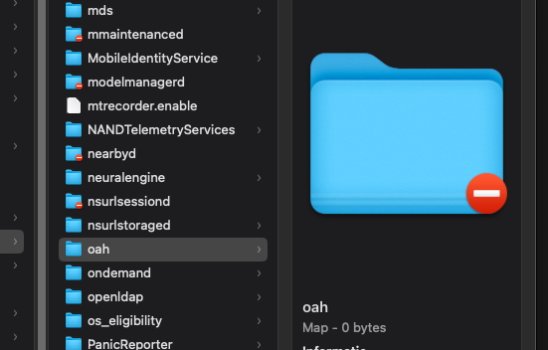
I found that some hidden files left labeled Steinberg using FindAnyFile in this directory : HD/private/var/db/oah ; the problem is that the ‘oah’ folder is not accessible and I cannot change the permissions, even with my administrator password.

I cannot delete the files in that folder. Tried disabling the integrity protection (csrutil disable) but when I reboot, the folders inside /oah where the Steinberg files are, is missing. Re-enabling integrity permission and rebooting brings them back.
Bizarre...

Any way of deleting those files, by accessing from another mac (i have an iMac running Ventura) ?
 
Some new information : I seem to have the same problem in Komplete Kontrol.

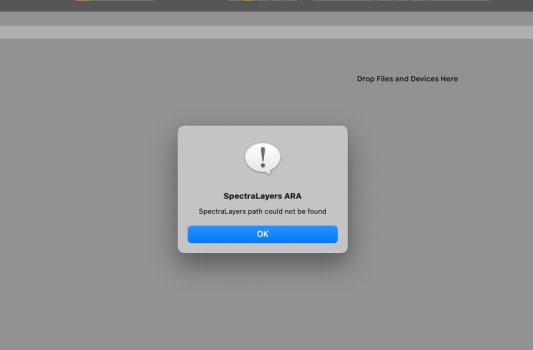
When scanning for plugins, it gives the same error message as Ableton ‘Spectralayers ARA. Spectralayers path could not be found’ and Spectralayers is also in Komplete Kontrol’s plugin list.

When scanning with FindAnyFile, no sign of anything from Steinberg or Spectralayers, even in hidden files so nothing to delete…
Really weird.
 

Attachments

  • Spectralayers.jpg
    Spectralayers.jpg
    54 KB · Views: 11
Is there a way to access this kind of folder using a terminal command ?

Root.jpg


I know Mac OS pretty well but the terminal still holds secrets for me. Administrator access isn't enough, tried that already (Get info, and tried to change permissions but says I have no permissions).
I assume I need root access. I've googled it but it seems risky.

Can anyone tell me how to do it safely ?
 

Attachments

  • Root.jpg
    Root.jpg
    7.2 KB · Views: 8
I'm thinking you may have to enable the root account to "get at them".

It's not difficult to do so.
Then... delete the files, and DISABLE the root account.

Another way that -might- work (not sure):
Boot from an external boot drive.
Use the get info box on the internal drive, and set the checkbox at the bottom to "ignore ownership on this volume".
Then... see if you can get at the files that way.
Sometimes it works, other times, no -- you have to try in order to find out.
 
OP:

RE your reply 4 above...

Just to see, I navigated to
private/var/db/
... on my own internal boot drive.

This is on a Mac m4 Mini running Sequoia, SIP disabled, and I have made normally-invisible files visible by using the "command-shift-period" key combo:
db.jpg

You'll note that neither the "private", "var", or "db" folders have the "red minus sign" that makes them inaccessible to me, the administrative user.

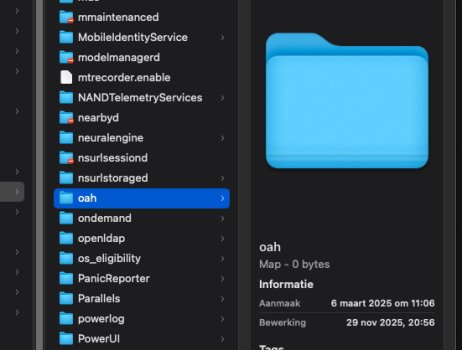
Scrolling further down, here is the "oah" folder:
oah.jpg

Again, nothing in it seems "prohibited" from deletion.
Aside:
That folder with the long numerical "name" has many more files within, also with long, numerical "names".

What happens if you make invisible files visible, and then go down into that folder?
What do you see?
Take a screenshot and post it here.
 
The "oah" folder is not accessible to me. The folder icon keeps flashing between a normal icon and one withe forbidden sign. Strange...

I have made the hidden folders visible but it doesn't seem to make any difference as the folder is not accessible...
 

Attachments

  • oah2.jpg
    oah2.jpg
    77.9 KB · Views: 8
  • oah.jpg
    oah.jpg
    103.3 KB · Views: 8
there is a free app I use when I delete an application. It is called "AppleCleaner". Small and simple app. You drag what you want to remove and it finds all references and items needed by that app and moves it to the trash. I don't work for them just have used the app for years. Not sure it will work in your situation but could be worth a try.

 
After not a lot of research it seems that the "oah" folder in question is a cache folder for Rosetta2.

Speculating further…is it possible that something from Steinberg you installed (and ran) wrote to this Rosetta2 cache and that the apps you mention are looking at this cache when building their VST3 plugin list? I dunno. Audio apps definitely use cached info to build plugin lists so that they don't have to scan everything again if no changes have been made.

Have you added any new Intel-only-based VST3 plugins since this started happening? I'm wondering if the Rosetta2 cache would rebuild itself and the Steinberg stuff would disappear from the plugin list.

Having said all that I'll mention that I do have some Intel-only audio unit plugins running via Rosetta2 and Find Any File isn't finding anything in that particular oah folder.

You might download the $2.99 "PlugInfo" app from the App Store and see what audio plugins it detects.

Google's AI search came up with this (when searching "macos" "rosetta" "vst3" "oah" "folder"):

The term "oah" is Apple's internal designation for Rosetta 2, the compatibility layer that allows Apple Silicon Macs (ARM64 architecture) to run software compiled for Intel Macs (x86_64 architecture). The process responsible for managing the translation is called oahd (OAH daemon).


OAH Folders and Files

When an x86_64 application, such as a VST3 plugin, runs under Rosetta, the system creates translated files with a .aot (Ahead-Of-Time) extension and stores them in specific, system-protected folders.


  • /var/db/oah: This is the primary directory where Rosetta stores its AOT cache files. The contents of this folder are dynamically generated hashes and files essential for running Intel applications on Apple Silicon.
  • /Library/Apple/usr/libexec/oah/: This directory contains the actual Rosetta binaries, such as translate, oahd, and oahd-helper, which perform the translation process.

VST3 Folder Location

The standard location for VST3 plugins on macOS is separate from the Rosetta cache and does not contain "oah" in its name.


  • Standard VST3 location: Macintosh HD/Library/Audio/Plug-Ins/VST3/.

Key Points

  • "oah" is internal terminology: You won't typically see a user-facing folder named "oah". It is part of the system's hidden directories (/var/db/oah) and internal process names.
  • Rosetta works automatically: Rosetta operates in the background, requiring no user interaction.
  • Cache management: The AOT files in /var/db/oah are a cache. Deleting them requires disabling System Integrity Protection (SIP), which is generally not recommended for average users and only necessary for specific technical use cases, as the files will be recreated when the application runs again.
 
  • Like
Reactions: Dr. McKay
there is a free app I use when I delete an application. It is called "AppleCleaner". Small and simple app. You drag what you want to remove and it finds all references and items needed by that app and moves it to the trash. I don't work for them just have used the app for years. Not sure it will work in your situation but could be worth a try.

Already using that...
 
After not a lot of research it seems that the "oah" folder in question is a cache folder for Rosetta2.

Speculating further…is it possible that something from Steinberg you installed (and ran) wrote to this Rosetta2 cache and that the apps you mention are looking at this cache when building their VST3 plugin list? I dunno. Audio apps definitely use cached info to build plugin lists so that they don't have to scan everything again if no changes have been made.

Have you added any new Intel-only-based VST3 plugins since this started happening? I'm wondering if the Rosetta2 cache would rebuild itself and the Steinberg stuff would disappear from the plugin list.

Having said all that I'll mention that I do have some Intel-only audio unit plugins running via Rosetta2 and Find Any File isn't finding anything in that particular oah folder.

You might download the $2.99 "PlugInfo" app from the App Store and see what audio plugins it detects.

Google's AI search came up with this (when searching "macos" "rosetta" "vst3" "oah" "folder"):

Tried Pluginfo, couldn't find anything related to Spectralayers or Steinberg...
 
Look that folder ~/Library/Application Support

Maybe there are clues there. Many applications tend to leave memory objects there when uninstalled.
 
Then remnants to it are hidden in your project files and/or application configuration files.

I'm sure, most Mac users don't know how to look inside *.app folders ;)
 
Then remnants to it are hidden in your project files and/or application configuration files.

Yeah…the OP is trying to find the issue and has eliminated a LOT of "configuration files" as the culprit. If you know where the issue lies then be specific!

I'm sure, most Mac users don't know how to look inside *.app folders ;)

The OP says they removed and reinstalled Ableton. Where in a cleanly installed Ableton app container should one look for this offending remnant?
 
I can't give him exact instructions, I'm not in the same situation. He has to use his own brain and develop logical thinking. Almost no uninstaller will remove changed settings and later added third-party components and their settings, because they are not described to the uninstaller.

Let him read the readme files, especially the parts about how to remove installed things and where these things are located. If you/he do things in the wrong order, some things will get stuck somewhere.
 
FindAnyFile searches for everything, even hidden files, there are no files related to Spectralayers or Steinberg anywhere on my drive anymore.

Installed Mole, a CLI tool to clean and purge remnant files of uninstalled apps, no luck either. And yes, I do know how to open app containers. Tried everything, no go. It's like Spectralayers has attached itself to the hardware (stupid thing to say but it's beginning to look that way).

Upgraded to Tahoe yesterday, thought that might clean out all caches, even the ones I couldn't find, but Spectralayers is still there. It's as if Steinberg hates Macs, after all, it's about the only DAW that doesn't support AU plugins...
 
I can't give him exact instructions, I'm not in the same situation. He has to use his own brain and develop logical thinking. Almost no uninstaller will remove changed settings and later added third-party components and their settings, because they are not described to the uninstaller.

Let him read the readme files, especially the parts about how to remove installed things and where these things are located. If you/he do things in the wrong order, some things will get stuck somewhere.
You and I have come to different conclusions as to the OP's abilities.
 
Upgraded to Tahoe yesterday, thought that might clean out all caches, even the ones I couldn't find, but Spectralayers is still there. It's as if Steinberg hates Macs, after all, it's about the only DAW that doesn't support AU plugins...
Is there an Ableton folder in your user account's ~/Library/Preferences folder?
 
Another thing…if a new, test user account doesn't show the plugin when running Ableton you should be able to assume the issue lies in your current user account.
 
Is there an Ableton folder in your user account's ~/Library/Preferences folder?

Nope...

Another thing…if a new, test user account doesn't show the plugin when running Ableton you should be able to assume the issue lies in your current user account.

Haven't tried that. Obviously, I haven't tried everything yet...

Will post my findings !
 
Some totally random thoughts...

OP...
...does this "ghost file" actually impact the operation of the Mac and the apps you're using?
Or... are you merely concerned with the fact that it's "there" and... you can't find it and get rid of it?

At some point you may have to decide to either:
- live with it
or
- do a "nuke and pave" on the Mac that should really get rid of it.

By "nuke and pave" I mean using the "erase all content and settings" option (system settings), which WILL REMOVE IT, 100% guaranteed.
(...along with every other file you have put on the Mac since "moment zero" -- the moment you first took it out of the box and booted up.)

But then, you'll have to restore your personal data & apps afterwards.
I'm thinking that if you do it the easy way with setup assistant/migration assistant, it may "restore" the offending file, too.
So... you might consider doing a "manual reinstall". But that's a LOT MORE work.

I'd try running "Pretty Clean" (free utility) on the drive first.
If that doesn't work, try OynX.
 
Last edited:
Some totally random thoughts...

OP...
...does this "ghost file" actually impact the operation of the Mac and the apps you're using?
Or... are you merely concerned with the fact that it's "there" and... you can't find it and get rid of it?

At some point you may have to decide to either:
- live with it
or
- do a "nuke and pave" on the Mac that should really get rid of it.

By "nuke and pave" I mean using the "erase all content and settings" option (system settings), which WILL REMOVE IT, 100% guaranteed.
(...along with every other file you have put on the Mac since "moment zero" -- the moment you first took it out of the box and booted up.)

But then, you'll have to restore your personal data & apps afterwards.
I'm thinking that if you do it the easy way with setup assistant/migration assistant, it may "restore" the offending file, too.
So... you might consider doing a "manual reinstall". But that's a LOT MORE work.

I'd try running "Pretty Clean" (free utility) on the drive first.
If that doesn't work, try OynX.

Pretty Clean hasn’t had a new release since December 2024… don’t think it’s safe to use now that I’m on Tahoe.

In any case, I have tried every uninstaller and cleaner app out there (includin Onyx), even tried CLI tools, but nothing works. I don’t know what the Steinberg installer did to my Mac but it’s certainly nothing pretty.
The strange thing is that Spectralayers VST3 is only detected by Ableton, Kontakt 8 and Komplete Kontrol, not by Bitwig, Reaper or any other app, not even by a VST scanner app…

My advice : if you feel like trying out Cubase, or anything else from Steinberg, don’t ! You’ll never get rid of it anymore…
In any case, I’m done with Steinberg.

OP...
...does this "ghost file" actually impact the operation of the Mac and the apps you're using?
Or... are you merely concerned with the fact that it's "there" and... you can't find it and get rid of it

It does not impact the operation of my Mac in any way but it hugely annoys me (and that’s putting it mildly) ; I’m determined to find a solution, even if it’s the last thing I ever do 😁
 
Last edited:
Register on MacRumors! This sidebar will go away, and you'll see fewer ads.