Become a MacRumors Supporter for $50/year with no ads, ability to filter front page stories, and private forums.

Styg

macrumors newbie
Original poster
Apr 29, 2011
6
0
I saw that everything on my Desktop has disappeared except the "Macintosh HD" icon and the icons for my two external harddrives.

I remember incorrectly typing something in Terminal, and seeing a message in the Terminal window that says something like "Desktop permission denied" and saw that my Desktop icons were gone. I promptly restarted, and now the bookmarks I've saved on Camino (my browser) are gone.

I've tried restarting Finder, but that didn't help.

Advice?

EDIT: I've tried looking for invisible files, but they still don't appear. I also tried finding it in Macintosh HD/Home/Desktop but the files weren't there either. I can still download new files just fine, but the ones I had on the Desktop previously do not show up.
 
Last edited:
What command did you run? Open Terminal, and press the up arrow until you find it, and then copy and paste it here.
 
What command did you run? Open Terminal, and press the up arrow until you find it, and then copy and paste it here.

I don't have the original, but I think it appeared after I entered the following text incorrectly:

cd ~
mkdir mctmp
cd mctmp
jar xf ~/Library/Application\ Support/minecraft/bin/minecraft.jar

----

I was trying to reveal a hidden Minecraft file. This usually works, but after I entered it this time I got the Permission Denied message.
 
I don't have a clue what you did to your desktop, but if you want to find invisible files, get yourself a copy of EasyFind (Freeware), it will let you search for invisible files as well as others, doesn't require the use of Terminal and won't muck up your system if you make a typo.
 
I don't have a clue what you did to your desktop, but if you want to find invisible files, get yourself a copy of EasyFind (Freeware)

I don't think EasyFind is working. The files are more than just invisible: I've been denied access to them.
 
If you go to your user folder and select the Desktop folder and do a Get Info on it, what does it show for Ownership & Permissions?
 
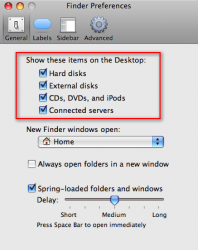
Did you look at Finder > Preferences?
ScreenCap 8.png
 
If you go to your user folder and select the Desktop folder and do a Get Info on it, what does it show for Ownership & Permissions?

For Ownership & Permissions, it says
Name: Me Privilege: Read & Write
Name: Everyone Privilege: No Access

GGJstudios said:
Did you look at Finder > Preferences?

There I found everything was checked just as you had them in the attachment.
 
For Ownership & Permissions, it says
Name: Me Privilege: Read & Write
Name: Everyone Privilege: No Access


There I found everything was checked just as you had them in the attachment.

I'm not sure this will be of any help or not since I'm on OS X 10.4.11 (but I can't imagine it should be any different) but I've got:

Owner: Me
Access: Read & Write

Group: staff
Access: Read only

Others: Read only
 
How I restored disappeared desktop icons

Maybe this will work for you.
I opened OnyX, -->Maintenance --> checked Display of Folders Content -->Then I selected /LaunchPad in the Path search box (This file and all its sub-folders) --> Execute.
That's it. Desk top icons appeared immediately!

----------

I opened OnyX, -->Maintenance --> checked Display of Folders Content -->Then I selected /LaunchPad in the Path search box (This file and all its sub-folders) --> Execute.
That's it. Desk top icons appeared immediately!
 
Register on MacRumors! This sidebar will go away, and you'll see fewer ads.