Become a MacRumors Supporter for $50/year with no ads, ability to filter front page stories, and private forums.

smithktkt

macrumors newbie
Original poster
Jan 28, 2026
13
0
Hello
I wanted to reset my Mac back to factory settings and have somehow managed to go wrong…
When I turn the Mac on now it goes straight to
OS X Utilities
If I click re install and follow the steps I get an error code 403?? And it won’t work
I’ve tried a few steps on disk utilities and I’ve also tried my Time Machine back up but nothing is working
My Mac is early 2008… looking at some helpful comments it seems @ https://forums.macrumors.com/members/weaselboy.46537/ seems a great help, but the threads are quite old so I’m not sure if I can get some advice
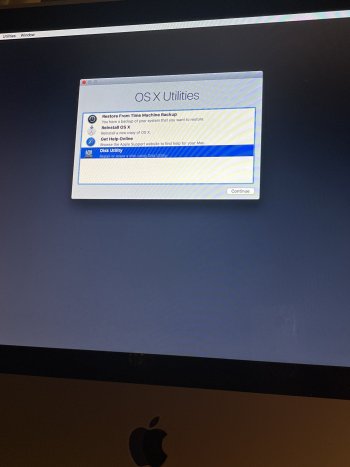
 
This is my current screen
 

Attachments

  • image.jpg
    image.jpg
    350.6 KB · Views: 20
It looks like it is straight booting into restore boot.

What happens if you hold the option key down when you re-boot? Can you post a screen shot of that?
 
Just
It looks like it is straight booting into restore boot.

What happens if you hold the option key down when you re-boot? Can you post a screen shot of that?
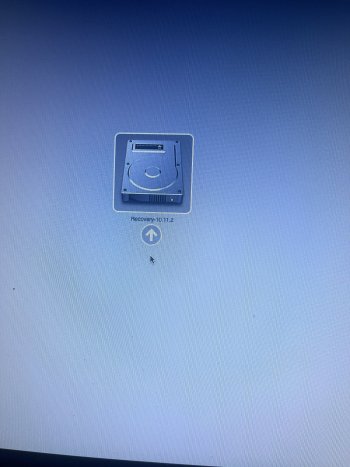
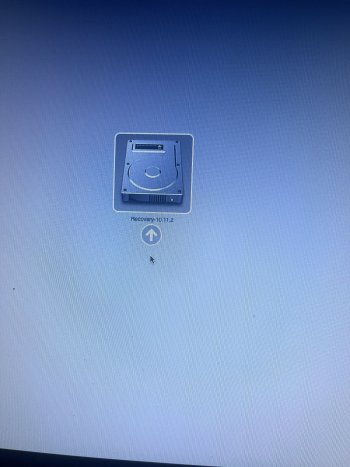
I’ve just clicked restart and held the “alt” button down…. It went to a screen that said recovery 10.11.2
 
Just

I’ve just clicked restart and held the “alt” button down…. It went to a screen that said recovery 10.11.2
After a long wait it has gone to this screen
It looks like it is straight booting into restore boot.

What happens if you hold the option key down when you re-boot? Can you post a screen shot of that?
I’ve just clicked restart and held the “alt” button down…. It went to a screen that said recovery 10.11.2
 
Is this your only Mac? It probably is going to be the best bet to try and make a boot USB. Disk Utility probably is not working because you can not format a drive that the computer is booted off of.

Not sure why the install is not working, unless you have no internet access.

The Apple Store will probably not allow it, but you might be able to talk someone at Micro Center or a friend into letting you use a Mac to make a boot USB.

Tricky part is going to be finding the OS download that you want/need.
 
Is this your only Mac? It probably is going to be the best bet to try and make a boot USB. Disk Utility probably is not working because you can not format a drive that the computer is booted off of.

Not sure why the install is not working, unless you have no internet access.

The Apple Store will probably not allow it, but you might be able to talk someone at Micro Center or a friend into letting you use a Mac to make a boot USB.

Tricky part is going to be finding the OS download that you want/need.
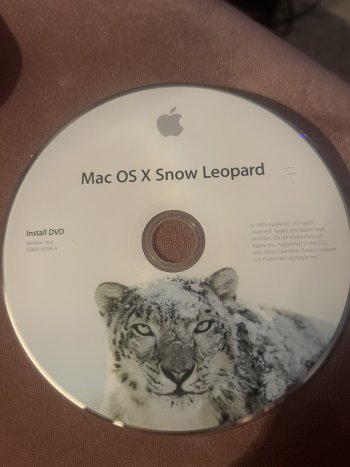
I have this disc (not sure it’s what I need?) but when I put it in, after a while it spits it out? My son has a Mac book pro (would that help?)
 

Attachments

  • image.jpg
    image.jpg
    300 KB · Views: 5
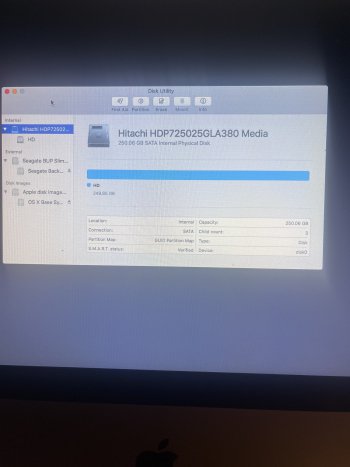
Just saw those screen shots, what do you see if you go into Disk Utility? Make sure to show all devices.
 
What happens if you pop in the DVD and boot holding the option key? Hopefully there is an option to boot off the DVD drive.
 
What happens if you pop in the DVD and boot holding the option key? Hopefully there is an option to boot off the DVD drive.
Just tried a restart holding the “alt” with the DVD inserted but it’s just spat it out ? Not sure why?
Will have a look at the disk utilities once it’s back on
 
Yeah this sucks, the pains of older systems. DVD drive might be toast.

What is the external drive for? Time Machine? I would unplug that while you are trying to get the OS back installed. The main drive looks like it is completely full; is/was there anything on there you needed?
 
  • Like
Reactions: MacInTO
Yeah this sucks, the pains of older systems. DVD drive might be toast.

What is the external drive for? Time Machine? I would unplug that while you are trying to get the OS back installed. The main drive looks like it is completely full; is/was there anything on there you needed?
The external drive is my back up and I was hoping to clear the Mac so the speed improved (I’ve got many years of photos on the Mac but moved them all to the seagate and then tried to link the Time Machine to also use as a backup - don’t have much knowledge)
 
I would suggest seeing if your Son can help you; it is tough over a forum board. I for one would make sure your external drive is not plugged in, since it would be real bad to accidentally do something to that drive (make sure to shut down first from the Apple logo top left before unplugging it.)
 
I would suggest seeing if your Son can help you; it is tough over a forum board. I for one would make sure your external drive is not plugged in, since it would be real bad to accidentally do something to that drive (make sure to shut down first from the Apple logo top left before unplugging it.)
Ok thankyou for trying to help… what is it I would need to do off my sons mac book pro to enable me to restart my mac?
 
Geez! Just use Mist https://github.com/ninxsoft/Mist, using another Apple computer, create a USB with 10.11.6 El Capitan, put it in vintage iMac USB port, restart the computer, holding down the OPT key, boot from the USB, run Disk Utility. As long as your 2008 HDD is healthy enough, you can delete the existing partition, create a new one and format or use the secure erase options.
 
  • Like
Reactions: !!! and smithktkt
Geez! Just use Mist https://github.com/ninxsoft/Mist, using another Apple computer, create a USB with 10.11.6 El Capitan, put it in vintage iMac USB port, restart the computer, holding down the OPT key, boot from the USB, run Disk Utility. As long as your 2008 HDD is healthy enough, you can delete the existing partition, create a new one and format or use the secure erase options.
Thankyou, I will see if my son can help with this?
 
Maybe try to create a USB installer.

Download the OS of your choice from this link, https://support.apple.com/en-us/102662

Create a bootable installer with this link, https://support.apple.com/en-US/101578

Real speed improvements in your Mac will come from replacing the spinning drive with a solid state drive. Boot up time on a SSD is typically 15 to 20 seconds.
Thanks for posting these links. Yes have your son make a bootable USB for you to boot and install from.
 
I did a similar thing with my 13 year old MBP a few years ago.

I tried many things to reload my OS after I wiped the hard disc.

I had to ultimately go to the Apple Store for help. My MBP had been recently added to the list obsolete list at the time, but thankfully the Apple staffer helped me out anyway. She direct downloaded the OS I wanted from the Apple network via Ethernet cable.

Getting everything set back up took a while but I am thankful. Prior to that, I could wipe and reinstall on my own without issues. I did it for years with all of my prior Apple notebooks. Seems you can’t do that anymore. Anyway that Apple Staffer’s support has been the best Apple Store experience I’ve ever had. Good times…
 
Thankyou, I will see if my son can help with this?
This is uber-easy! The good thing is, no searching, digging around looking for the macOS version and separate USB builder as @MacInTO is suggesting. Sure that works, but this works waaaaaaaay better. Your son just has to agree to installing the "helper" then click on the 10.11.6 Installer, after a USB of 8GB or larger is plugged into the secondary machine, Mist will download and build, bing, bang, done! Mist is regularly updated and up to date for the most current macOS you can download as a standalone firmware (directly from Apple servers) or building an installer. 🤠

Is your goal to simply decommission this machine or rebuild it and use it for the very very limited things you can do with it at the point? Safari is so ancient it will virtually not work with any modern website, Chrome and Firefox are the same at this point too.

Sure, putting in an SSD would be awesome, but in a 2008 machine - why?! Swapping HDD for SSD isn't easy or at all straight forward for someone lacking the right tools or knowledge of the internal connectors, especially the LCD and I would HIGHLY recommend against it unless you've a great attention to detail, cautious, aren't like a bull in a china shop. 🤣

You'd be better off installing Linux Mint for a more modern OS and it's the closest/easiest comparable to Windows 10/11 look and feel and supports modern browsers, Office compatible softwares, with likely OOBE in hardware compatibility.

Otherwise, sanitize your HDD data and be sure the unit is responsibly recycled.
 
Last edited:
Register on MacRumors! This sidebar will go away, and you'll see fewer ads.