

Become a MacRumors Supporter for $50/year with no ads, ability to filter front page stories, and private forums.

PADBOL2000

macrumors newbie
Original poster
Nov 30, 2025
4
0
Hello,
i have an imac 27" 2010 ( 11.3 ) , i bought a gpu AMD s7100x pre flashed with 3pipe heatsink
- first i remove old hdd an install a ssd with official high sierra : done ✅
- install sonoma with open core legacy patcher 2.4.1 : done ✅
- install new gpu card and try to boot : black screen no light , no fan sound ❌
- replace old gpu : imac boot, and works ✅.

Have I missed a step? Maybe a configuration setting? Do I need to return the GPU or try something else?

thanks


Attachments
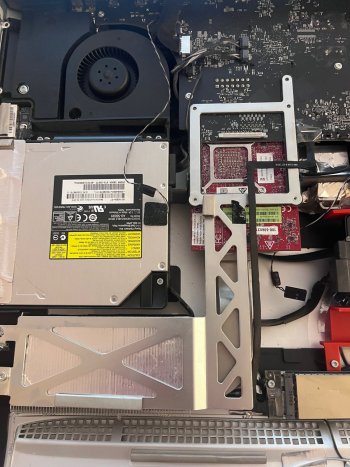
  • IMG_7469.jpeg
    IMG_7469.jpeg
    537.8 KB · Views: 9
  • IMG_7470.jpeg
    IMG_7470.jpeg
    339.6 KB · Views: 7
Last edited:
My best guess here would be that when you did the root patches after installing Sonoma you had the old GPU installed. So when trying to boot with the new GPU card it's using the root patches for the old card.

What happens if you install the new GPU card and boot in Safe Mode then install root patches again (booting normally afterwards)?
 
Humm, with a black screen, do you think i can boot in safe mode?
i will try wednesday, i have to replace the new card instead of the old one)
 
Be sure you've turned on the (correct) GOP injection in the 'Advanced' tab of OCLP settings
 
I am certainly not the expert here - I've only a student at this point, as I plan to do the same thing (roughly) as you are doing, in upgrading your video card. After selecting your correct Target Model, go to settings in OCLP - under the Advanced tab is the Graphics section. My understanding is that we must 'turn on' injection of the correct GOP for our card(s).

Again, I have not done this yet myself. Am still struggling to correctly build an installer on USB!

Post #1 in this thread is your friend here.
 
Last edited:
Register on MacRumors! This sidebar will go away, and you'll see fewer ads.