Become a MacRumors Supporter for $50/year with no ads, ability to filter front page stories, and private forums.

Do you magnify your dock

  • Yes, I'm a normal person

    Votes: 18 46.2%
  • No, that's how I roll

    Votes: 21 53.8%

  • Total voters
    39

thebart

macrumors 6502a
Original poster
Feb 19, 2023
792
834
It's Friday so here is a pointless poll.

Do you use magnification of the dock?

On the one hand, I feel like a freak if I don't have this on to some extent, seeing how this is probably one of MacOS' most iconic features.

On the other hand, I feel like it makes it harder to click the icon I want.

Obviously if you have huge number of icons on your dock, you probably need it.

But after 3 years, I've decided to have it all the way OFF for a while and see how I feel. What decided it for me was I kept overshooting the Back button on my browser and clicking on the Finder icon due to the magnification.
 
No, I hide my Dock, partly because I use an OLED display, but also because my affection for the Dock has waned over the years. I’m old, but the Dock feels like a real relic of the past. Spotlight, Raycast, LaunchBar, Alfred have, in many ways, made the Dock an irrelevant waste of valuable space.
 
Nope, I use the default size, now magnifying, no placing it on the side like a monster - just a typical user :)
 
So you're one of the superfreaks with the dock positioned to the side...
No magnification on any Mac. I do the dock on the left on my Mac Studio with a 32" screen, but bottom on my 15" MBA
 
Last edited:
Honestly it makes perfect sense given the popular screen ratios. But I could never adjust to it. I'm old.
I used to keep it on the bottom. I switched it to the side when I realized I get a fair bit more vertical space on websites and documents, requiring less scrolling. Never reverting back.
There is logic to it. Although, what about movies? 😉 (I’m obviously nitpicking because it would only matter when not in fullscreen.)
Anyway… My OCPD would need time to be convinced.
 
It's Friday so here is a pointless poll.

Do you use magnification of the dock?

On the one hand, I feel like a freak if I don't have this on to some extent, seeing how this is probably one of MacOS' most iconic features.

On the other hand, I feel like it makes it harder to click the icon I want.

Obviously if you have huge number of icons on your dock, you probably need it.

But after 3 years, I've decided to have it all the way OFF for a while and see how I feel. What decided it for me was I kept overshooting the Back button on my browser and clicking on the Finder icon due to the magnification.
I haven't changed dock settings in like 15+ years but now turned magnification off, lets see how that goes ...
And, I have the dock on the right side :eek::p
 
I keep my dock at the bottom and do magnify it. Been doing it since the beginning. Don't ever plan to change it.
 
Mine is magnified slightly, and at the bottom, but hidden. My documents and web pages make use of the full height of my screen.
 
Been using it on the left for about 20 years, just makes more sense to me. Also hidden with moderate magnification.
 
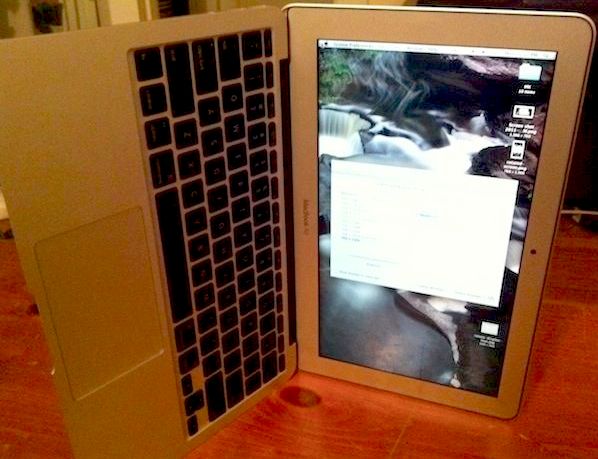
It is possible to turn some monitors 90 degrees so it handles portrait orientation better.

rotate-macbook-display1.jpg


This is really awkward to type on. 😜
 
Turned it off many many years ago but in honor of this thread I will now enable a small amount of magnification.
 
I used that when Mac OSX (remember that?) was new to me, and it felt too fancy. Once I started to use it more & more, I totally disabled magnification.

Looking at the poll. It seems like people are so 50/50 about this.
 
Full magnification, with the dock on the bottom. I have 30" Cinema Displays attached to my Mac Pro.

But it's rather pointless, because I have the dock permanently hidden (via a terminal command) and I don't use it to open apps or interact with windows. For opening apps I've been using Quicksilver for almost 20 years (on my work Macs, I just use Spotlight as an app launcher). I switch apps via CMD+TAB and combine that with the down arrow key to select windows in my open apps.

But pretty much I just hide apps and all their open windows if I need something out of the way. I run a multi-monitor setup so I can move windows out of the way and leave them there.

I want as much screen space as I can get and both the dock and the menubar rob me of it when active (I autohide the menubar).
 
Register on MacRumors! This sidebar will go away, and you'll see fewer ads.