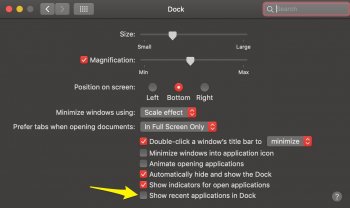
A akilone9 macrumors newbie Original poster Jan 25, 2017 5 0 Oct 21, 2018 #1 Hello all, Is there a way to hide part of a dock with open apps displayed (the rightmost part)? There is an option to hide recents apps, but it seems there is no way to hide open apps.
Hello all, Is there a way to hide part of a dock with open apps displayed (the rightmost part)? There is an option to hide recents apps, but it seems there is no way to hide open apps.
mikzn macrumors 68040 Sep 2, 2013 3,005 2,300 North Vancouver Oct 21, 2018 #2 How about the "Automatically hide and show the Dock" option in preferences? not quite what you are asking but does the job for me - not visible unless you move the mouse down to the bottom of the screen.
How about the "Automatically hide and show the Dock" option in preferences? not quite what you are asking but does the job for me - not visible unless you move the mouse down to the bottom of the screen.
CoastalOR macrumors 68040 Jan 19, 2015 3,051 1,158 Oregon, USA Oct 21, 2018 #3 Uncheck "Show recent applications in Dock" in System Preferences>Dock. EDIT: Never mind, I misunderstood the OP's request. Last edited: Oct 22, 2018
Uncheck "Show recent applications in Dock" in System Preferences>Dock. EDIT: Never mind, I misunderstood the OP's request.
steveaburns macrumors member Sep 5, 2006 86 81 Palo Alto, CA Oct 21, 2018 #4 maybe this is what you need: https://www.cultofmac.com/202024/hide-the-dock-icon-for-any-running-app-os-x-tips/ [doublepost=1540171986][/doublepost] steveaburns said: maybe this is what you need: https://www.cultofmac.com/202024/hide-the-dock-icon-for-any-running-app-os-x-tips/ Click to expand... Looking at what it is doing, looks like you would have to turn off System Integrity Protection to get it to work. May not be a good idea.
maybe this is what you need: https://www.cultofmac.com/202024/hide-the-dock-icon-for-any-running-app-os-x-tips/ [doublepost=1540171986][/doublepost] steveaburns said: maybe this is what you need: https://www.cultofmac.com/202024/hide-the-dock-icon-for-any-running-app-os-x-tips/ Click to expand... Looking at what it is doing, looks like you would have to turn off System Integrity Protection to get it to work. May not be a good idea.