Become a MacRumors Supporter for $50/year with no ads, ability to filter front page stories, and private forums.

praised

macrumors newbie
Original poster
Apr 22, 2011
5
0
i have a problem in safari context menu

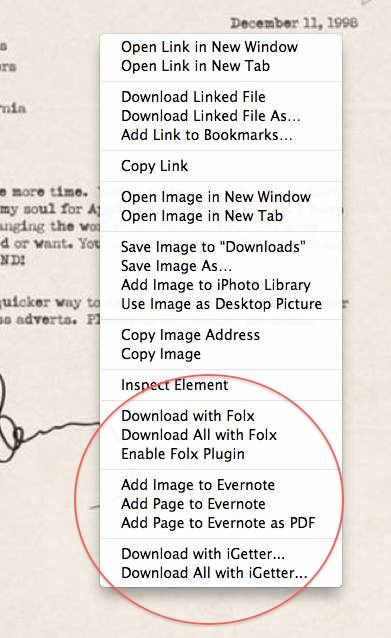
when i right click on a link or in a page, there are some options i don't want to see:
attachment.php


actually i have deleted the application "Folx" from my application folder, but it's still in context menu

another question

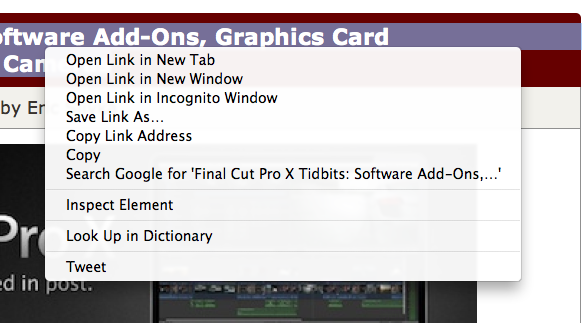
is there anyway to replace the options " Open link in new window" with "open link in new tab"? i mean to make the "open link in new tab" the first option just like google chrome?
attachment.php
 

Attachments

  • Screen shot 2011-06-21 at 9.46.05 PM.jpg
    Screen shot 2011-06-21 at 9.46.05 PM.jpg
    82.8 KB · Views: 1,693
  • Screen shot 2011-06-21 at 9.55.13 PM.png
    Screen shot 2011-06-21 at 9.55.13 PM.png
    92.8 KB · Views: 1,280
isn't there any solution to remove some items from context menu?
 
Yes, fully uninstall iGetter, Folx and Evernote. The only effective method for complete app removal is manual deletion:

thanks, it worked for one app that i had removed, but it's options were in the context menu
do you know any way to edit context menu? for the apps that i need them and use them, but not their options in safari context menu, it's evernote which doesn't have an option in it's settings to remove it's stuff from safari context menu
 
thanks, it worked for one app that i had removed, but it's options were in the context menu
do you know any way to edit context menu? for the apps that i need them and use them, but not their options in safari context menu, it's evernote which doesn't have an option in it's settings to remove it's stuff from safari context menu
If you fully remove all components of the app, that should remove the menu items, as well, since they were installed by the app.
 
Register on MacRumors! This sidebar will go away, and you'll see fewer ads.