

Become a MacRumors Supporter for $50/year with no ads, ability to filter front page stories, and private forums.

miamialley

macrumors 68040
Original poster
Jul 28, 2008
3,622
1,104
California, USA
I just restarted my computer, so I have no idea why these files are open. Also, when I click the files titled "no lights" and "photo" nothing opens...none of them do.

Update: Even if I quit Preview then open it again, all of those files in the bottom row in the picture still show in expose view.

Edited: pic uploaded.
 

Attachments
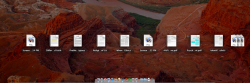
  • Screen Shot 2011-07-28 at 1.19.07 AM.png
    Screen Shot 2011-07-28 at 1.19.07 AM.png
    893.7 KB · Views: 111
Last edited:
If I close Preview and open up 2 Word documents, no recent word documents show up in that view. And there are about 6 or 7 recently used Word docs in the list from the task bar.
 
Maybe the app needs to be updated to take advantage of it. Recently opened files show up for me in Apple apps like TextEdit, Pages, Preview. But they don't in Photoshop. I don't have Office to test that on.
 
Yeah, those are recently opened documents pertaining to the currently active app. Only Apple apps have been updated to work like this though.
 
Register on MacRumors! This sidebar will go away, and you'll see fewer ads.