

Become a MacRumors Supporter for $50/year with no ads, ability to filter front page stories, and private forums.

dbe4876

macrumors newbie
Original poster
Sep 20, 2016
1
0
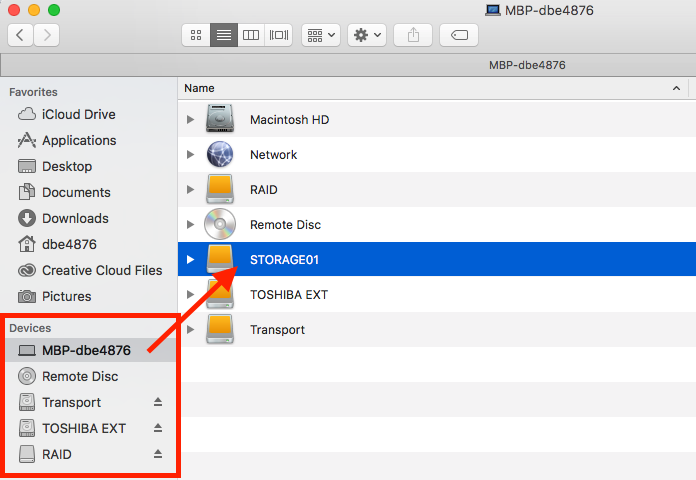
I did something accidentally in Finder, and my external drive "STORAGE01" is now showing under the main drive of my Macbook Pro (under "MBP-dbe4876"). It no longer shows as an individual drive under "Devices." Oh my. What did I do? How do I get my external drive to again display under "Devices" as an independent drive?
screen-shot-2016-10-10-png.664585
 

Attachments

  • Screen Shot 2016-10-10.png
    Screen Shot 2016-10-10.png
    85.1 KB · Views: 164
Just drag it, carefully, over to the Devices area in the Sidebar. Those are just a sort of shortcut/alias and you must have deleted or dragged it out of there at some point. Easy to do with a touchpad.
 
Register on MacRumors! This sidebar will go away, and you'll see fewer ads.