Hi everyone,
my Mac Pro 2008 runs Snow Leopard 10.6.1 on a striped software RAID and Windows XP using Bootcamp on a separate hard drive.
Initially that separate hard drive had been split into two partitions, one for Time Machine and one for Windows. But eventually I decided to get rid of the Time Machine partition and dedicate the entire hard drive to Windows.
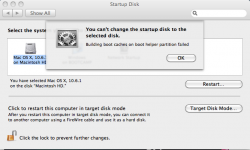
I've done that but there appeared a strange problem. In System Preferences my startup disk was set to Windows and now I'm unable to change it to Mac OS X anymore. (Please see the screenshot below).
Of course I can select Mac OS X while holding "Alt" on boot, but having Windows a default OS on Mac Pro is very disturbing
I have no idea what is "boot helper partition" and what's wrong with it. I'm afraid that Windows installer (I had to use it while transforming the partition) messed something up.
Any clues and advice are appreciated.
Thank you!
my Mac Pro 2008 runs Snow Leopard 10.6.1 on a striped software RAID and Windows XP using Bootcamp on a separate hard drive.
Initially that separate hard drive had been split into two partitions, one for Time Machine and one for Windows. But eventually I decided to get rid of the Time Machine partition and dedicate the entire hard drive to Windows.
I've done that but there appeared a strange problem. In System Preferences my startup disk was set to Windows and now I'm unable to change it to Mac OS X anymore. (Please see the screenshot below).
Of course I can select Mac OS X while holding "Alt" on boot, but having Windows a default OS on Mac Pro is very disturbing
I have no idea what is "boot helper partition" and what's wrong with it. I'm afraid that Windows installer (I had to use it while transforming the partition) messed something up.
Any clues and advice are appreciated.
Thank you!