Become a MacRumors Supporter for $50/year with no ads, ability to filter front page stories, and private forums.

shred444

macrumors newbie
Original poster
Aug 23, 2005
25
0
I thought canon cameras were usb plug and play compatible? do i need drivers?

im pluging my s400 digital elph into my g5 and nothing happens. no drives appear. The camera just blinks.

Is there a problem with plugging it into a pc and a mac as well?
 
wait, what the hell? i cant plug a usb camera into my mac and yank pictures off of it? does that make sense?

i wasnt going to be using a program, i was assuming it would appear as a drive.

they dont make firewire digital elphs.

where the hell is the microsoft camera and scanner wizarD?
 
Dude, if you're begging for Microsoft wizards, you must be high.

If you just wanna yank pictures off, use Image Capture to tell it to mount as a drive (if it supports that). Not all camera's are capable of that type of transfer, though I believe the Digital Elph's are. Personally, I just use iPhoto, it's the easiest solution.

jW
 
shred444 said:
I thought canon cameras were usb plug and play compatible? do i need drivers?

im pluging my s400 digital elph into my g5 and nothing happens. no drives appear. The camera just blinks.

Is there a problem with plugging it into a pc and a mac as well?
I suppose that reading your manual is too difficult. And it must be impossible to reach the Canon website. Perhaps, you should follow this link.
 
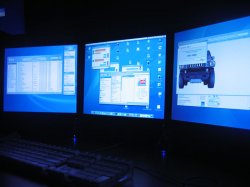
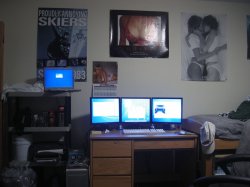
now that i got my pictures on this system, ill show you guys my new setup

Pimped out college dorm room
 

Attachments

  • IMG_1282.JPG
    IMG_1282.JPG
    108.5 KB · Views: 130
  • IMG_1280.JPG
    IMG_1280.JPG
    107.2 KB · Views: 119
Is it wrong that the first thing I noticed were your calendar and posters then the Power Mac G5? :confused: :D

So does iPhoto see the digi cam?
 
haha well i just used the camera importer wizard. i dont htink i have iphoto.

the best poster is cut off on the top, the one that says GOALS.
 

Attachments

  • IMG_1275.JPG
    IMG_1275.JPG
    106.3 KB · Views: 118
shred444 said:
haha well i just used the camera importer wizard. i dont htink i have iphoto.

the best poster is cut off on the top, the one that says GOALS.

You don't have iPhoto? Did you uninstall it or something? All Macs come with iLife so you should have iPhoto.

:confused:


btw: thanks for posting new pic ;) You should at these photos of your set up to the set up thread in the Picture Gallery.
 
Canon cameras don't disk mount like Nikon or Fujifilm. You have to use Image Capture or iPhoto. It's not a limitation of Mac OS X, Canon wants you to use their image capture software for Mac and PC to import your pictures.
 
iphoto: i dunno i have ipreview. its all good, ive got photoshop cs2. i think thats just an itty bitty bit better than iphoto.

those are samsung 19 inchers. samsung=best monitors.
 
Register on MacRumors! This sidebar will go away, and you'll see fewer ads.