Hello. I just airdropped a bunch of photos and videos from a trip on to my Mac. I put them on my new Samsung external hard drive and now it won’t eject. I’ve never had this problem and I’ve had this external hard drive for about four or five months now. When I clicked the question mark on the pop-up, it took me into an apple help window. I followed the first instructions and logged out and logged back in, but I still cannot eject. Quick Finder isn’t running or Preview. I thought maybe because I looked at a video and some pictures that that could be the issue, but it’s not. Should I follow the second set of instructions and shut down my Mac and then unplug the external hard drive? You can see the pop-up I’m getting and the instructions I got when I clicked the question in the pop-up in the pictures. Thank you!


Got a tip for us?
Let us know
Become a MacRumors Supporter for $50/year with no ads, ability to filter front page stories, and private forums.
Help. Cant eject Samsung T7 SSD.
- Thread starter zowenso
- Start date
- Sort by reaction score
You are using an out of date browser. It may not display this or other websites correctly.
You should upgrade or use an alternative browser.
You should upgrade or use an alternative browser.
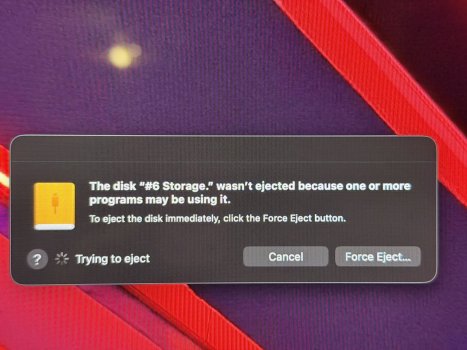
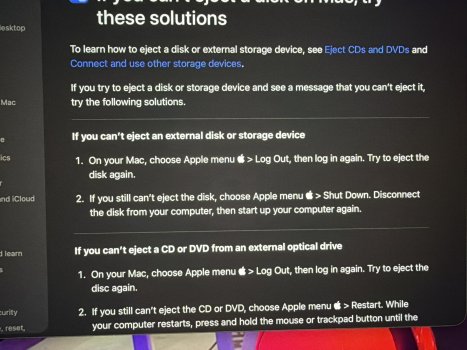

Shut down the Mac and then unplug the external drive. That way, you won't run the risk of data corruption.

Ok, thank you. So that’s totally safe? I yanked a flash drive once and lost everything, but, I didn’t shut the Mac down. So, just choose “Apple menu” > shut down and then unplug the cord from the T7 and then start the Mac back up?Shut down the Mac and then unplug the external drive. That way, you won't run the risk of data corruption.
That is correct.Ok, thank you. So that’s totally safe? I yanked a flash drive once and lost everything, but, I didn’t shut the Mac down. So, just choose “Apple menu” > shut down and then unplug the cord from the T7 and then start the Mac back up?

Did you try Force Eject? When it gives you that option it will "properly" eject but ignore the open files. Only risk of corruption is from whatever runaway macOS process is writing to it, if any, which is the exact same case as shutting down, since the process will be killed during shutdown anyways. Obviously if you're actually using the drive the don't force eject it.
And just a reminder: if you're worried about corruption because of data loss, get a backup.
And just a reminder: if you're worried about corruption because of data loss, get a backup.

What version of macOS? what file system uses the T7?
Besides that: open a terminal. Type and then press at the end return to execute:
this will output to the terminal something like:
this lists the open files. in the above you see foobar2000 opened/locked an mp3 file. Switch to the program and quit it, and you should be able to eject.
you can also see that there is a process
to end the process and then eject the external drive. If you prefer a GUI to identify programs or processes currently locking a drive, open files, etc. you can use Sloth.
Depending on your needs, you might want to exclude external drives from Spotlight indexing via the System Settings.
Depending on the file system and your use of the T7, you might want to disable .DS_Store on removable drives too.
Besides that: open a terminal. Type and then press at the end return to execute:
sudo lsof | grep "#6 Storage"this will output to the terminal something like:
Code:
sudo lsof | grep "#6 Storage"
foobar2000 60758                  root    6r      REG               1,27 4163181904              808769 /Volumes/Media (#6 Storage)/Music/Birdland.mp3
mds       98474                  root    6r      DIR               1,27        992                   2 /Volumes/Media (#6 Storage)
mds       98474                  root   34r      DIR               1,27      14272                  21 /Volumes/Media (#6 Storage)/.Spotlight-V100/Store-V2/A448E67A-FA2B-45BC-B6D9-9EF563D5719E
mds       98474                  root   56r      DIR               1,27        992                   2 /Volumes/Media (#6 Storage)
mds       98474                  root   73w      REG               1,27         49             1270183 /Volumes/Media (#6 Storage)/.Spotlight-V100/Store-V2/A448E67A-FA2B-45BC-B6D9-9EF563D5719E/journals.scan/journal.6898
mds_store 98476                  root  twd       DIR               1,27      14272                  21 /Volumes/Media (#6 Storage)/.Spotlight-V100/Store-V2/A448E67A-FA2B-45BC-B6D9-9EF563D5719E
  … skip several hundred entries …
mds_store 98476                  root  362u      REG               1,27       4096             1058890 /Volumes/Media (#6 Storage)/.Spotlight-V100/Store-V2/A448E67A-FA2B-45BC-B6D9-9EF563D5719E/live.12.indexHead
this lists the open files. in the above you see foobar2000 opened/locked an mp3 file. Switch to the program and quit it, and you should be able to eject.
you can also see that there is a process
mds with the process ID 98474 related to Spotlight‘s mds_store which has open files on the 3xternal drive. you can use the terminal command:sudo kill 98474 to end the process and then eject the external drive. If you prefer a GUI to identify programs or processes currently locking a drive, open files, etc. you can use Sloth.
Depending on your needs, you might want to exclude external drives from Spotlight indexing via the System Settings.
Depending on the file system and your use of the T7, you might want to disable .DS_Store on removable drives too.

I've used the "force eject" button many times in the past.
I don't recall it ever damaging a drive or its contents.
I don't recall it ever damaging a drive or its contents.

If you just finished copying data to the T7, it may be getting backed up to Time Machine….?

I've run into this w/ a T7 Shield too. Airdrop is the problem. For some reason it keeps a lock on the drive. I usually just force ejected. Now I tend to copy what I'm going to share to a temporary folder on the internal drive and share from there.
One thing I didn't try was Airdropping from the internal drive after the T7, and seeing if that frees the lock... like if it's just got a lock on the last directory used or something.
One thing I didn't try was Airdropping from the internal drive after the T7, and seeing if that frees the lock... like if it's just got a lock on the last directory used or something.


just for the protocol: Airdrop is not the sole culprit for that - using QuickLook on a file on the external drive or a bunch of other processes will cause this behaviour.I've run into this w/ a T7 Shield too. Airdrop is the problem. For some reason it keeps a lock on the drive.
A free alternative to Jettison for automatic unmounting/ejecting disks in various scenarios is EJECTIFY.
I'd rather just pay the 1.99 or 2.99 and pay the real guys instead of a clone who copied them. Just like iStat Menu.just for the protocol: Airdrop is not the sole culprit for that - using QuickLook on a file on the external drive or a bunch of other processes will cause this behaviour.
A free alternative to Jettison for automatic unmounting/ejecting disks in various scenarios is EJECTIFY.

If you know your way around the command line, you can use something like:
It will sometimes tell you exactly what process is holding on to the drive. In my contrived example, it says:
So I can just
diskutil unmount /Volumes/RAMDiskIt will sometimes tell you exactly what process is holding on to the drive. In my contrived example, it says:
Volume RAMDisk on disk4 failed to unmount: dissented by PID 5135 (/bin/zsh)Dissenter parent PPID 5134 (/usr/bin/login)So I can just
kill -9 5135 and I'm good to go.
Register on MacRumors! This sidebar will go away, and you'll see fewer ads.