

Situation:
So I have a 1TB external drive with these 3 partitions:
- partition1 (253GB) (if it matters, this one is a bootable clone of my MBP drive made by CCC)
- partition2 (496GB)
- partition3 (249GB)
Aim:
Downsize partition3 to 179GB
and then
Upsize partition1 to 321GB
Problem:
I managed to resize partition3, but partition1 just won't go up to 320GB . If I put "320" in the Size field and partition the drive, Disk Utility just verifies, unmounts and remounts without any change in size :S. FYI, there is more than enough of unpartitioned space left on the drive. (You can do the math yourself).
So..why doesn't Disk Utility resize the desired partition?
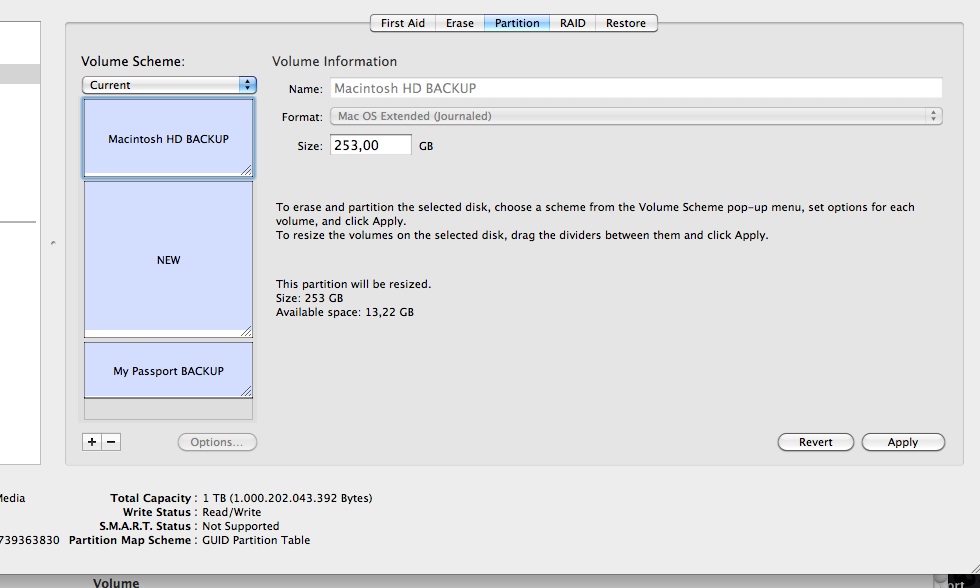
Screenshot of the external drive in the Disk Utility:
So I have a 1TB external drive with these 3 partitions:
- partition1 (253GB) (if it matters, this one is a bootable clone of my MBP drive made by CCC)
- partition2 (496GB)
- partition3 (249GB)
Aim:
Downsize partition3 to 179GB
and then
Upsize partition1 to 321GB
Problem:
I managed to resize partition3, but partition1 just won't go up to 320GB
. If I put "320" in the Size field and partition the drive, Disk Utility just verifies, unmounts and remounts without any change in size :S. FYI, there is more than enough of unpartitioned space left on the drive. (You can do the math yourself).So..why doesn't Disk Utility resize the desired partition?
Screenshot of the external drive in the Disk Utility:
Last edited:

