Become a MacRumors Supporter for $50/year with no ads, ability to filter front page stories, and private forums.

Bazzy

macrumors 6502
Original poster
Jun 8, 2009
324
11
Hi All,

I am not at all technical & never ever mess with anything in the System, Library Files, Terminal etc - Never as I have no computer files or technical knowledge. I used to use cleaning Apps way in the past like Clean My Mac but was warned off them as potentially very harmful so I stopped using them & was told the MacOS regulates & cleans itself.

I have two laptops - 15” 2015 rMBP & 13” rMBP - each with 1TB SSD & 16GB RAM. Both became sluggish over the years & I had to just live with all the issues like slow downs, beachballs, crashes, running out of RAM etc (no heavy tasks) - it is way worse on the 15” as I was getting low on space.

I then found out just a few days ago that “System Data” on both of them is taking up huge amounts of disk space - 215.32GB on the 15” & 314.04GB on the 13”. I had no idea what this was so watching lots of YouTube Videos later found out they can be mostly Cache files that can be deleted but there was also caution not to delete anything until absolutely sure as otherwise it can cause operating issues.

I use an App called DaisyDisk & this helped me identify what was taking up so much of this System Data disk space. It was basically mostly all Mail files on both Laptops dating from about 2021-2023 - some were around 50GB each. I checked & double checked as best as my knowledge would allow me & they all seem to be Mail Cache files. I also found them by typing on the laptops: Go To Folder > ~/Library/Cache. Again this confirmed that most of the space was taken up by Mail files.

I even opened the individual files on Quick Look & they were astronomically long - mostly all code stuff that I have no idea of but could identify email addresses & email message contents in most.

I have not deleted anything yet but on the 15” one have moved them to the Bin. On the 13” one, they are untouched so still in their original place. I know the following will be a pain for you all & very long but I have attached various screen-shots from each laptop below for you all to check & confirm to me that they are indeed safe to delete - they are taking up such enormous amounts of disk space & making the Laptops function poorly - especially the 15”.

I am also upset that the Apple MacOS is storing all this unnecessary stuff & hogging massive resources instead of keeping the computers clean of crap & operating at their most efficient which is what everyone told me is what they do - not in my case it seems! We all pay such a hefty premium for Mac Storage & RAM only for it to then be gobbled up massively by this System Data Stuff while affecting computer performance.

How can I avoid this happening in future - I would never install a Cleaning App that might harm my system but I need to figure out something so things do not get this bad again in future. I am curious, people still say do not use cleaning Apps like Clean My Mac as they can be very harmful & some even consider it a form of Malware & I believe them. The thing is Clean My Mac was voted the best & most effective Mac Cleaning App amongst many tested by MacWorld (who I assume are experts on Mac) & it is also on the Apple App Store to download & if it is on the App Store, Apple must by definition, have approved it? What gives - users say avoid like the Plague & Industry Mac Experts say it is the best of the many they tested & Apple offers it to download - help me understand this? I thought only Apps that meet Apple’s strict compliance standards make it to the App Store?

Please can you kindly look at the files listed & inform me if they are all safe to delete - just so I can be absolutely sure as I do not trust myself.

Very Sincere Thanks!

15” Macbook Pro:

Screenshot 2026-02-01 at 17.22.28.png


Screenshot 2026-02-02 at 00.56.19.png


13” Macbook Pro:


Screenshot 2026-02-02 at 13.09.39.png


1) From Folder Called "Containers":

01.png

02.png

03.png

04.png

05.png

06.png

07.png


2) From Folder Called "Mail":

01.png

02.png

03.png
 
Last edited:
The rule of thumb on Macs is that if it's in a folder called Logs or Cache, you can delete it. You shouldn't have to normally do this, the system should manage itself. Clearly something has gone awry with the mail app. You can delete the logs.
I am also upset that the Apple MacOS is storing all this unnecessary stuff & hogging massive resources instead of keeping the computers clean of crap & operating at their most efficient which is what everyone told me is what they do - not in my case it seems! We all pay such a hefty premium for Mac Storage & RAM only for it to then be gobbled up massively by this System Data Stuff while affecting computer performance.
It's a shame that the developers at Apple who have developed Mail have not adopted newer logging APIs which should be properly deleted. Nothing you personally can do except for give a second thought when you go to buy a new Apple product. Are you really happy with their software quality nowadays?
How can I avoid this happening in future - I would never install a Cleaning App that might harm my system but I need to figure out something so things do not get this bad again in future. I am curious, people still say do not use cleaning Apps like Clean My Mac as they can be very harmful & some even consider it a form of Malware & I believe them.
Looking in my ~/Library/Containers/Mail/Library, I do not even see a Logs folder. I would delete that entire folder, maybe then mail will never create more logs there? It doesn't seem like it should be doing so in the first place. Maybe some other forum users can chime in if they have a log folder there.

Do you mind posting a small (redacted) segment of the logs? Especially any messages that repeatedly come up? If it keeps encountering some kind of error, then maybe we could fix whatever's causing that.

The ~/Library/Mail/V6 folder contains your actual emails. If they're still on the server I believe you can delete them and Mail will redownload them. But if they're not, then you'd be deleting your actual emails.
 
  • Like
Reactions: M4th
The correct answer is usually "Let macOS handle it" - a high System Data is normally just a performance enhancement (e.g. lots of items in Cache) and if you have plenty of free space otherwise - Vaya con Dios.

Very seldom will it actually cause a problem (e.g. unable to save something, etc) and if it does, it usually is caused by TOTAL storage being too low (i.e. over 95% full, where Spotlight isn't running and therefore you can't count on the System Data, or any other category, being correct in terms of usage). But in your case it's clear that you have plenty of free space so my advice is "Let it be" and macOS will take care of it; it'll reduce the size as & when needed but otherwise you'll get better performance due to the more extensive cacheing.
 
  • Like
Reactions: Jumpthesnark
What is the OS version on each Mac?

Booting to Safe Mode will delete some cache files.

I'm uncertain whether Mail.app's cache is cleaned up in Safe Mode, but Safe Mode is simple to do.
 
Do you mind posting a small (redacted) segment of the logs? Especially any messages that repeatedly come up? If it keeps encountering some kind of error, then maybe we could fix whatever's causing that.

Hi,

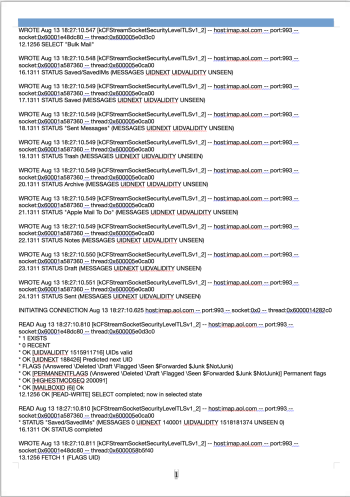
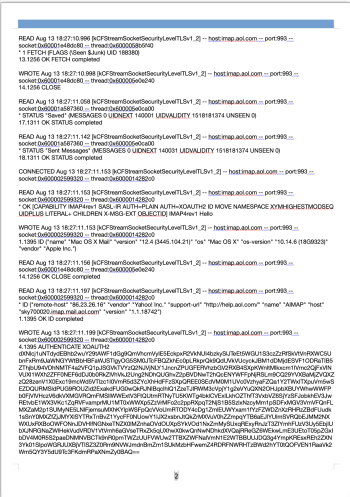
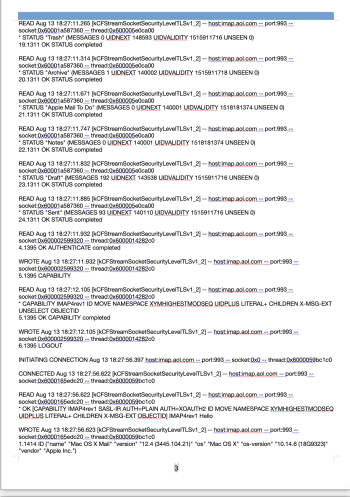
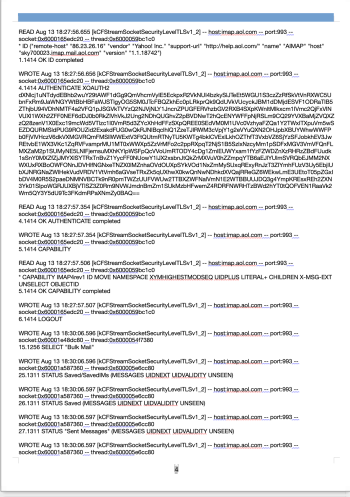
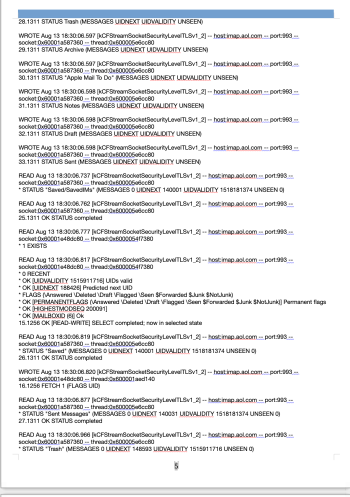
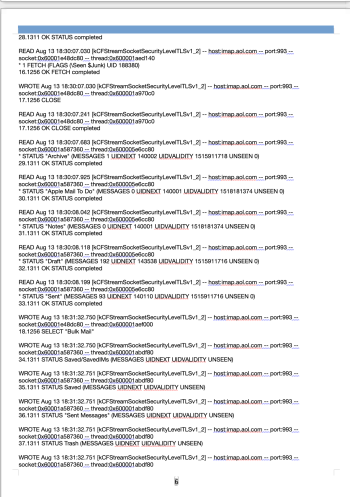
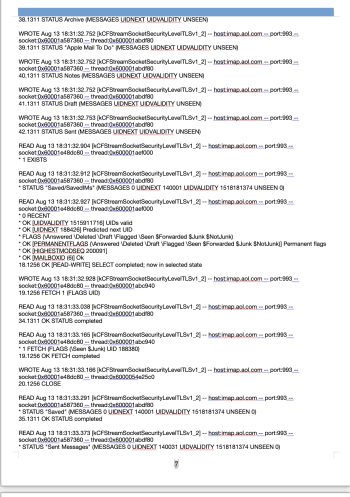
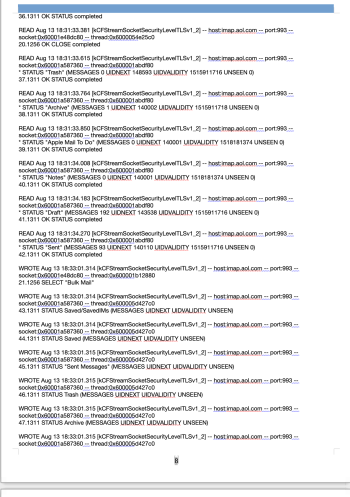
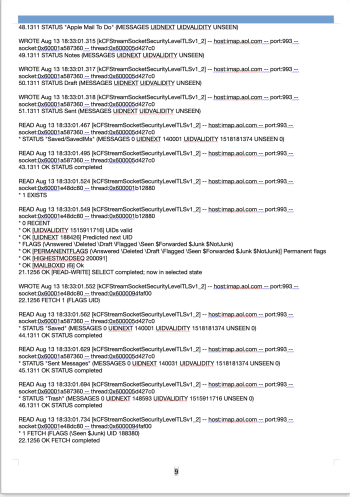
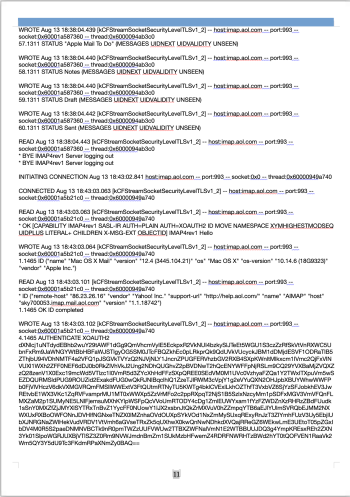
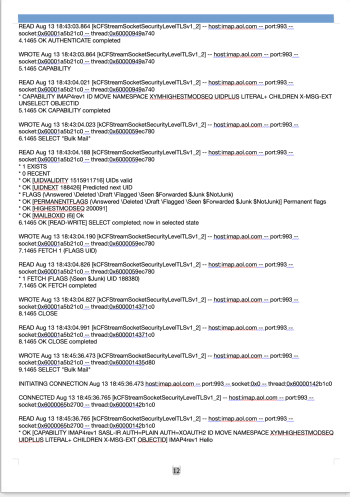
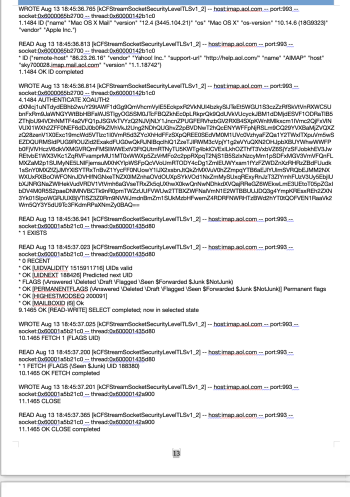
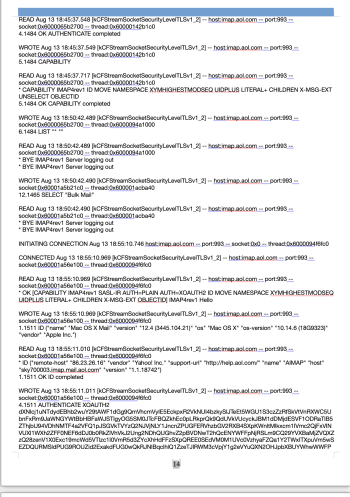
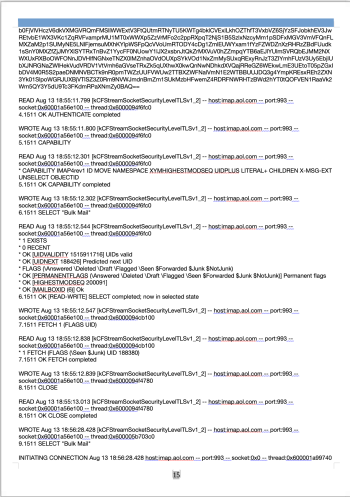
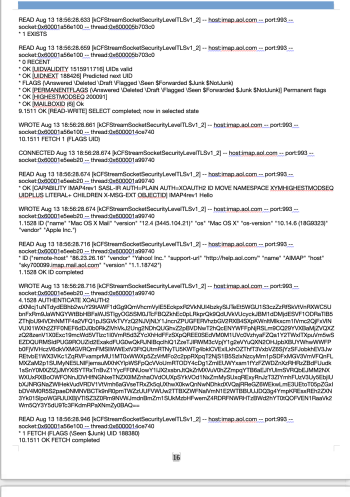
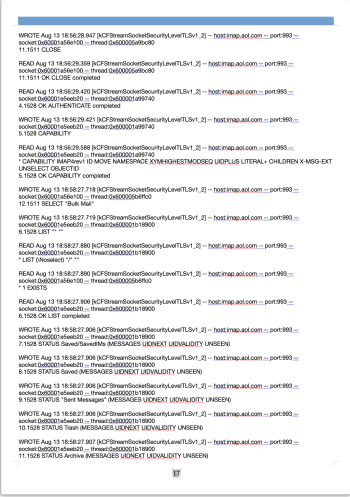
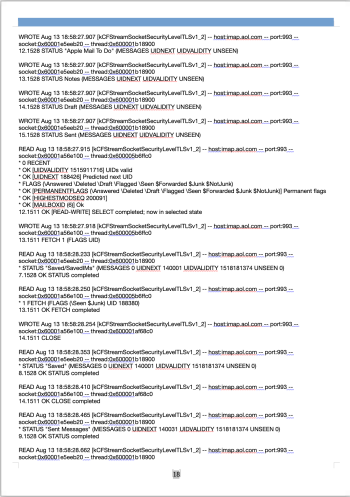
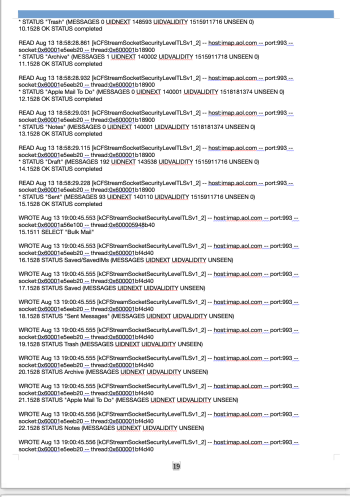
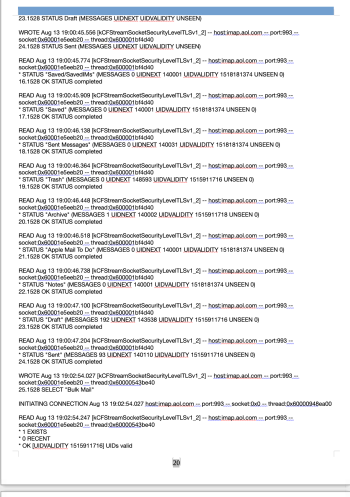
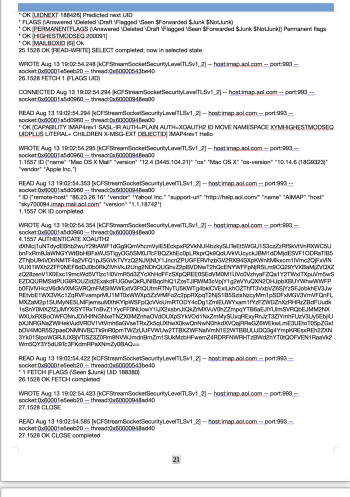
Please forgive me as I tried to attach a PDF but it was not working so I had to take individual images of an infinitessmal small section from one of the files starting at the beginning - the file was around 50GB so no idea how long that would take to copy & paste - even scrolling through it ay very high speed took me about an hour or so.

I have done the best I cam with my limited know how but have had to attach as individual images - hopefully they can shed some light - most were the same/similar but with slight variations on how the data was presented.

If need be, I can also take excerpts from other, different files or some distance down a particular file if that might help? Due to the number, I have attached them as thumbnails.

Many Thanks!
Screenshot 2026-02-02 at 18.33.24.pngScreenshot 2026-02-02 at 18.33.42.pngScreenshot 2026-02-02 at 18.33.57.pngScreenshot 2026-02-02 at 18.34.10.pngScreenshot 2026-02-02 at 18.34.22.pngScreenshot 2026-02-02 at 18.34.40.pngScreenshot 2026-02-02 at 18.34.57.pngScreenshot 2026-02-02 at 18.35.11.pngScreenshot 2026-02-02 at 18.35.24.pngScreenshot 2026-02-02 at 18.35.47.pngScreenshot 2026-02-02 at 18.35.58.pngScreenshot 2026-02-02 at 18.36.11.pngScreenshot 2026-02-02 at 18.36.20.pngScreenshot 2026-02-02 at 18.36.33.pngScreenshot 2026-02-02 at 18.36.46.pngScreenshot 2026-02-02 at 18.36.55.pngScreenshot 2026-02-02 at 18.37.08.pngScreenshot 2026-02-02 at 18.37.25.pngScreenshot 2026-02-02 at 18.37.34.pngScreenshot 2026-02-02 at 18.37.44.pngScreenshot 2026-02-02 at 18.37.55.pngScreenshot 2026-02-02 at 18.38.11.png
 

Attachments

  • Screenshot 2026-02-02 at 18.35.36.png
    Screenshot 2026-02-02 at 18.35.36.png
    415.9 KB · Views: 17
Last edited by a moderator:
The ~/Library/Mail/V6 folder contains your actual emails. If they're still on the server I believe you can delete them and Mail will redownload them. But if they're not, then you'd be deleting your actual emails.

Hi,

Thank you so much for letting me know of this as I had no idea they were actual emails. Just to ensure I do not delete any important ones, I will go on the servers & check there between those dates just in case there are a few important ones.

Is there anyway on my Mac to see what the emails in this V6 folder are please?

Many Thanks!
 
The correct answer is usually "Let macOS handle it" - a high System Data is normally just a performance enhancement (e.g. lots of items in Cache) and if you have plenty of free space otherwise - Vaya con Dios.

Very seldom will it actually cause a problem (e.g. unable to save something, etc) and if it does, it usually is caused by TOTAL storage being too low (i.e. over 95% full, where Spotlight isn't running and therefore you can't count on the System Data, or any other category, being correct in terms of usage). But in your case it's clear that you have plenty of free space so my advice is "Let it be" and macOS will take care of it; it'll reduce the size as & when needed but otherwise you'll get better performance due to the more extensive cacheing.

Hi,

You say to let MacOS just handle it and to let it be & MacOS will take care of it but what I do not understand is that these files that are taking up a whopping 200+GB & 300+GB have been there since 2021 & 2023 & still not taken care of by MacOS? All the time eating into valuable disk space & the other issues caused that I mentioned - why is this please? Is there something wrong with my MacOS settings that it is letting this stuff stay there for years on end without ever clearing them - especially if they are all Cache files?

If I had not found out about System Data taking up so much space, they would likely be hogging space & resources for many more years...


Many Thanks!
 
What is the OS version on each Mac?

Booting to Safe Mode will delete some cache files.

I'm uncertain whether Mail.app's cache is cleaned up in Safe Mode, but Safe Mode is simple to do.

Hi,

On the 15" rMBP it is Monterey & on the 13" rMBP it is Mojave (as I use the Desktop Sketch Up App that is no longer supported after Mojave)

Thank you about letting me know about Safe Mode Clearing Caches - I did not know this so will do so.

However it seems that in my case, 98-99% of the problems come from Mail Caches so would there be anyway to investigate why & how to mitigate against this in future - something in my mail settings maybe etc?


Many Thanks!
 
You say to let MacOS just handle it and to let it be & MacOS will take care of it but what I do not understand is that these files that are taking up a whopping 200+GB & 300+GB have been there since 2021 & 2023 & still not taken care of by MacOS? ... If I had not found out about System Data taking up so much space, they would likely be hogging space & resources for many more years...
If you're not using the space - what's the problem? You have nothing better to do, I guess?
 
If you're not using the space - what's the problem? You have nothing better to do, I guess?

Hi,

On my 15" MBP, after I got to about 800GB+ used on the SSD, I started having all kinds of issues, overheating, spinning beachballs, apps crashing, very slow start up & shut down times (I am talking a few minutes), RAM being fully used, Fans at full speed, webpages very slow to load if at all, jerky scrolling, YouTube unplayable etc etc etc.

I the read that never to let your SSD go over 75% full so I then started deleting anything & everything I could on my user account & transferred what I could not delete on to an external HDD. I managed to save about 65GB & it helped a fair bit but I am still having a number of issues with iffy performance. One of the things I then learned from others is that having a nearly full SSD is a very bad idea, shortens the life of the disc & affects performance especially if RAM swaps are being done on it & this happens daily multiple times - 16GB gets eaten up to zero very quickly.

If 200+GB had not been eaten up by this System Data then as a novice & from what everything I have learned from watching YouTube videos I can only assume from what they tell me, is that all that extra space would not be stressing the SSD out so much & might well have alleviated some of the many issues I have being having over the years.

Also, say I wanted to add a large amount of new data to my Mac - like a wedding event videos & other space hungry things & I needed say a couple to a few hundred gigs of space on my SSD - as a novice, I would have thought there is not enough space left on it & would have spent money on a external one unnecessarily when by not having hundreds of gigs being wasted on my SSD, I could have just stored data on it that was actually valuable & useful to me.

Please enlighten me as to why then if MacOS does everything by itself including maintenance & self cleaning etc - then why did it not clear 200+GB & 300+GB on my Mac's with which I have now learnt are mainly Cache files in the last 6 years?

You seem to know much about this for which I am most grateful but part from leave it alone, please explain to this simpleton why MacOS has not done what it is supposed to for all these years - I really want to know so I can learn & progress & I would dearly love to know from you why.

Many Thanks
 
  • Like
Reactions: underthere
I've been using CleanMyMac made by MacPaw for close to 20 years, it's great (macpaw.com), they have a long history of safe & effective use.
I think that CleanMyMac gets thrown in sometimes with apps like MacKeeper, which is unfortunate since they are definitely not the same.
 
If using cloud storage then it’s cache files. Technically after it has successfully uploaded to the cloud it should delete the cache file but what happens is that if it’s a large upload and the process is interrupted, it will resume as a new cache file. I have a similar situation on my end.
 
  • Like
Reactions: Bazzy
From your first post, these huge *.txt files exist in the directory ~/Library/Containers/com.apple.mail/Data/Library/Logs/ Emphasis on "Logs".

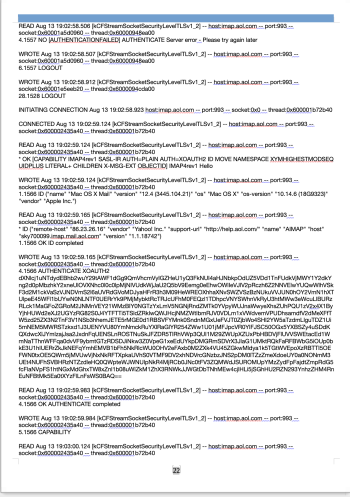
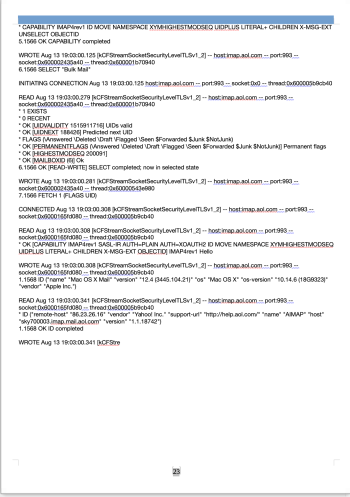
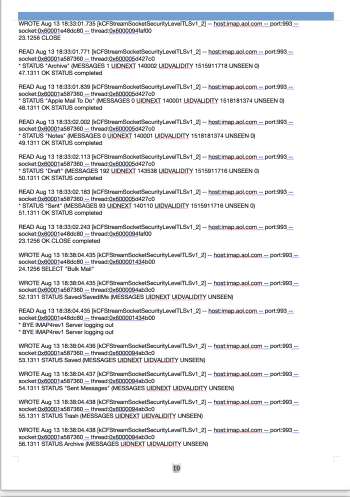
From your post number 5 with the screenshots, it seems very clear to me that these are indeed log files (NOT cache files). It appears that Mail.app was (perhaps still is?) logging every transaction it did with the mail "imap" servers. For example, WROTE, READ, STATUS, INITIALIZING CONNECTION, CONNECTED, etc.

I have Monterey, and Sequoia systems running and using Mail (my Mojave system doesn't have mail set up). Both of those systems DO have the directory ~/Library/Containers/com.apple.mail/Data/Library/Logs/ , but that directory is empty (no files).

I don't know for sure, but I doubt that Clean My Mac and similar programs will delete these rather hidden, and apparently unusual, log files.

If Mail.app has been working correctly, I'm very confident that you do not need these .txt files in the Logs directory. The real question, in my mind, is why were they created? Is there a hidden "debug" setting in Mail.app that causes these files? Maybe in the long-past Apple Support told you to issue some Terminal command that turned on log file creation?

While it's true that macOS usually deletes files that are no longer needed (caches, logs, etc), in your case I'm pretty sure that's not going to happen.

Here's what I would do:

First, try to determine if these log *.txt files are still being created. Sort by date and see if any have a very recent date. Use Finder, or here's a Terminal command that will list all files in that Logs directory, sorted from oldest to newest (so you can easily see if any are recent): ls -ltr ~/Library/Containers/com.apple.mail/Data/Library/Logs/

Next, I would just delete them and empty the Trash. That might feel risky, though, so an alternative is to copy them to an external disk or thumb drive, and then delete them from your internal drives. Hold on to the external copy until you're convinced that everything is working ok.

Keep in mind, as @Mactech20 mentioned, that if you use Time Machine (or CCC with snapshot support turned on for the source volume), then all those GB's of .txt files may still exist in a filesystem snapshot, and the space won't be freed until the snapshot is deleted. Time Machine should delete it in about 24 hours, or we can tell you how to use Disk Utility.app to see the snapshots and delete them manually. Again, this only applies if you're using an app like TM to make snapshots.

A day or a week after removing the .txt files, I would again look in that directory (you can use the same command) to see if any new ones have popped up. If so, the next task is to figure out what's different about Mail.app on your systems compared to (seemingly) everyone else...

Again, that's what I would do. I can't make any guarantees about a positive outcome, though. Oh yeah, I guess the FIRST step should be to make sure you have a backup of your system -- but everyone knows that, right? ;-)
 
Hi All,

I am not at all technical & never ever mess with anything in the System, Library Files, Terminal etc - Never as I have no computer files or technical knowledge. I used to use cleaning Apps way in the past like Clean My Mac but was warned off them as potentially very harmful so I stopped using them & was told the MacOS regulates & cleans itself.

I have two laptops - 15” 2015 rMBP & 13” rMBP - each with 1TB SSD & 16GB RAM. Both became sluggish over the years & I had to just live with all the issues like slow downs, beachballs, crashes, running out of RAM etc (no heavy tasks) - it is way worse on the 15” as I was getting low on space.

I then found out just a few days ago that “System Data” on both of them is taking up huge amounts of disk space - 215.32GB on the 15” & 314.04GB on the 13”. I had no idea what this was so watching lots of YouTube Videos later found out they can be mostly Cache files that can be deleted but there was also caution not to delete anything until absolutely sure as otherwise it can cause operating issues.

I use an App called DaisyDisk & this helped me identify what was taking up so much of this System Data disk space. It was basically mostly all Mail files on both Laptops dating from about 2021-2023 - some were around 50GB each. I checked & double checked as best as my knowledge would allow me & they all seem to be Mail Cache files. I also found them by typing on the laptops: Go To Folder > ~/Library/Cache. Again this confirmed that most of the space was taken up by Mail files.

I even opened the individual files on Quick Look & they were astronomically long - mostly all code stuff that I have no idea of but could identify email addresses & email message contents in most.

I have not deleted anything yet but on the 15” one have moved them to the Bin. On the 13” one, they are untouched so still in their original place. I know the following will be a pain for you all & very long but I have attached various screen-shots from each laptop below for you all to check & confirm to me that they are indeed safe to delete - they are taking up such enormous amounts of disk space & making the Laptops function poorly - especially the 15”.

I am also upset that the Apple MacOS is storing all this unnecessary stuff & hogging massive resources instead of keeping the computers clean of crap & operating at their most efficient which is what everyone told me is what they do - not in my case it seems! We all pay such a hefty premium for Mac Storage & RAM only for it to then be gobbled up massively by this System Data Stuff while affecting computer performance.

How can I avoid this happening in future - I would never install a Cleaning App that might harm my system but I need to figure out something so things do not get this bad again in future. I am curious, people still say do not use cleaning Apps like Clean My Mac as they can be very harmful & some even consider it a form of Malware & I believe them. The thing is Clean My Mac was voted the best & most effective Mac Cleaning App amongst many tested by MacWorld (who I assume are experts on Mac) & it is also on the Apple App Store to download & if it is on the App Store, Apple must by definition, have approved it? What gives - users say avoid like the Plague & Industry Mac Experts say it is the best of the many they tested & Apple offers it to download - help me understand this? I thought only Apps that meet Apple’s strict compliance standards make it to the App Store?

Please can you kindly look at the files listed & inform me if they are all safe to delete - just so I can be absolutely sure as I do not trust myself.

Very Sincere Thanks!

15” Macbook Pro:

View attachment 2601214

View attachment 2601215


13” Macbook Pro:


View attachment 2601226

1) From Folder Called "Containers":

View attachment 2601216
View attachment 2601217
View attachment 2601218
View attachment 2601219
View attachment 2601220
View attachment 2601221
View attachment 2601222

2) From Folder Called "Mail":

View attachment 2601223
View attachment 2601224
View attachment 2601225
I wouldn't advise anyone lacking pretty comfortable, familiar knowledge of macOS caveats and various recepticals of all the cached, performance, Time Machine, etc. etc. cracks and crevices to get in there and start hacking away at things. Sadly, MUCH of what is contained in the "System Data" you'll just not be able to trim back, they are protected directories and files requiring elevated permissions and SIP to be turned off, etc. etc.

Apple very specifically supports and highlights/recommend CleanMyMac, and I have used it from version 3 all the way to the current 5.3.1, I've never had issues with it, but still, you're not likely to see a huge decrease of space used in this area. Only real way is to do a TimeMachine backup, reload macOS and then restore your TM backup. It's going to be initially lean in this space, but it WILL come back again over time...it's a guarantee.


  • Like
Reactions: Bazzy
From your first post, these huge *.txt files exist in the directory ~/Library/Containers/com.apple.mail/Data/Library/Logs/ Emphasis on "Logs".

From your post number 5 with the screenshots, it seems very clear to me that these are indeed log files (NOT cache files). It appears that Mail.app was (perhaps still is?) logging every transaction it did with the mail "imap" servers. For example, WROTE, READ, STATUS, INITIALIZING CONNECTION, CONNECTED, etc.
Well, that last part definitely rings a bell.

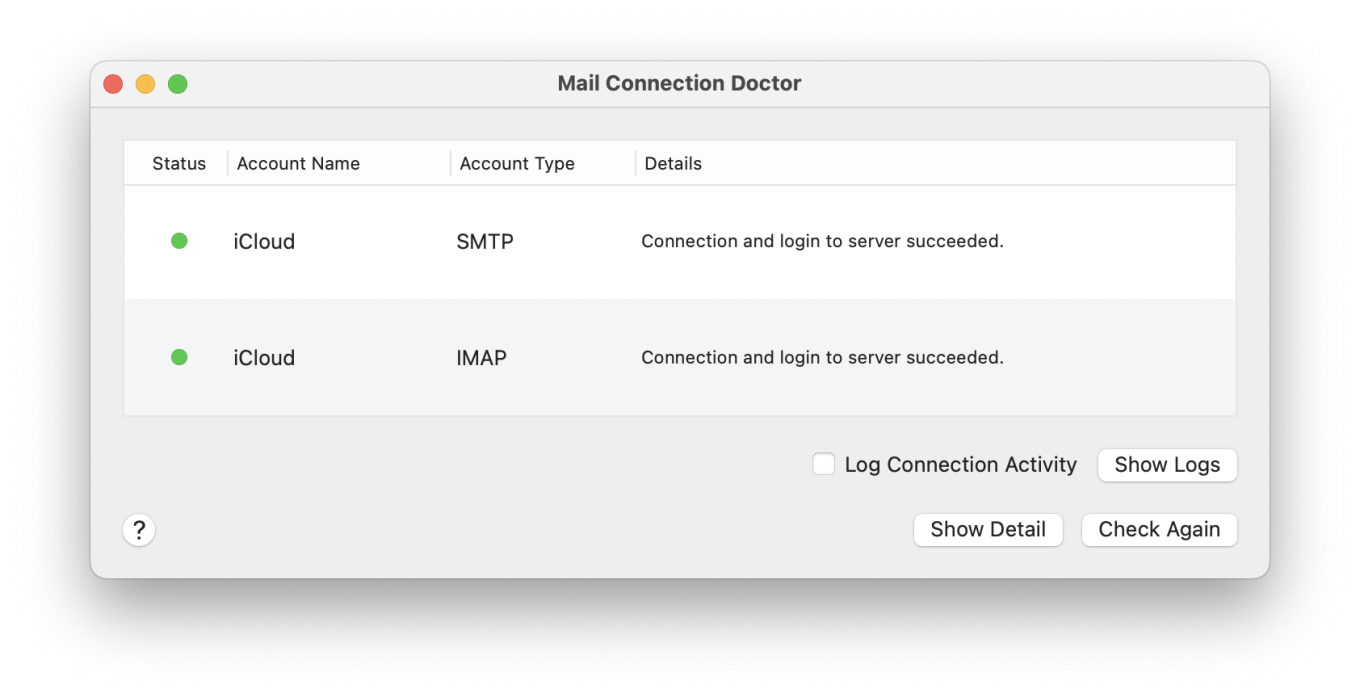
In the Connection Doctor window of the Mail app, there is a checkbox named "Log Connection Activity". If that's checked, then all connection activity is logged. Because it's a checkbox, it will stay on until turned off.

Here's a MacRumors thread on the topic, in the Monterey Forum:

It's also mentioned here, with a nice screenshot:

Step one is to open the Mail app, then in the Window menu choose "Connection Doctor". If the window shows a checked "Log Connection Activity" checkbox, then uncheck it. If it's unchecked, I'd check it, close the window, reopen the window, then uncheck it. That's the do-si-do I often use if I suspect a setting might be stuck in a weird state.

After confirming the checkbox is unchecked, I'd probably quit Mail, reopen it, and have it check for mail. If none of the log files in Mail's log dir show a mod-date after Mail's most recent launch, then it should be good. Personally, I'd check the log dir over the next few days of Mail.app use, just to make sure nothing has turned that setting on.
 
Last edited:
I got a new M4 MBA last spring and had about 250-300gb space taken by system data on a 1TB drive and no matter what I did it remained. I just ended up living with it.

However a few weeks ago I noticed it had lowered to 60gb for no reason apparent to me. In other words it’s likely it’ll sort itself out over time.
 
  • Like
Reactions: Bazzy
Do you or did you have a Time Machine backup? If so, it caches all the changes even if you delete them in your trash until the next plug in to back up the deleted files.

Hi,

I did not have a Time Machine Back Up - my Time Capsule is making whizzing sounds & I read somewhere that that might be one of the first clues that the HDD might be going bad so I made two back ups - one with SuperDuper & another with CarbonCopyCloner.

Many Thanks
 
If using cloud storage then it’s cache files. Technically after it has successfully uploaded to the cloud it should delete the cache file but what happens is that if it’s a large upload and the process is interrupted, it will resume as a new cache file. I have a similar situation on my end.

Hi,

I did not do any Cloud Back Up - just two separate Back Ups on two different external hard drives. I have been having internet issues with my ISP & thought, what if during Back Up, I lose internet connection - I do not want anything to go awry.

Many Thanks!
 
I finished some other stuff I had to do, and did some MR site searches. The search terms that got the best results were: mail connection log

Some of the relevant threads that mention huge logs are:


I probably missed some, but in all cases the solution is to turn off logging.


Another bunch of search results are about using the "Connection Doctor" window to diagnose connection problems. Sometimes that involves turning on logging for a while, to capture the details of what goes wrong when the problems are sporadic.
 
To everyone saying to leave and its normal my mac has almost 800 GBs of"system data" that is all cache crap located in the system folder. Meaning to delete it I need to disable SIP, and I can't do that since it is a managed laptop from my company.

My anger and disappointment is immersible on this issue and there is no excuse. No apple doesn't automatically clean it, me running out of space is how I discovered almost 4/5th of my SSD is full of UNDELETABLE GARBAGE.
 
Register on MacRumors! This sidebar will go away, and you'll see fewer ads.