Become a MacRumors Supporter for $50/year with no ads, ability to filter front page stories, and private forums.

peglegjack

macrumors 6502
Original poster
Jul 30, 2011
436
252
Brooklyn, NY
When I increase my buffer in Logic Express 9.1.5 to 1024, the CPU goes through the roof! When I set it to 32 it goes back down again. I thought it was the other way around?
 
It should be the other way around...but sometimes
other stuff causes this.

What OS version are you using?

I've seen this behavior occur with third party
plugs in being attached to tracks.

Do you have many or any for that matter?

How many tracks are you running; and how many plugs in, soft snyths etc...are you running?

How much ram do you have?
 
It should be the other way around...but sometimes
other stuff causes this.

What OS version are you using?

I've seen this behavior occur with third party
plugs in being attached to tracks.

Do you have many or any for that matter?

How many tracks are you running; and how many plugs in, soft snyths etc...are you running?

How much ram do you have?

I'm using Lion, so 10.7

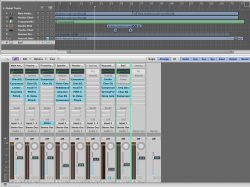
I'm only using one software track (as hopefully you can see, not quite sure if this will work)

I have a Mid 07 iMac Core 2 Duo 2.4 Ghz w/ 6 gig of Ram (don't think thats the ssue)
 

Attachments

  • Screen Shot 2011-08-13 at 10.12.27 PM.png
    Screen Shot 2011-08-13 at 10.12.27 PM.png
    140.8 KB · Views: 105
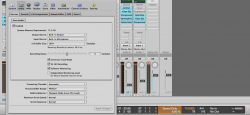
A pic showing my buffer size and CPU:

For the record, I usually use an audio interface, it's just not connected. I'm about to get an Apogee Duet 2.

Also, my music files are on an My Book Studio Firewire 800 external drive.
 

Attachments

  • Screen Shot 2011-08-13 at 10.30.05 PM.png
    Screen Shot 2011-08-13 at 10.30.05 PM.png
    147.1 KB · Views: 103
I can't duplicate your issue..and I also have the same MyBook attached and
I am running a iMac Quad Core with 8gb ram.

Sometimes issues are caused by the audio drivers...so starting Logic without a driver helps troubleshoot the issue. Press and hold down the Control key immediately after Logic starts to open. A dialog asking whether you wish to launch audio drivers will appear. Click "No" and see if you file acts normally after that.


You may need to delete the preference file. You can do so by deleting the 'com.apple.logic.express.plist' file from the Preferences folder. Preferences
are located in the 'Home Folder'/Library/Preferences. I would export your custom key
commands as a preset prior to deleting the prefs file. Check the Manual for how to do this.
 
Last edited:
Register on MacRumors! This sidebar will go away, and you'll see fewer ads.