Become a MacRumors Supporter for $50/year with no ads, ability to filter front page stories, and private forums.

MacAztec

macrumors 68040
Original poster
Oct 28, 2001
3,028
1
San Luis Obispo, CA
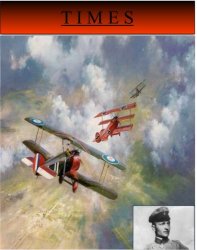
Hi. My world cultures teacher is having us make a frontpage for a TIME magazine, only the frontpage has to be about a major event/person in WWI.

I think I am going to do mine on the "Red Baron". All I need to do is put in some text, rearrange some images, and maybe put a border on it.

Im not that good with photoshop, so what would be the easiest way to do this?
 
If you have photoshop that would have more than enough to do what you need. Just get the right image and maybe look online to see what a Time Magazine cover might have looked liked in 1912 😀

Could be fun to do a retro look...

Also, remember the photo should be in black and white - no color photos back then.

D
 
You could actually do this using MS Word or Powerpoint. Personally I think it would be easier with something like Photoshop, but that might be a matter of preference. Good luck!
 
Originally posted by Mr. Anderson
If you have photoshop that would have more than enough to do what you need. Just get the right image and maybe look online to see what a Time Magazine cover might have looked liked in 1912 😀

Could be fun to do a retro look...

Also, remember the photo should be in black and white - no color photos back then.

D

Thanks Mr. A

The article doesn't have to match the standards of back then, it just has to be like...how a TIME magazine coverpage would look if they TODAY if they chose a topic from WWI.

So if a TIME magazine came out today and the Red Barron is on the front in color and stuff, I could do the same thing. It just has to be ABOUT WWI.
 
Make sure to do some layout/planning before any computer work. Draw everything out before hand... just a word of advice.
 
Where I'm at...

Ok, heres what I have done so far. I still need to add some text and stuff, but this is just the images.
 

Attachments

  • picture 2.jpg
    picture 2.jpg
    35.2 KB · Views: 331
A Tip...

MacAztec...

I strongly suggest you turn your project into a litho-type looking image. Be authentic! Also, try to find the very "teutonic" font that was used in Germany from the time of Bismark until WWII. Use it for the masthead: and definitely stay away from color.

Yiu have some good tools, and a good assignment: try to make it as authentic-looking for WWI era Germany. That will be the real challenge.

Good Luck and Have Fun being a teenager. Eres Chingon o No?
 
Re: A Tip...

Originally posted by Balin64
MacAztec...

I strongly suggest you turn your project into a litho-type looking image. Be authentic! Also, try to find the very "teutonic" font that was used in Germany from the time of Bismark until WWII. Use it for the masthead: and definitely stay away from color.

Yiu have some good tools, and a good assignment: try to make it as authentic-looking for WWI era Germany. That will be the real challenge.

Good Luck and Have Fun being a teenager. Eres Chingon o No?

Just because it doesn't have to look like the magazine was printed in 1915 doesn't mean it wouldn't be cooler if it did.

For the masthead, use a darker or faded red to look more like it would have in 1915. Good cinematographers use faded, somber (dark), and earth tones for movies set in the past because it makes it look more authentic, even if we all realize that blues and reds and greens were as bright and vivid then as they are now.

But the Teutonic font is a good idea for the title of the feature story about the red baron, which would also be on the cover.

And since the painting is, well, a painting, I would keep the color. It looks more arresting. It's not like they had no color printing back then. At least, I think they had color magazine covers. It might have been expensive or rare, though.

Instead of that solid background for the masthead (which Time doesn't use), put the "Time" on a transparent layer over the picture. That would look a lot more accurate. Also, Time magazine has a red border around the cover, if I recall correctly.

And raise the picture of the the baron so it's more front and center. Where you have it, it looks like it's a teaser about an article on another subject (although you could do that, too--put in a teaser picture about another WWI figure--the Mata Hari would be fun).

And "Time" should be red and much larger--from one side of the magazine to the other.

 
Photoshop homework

MACAztec, Being a Graphics professional for more than 30 years, I will sound a little biased. If you have Photoshop I would assume you would have access to a PageLayout Program such as InDesgin, QuarkXpress or (God forbid) PageMaker. In any case what you are trying to do is "Page Layout" the page you have so far looks great, but using a raster image editor (what Photoshop is) as a typesetting program is not recommended. Even though Adobe has improved on the typography engine it does not have the diversity that the afore mentioned programs do. Illustrator (vector based editor) is good if you can draw, but again only to use and save files as .eps and import to a Page Layout, then type colorize add borders use transparency (InDesign only) and then you're read to go to press or convert on the fly to HTML and the web!
And keep in mind that if you do intend to go to print save your files in either .TIFF format or .eps, jpgs and .gif formats are best suited for the web and not used in commercial printing.
 
Where I'm at...

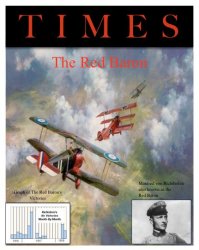
Ok, here is a little update. Could you give me some info on what fonts to use, etc.? Just some feedback.
 

Attachments

  • picture 1.jpg
    picture 1.jpg
    40.3 KB · Views: 253
remember the magazine is called TIME magazine, not TIMES. Also the lay out looks pretty good but it might be a good idea to play a little with the fonts and alignment. The graph on the fromt cover might be a little too much tho. anyways good luck

Also look at a TIME magazine cover and try to figure out what fonts they use. Granted you don't have a font base that i have access to but im sure you could find something similar.
 
MacAztec, if you're serious I will comment when I get home tonight. Most layout programs will tell you in different ways if things are aligned, Its either by "snapping to guides" (by dragging and positioning ruller guides anywhere on the page) or by using "Align" in the menu bar, which offers several variables to either align left, right, centered, space by ___ or other ways.
I agree about the graph in the lower left though, if important to the piece than it needs a litle re-work. It looks like it was just plopped on the page.

Anyway back to work.....later

Sparky
 
leave it like that. i guarentee you will be the only in your class who probably uses a good program to do it. if your like me youll just leave it alone and take the A and go find something fun to do 😀


iJon
 
Homework

MacAztec, still with me? I did a quick rendering of a few ideas. Keep in mind these are MY ideas to YOUR work I am only trying to help from a person with a little experience. First have you researched what a cover of TIME magazine looked like in the 19teens? during the war? capuring that look would be of great historical value. Also remember it is a magazine with header, date, main title, and usually several sub titles refering to additional articles within.

Here is what I did to what you posted.
Take it for what it's worth or do as iJon says and let it go. (personally iJon wouldn't make it in my company)

PS go here to find old covers, I can't find anything older than 1923 (The beginning?)
http://www.time.com/time/magazine/c...&to_day=31&to_year=2004&year=1923&year=&year=
:>)
 
Without going back and editing the post all the time I also wanted to mention, I did this in Photoshop to get the "outer glow" and "drop shadow" effects. I could have taken this into InDesign and added all sort of text effects, and borders or other type of editing.
The earlier covers, as you can see from the link, were primarily in the fashion and colors of the day. Photos were black and white grayscale and borders were composed of very ornate flowery things, but again the colors were very subdued.
good luck on your assignment.
Sparky
 
Re: Homework assignment...use Photoshop?

Originally posted by MacAztec
Hi. My world cultures teacher is having us make a frontpage for a TIME magazine, only the frontpage has to be about a major event/person in WWI.

I think I am going to do mine on the "Red Baron". All I need to do is put in some text, rearrange some images, and maybe put a border on it.

Im not that good with photoshop, so what would be the easiest way to do this?

The Red Baron is a good idea but have you considered using the first rumor of the new PowerBooks next Tuesday? As I recall, was right after he war ended.
 
Register on MacRumors! This sidebar will go away, and you'll see fewer ads.