Become a MacRumors Supporter for $50/year with no ads, ability to filter front page stories, and private forums.

SalisburySam

macrumors 65816
Original poster
May 19, 2019
1,138
1,088
Salisbury, North Carolina
Forced to update my 2017 iMac from Monterey to Ventura to run TurboTax2024. Update went well, app works well, life is good. However, in addition to the Systems Settings changes commented upon in other threads, I noticed all text (Mail, Preview, other apps) is now this almost unreadable pale gray against the white background. Nothing I’ve found makes text darker/readable except to reverse the colors to white text against a black background, something I don’t wish to do. I’ve altered the contrast but that does very little to improve the situation.

Has anyone found a way to darken the pale gray font in system apps?
 
  • Like
Reactions: Tagletigre
Forced to update my 2017 iMac from Monterey to Ventura to run TurboTax2024. Update went well, app works well, life is good. However, in addition to the Systems Settings changes commented upon in other threads, I noticed all text (Mail, Preview, other apps) is now this almost unreadable pale gray against the white background. Nothing I’ve found makes text darker/readable except to reverse the colors to white text against a black background, something I don’t wish to do. I’ve altered the contrast but that does very little to improve the situation.

Has anyone found a way to darken the pale gray font in system apps?
I've got the same problem. This type resulted because I keyed cmd B. Please let me know if you find a solution. It seems like everybody has forgotten the first rule of typography: Make it Legible!

jdkiernan2@att.net
 
  • Like
Reactions: SalisburySam
Has anyone found a way to darken the pale gray font in system apps?

I wonder if you can post sample screenshots that demonstrate the issue? I have plenty of my own grievances with macOS UI, but in this case I'm not sure what you're referring to yet.
 
I think this is a common problem, Apples decision to use pale grey on a white background was never a good idea especially for smaller screens.
Yes, you can fiddle with contrast, text size, the resolution (Appearence) but nothing really fixes what is a built in problem and has been for some time.

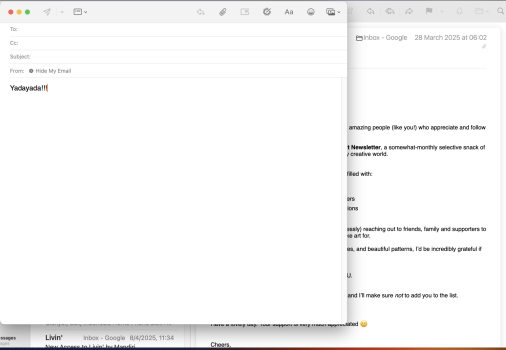
This is the best I can get mine on M1 MBP; Note the Typed text comes out black, why the heck didnt they make all screen text and symbols black?

Screenshot 2025-05-15 at 11.55.01.png

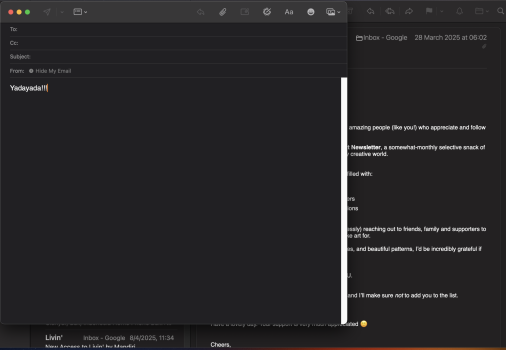
However, I don't use Light Mode. I have been using Dark Mode ever since it was introduced for my eyes white (or pale grey) on black is much easier to see;

Screenshot 2025-05-15 at 11.57.21.png

My wife's new 16" M3 MBA is even less ledgible than my MBP example on light mode.

So by all means check for "Contrast" in the search box of system settings there are a few options and by all means check out Dark Mode (System settings > Appearance), you may just like it.
 
  • Sad
Reactions: SalisburySam
Register on MacRumors! This sidebar will go away, and you'll see fewer ads.