

Got a tip for us?
Let us know
Become a MacRumors Supporter for $50/year with no ads, ability to filter front page stories, and private forums.
How to make VLC my default audio player?
- Thread starter boro
- Start date
- Sort by reaction score
You are using an out of date browser. It may not display this or other websites correctly.
You should upgrade or use an alternative browser.
You should upgrade or use an alternative browser.

Select audio file in Finder > CMD+I > Open With > Select VLC > Change all.
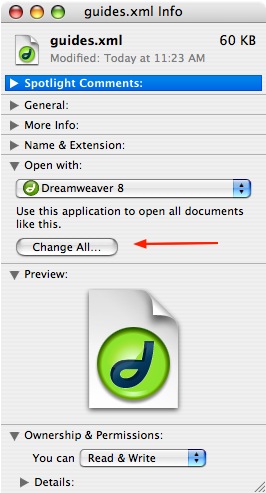
Do that with every audio container (.mp3, .wav, ,aiff, ...) you want to open.
Do let iTunes not copy every opened file:
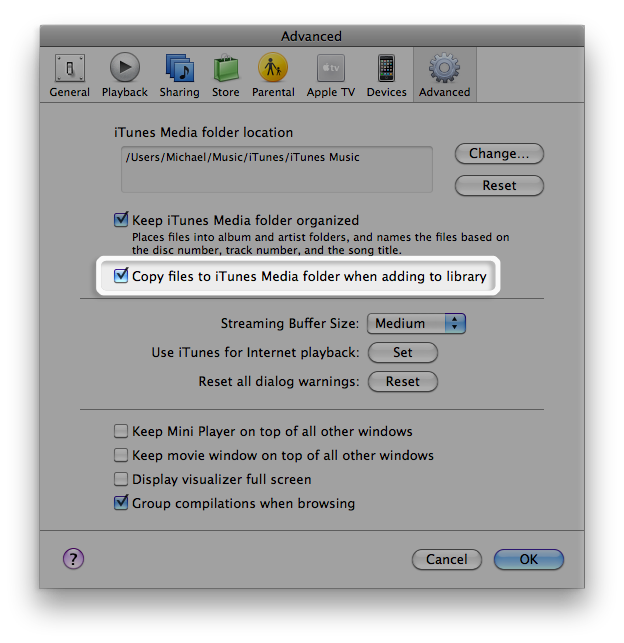
Do that with every audio container (.mp3, .wav, ,aiff, ...) you want to open.
Do let iTunes not copy every opened file:
To add to what spinnerlys said, you can also have VLC automatically start up when inserting a music CD instead of iTunes in your computer's System Preference's CD & DVD section.
Thank you for your help, I've done the second half of your post, but I'm quite new to mac and can't find audio file in finder?
How do you open audio files then?
You can either use Spotlight to search for .mp3 or other audio files or more specific songs

or select the song(s) in iTunes and right click and select Show in Finder.

this is a good question but i dont think the answer really works and it's not what the guy is looking for. I have the same question, I want VLC to be the default program for all .mkv files. If i to that "Change All" button, that seems to only change the files that are downloaded now. If I download another .mkv file am I going to have to change what to open that with too?
I'm looking for an option within VLC or maybe elsewhere to change the extensions that VLC is the default program to open
I'm looking for an option within VLC or maybe elsewhere to change the extensions that VLC is the default program to open
this is a good question but i dont think the answer really works and it's not what the guy is looking for. I have the same question, I want VLC to be the default program for all .mkv files. If i to that "Change All" button, that seems to only change the files that are downloaded now. If I download another .mkv file am I going to have to change what to open that with too?
I'm looking for an option within VLC or maybe elsewhere to change the extensions that VLC is the default program to open
As far as I have experienced, the Change all function works for existing files and for one that have not been conceived yet and may come into existence in the next nine months or so.
What do you think the guy is looking for and why don't you think the answer really works?
If you looking for a Windows like function where to set to open all of those files with that program, than you're looking for a while.
Mac OS X works in other ways.
I think he's looking for the same answer as me. and by "and for ones that have not been conceived yet and may come into existence in the next nine months or so." what do you mean? like, it'll change the default open program for all things downloaded after you click the button, but not after nine months?
I think he's looking for the same answer as me. and by "and for ones that have not been conceived yet and may come into existence in the next nine months or so." what do you mean? like, it'll change the default open program for all things downloaded after you click the button, but not after nine months?
No, I wanted to allude to the word conceived, therefore nine months.
In simple words: If you select Change all, it will stay that way, until you select another software and apply the Change all.
Example:
.mkv -> Get Info -> Open With : MOVIST -> Change All -> Yes/Okay/Change.
It stays that way until:
.mkv -> Get Info -> Open With : VLC -> Change All -> Yes/Okay/Change.
It stays that way until
.mkv -> Get Info -> Open With : MPlayer OS X Extended -> Change All -> Yes/Okay/Change.
It stays that way until
.mkv -> Get Info -> Open With : MOVIST -> Change All -> Yes/Okay/Change.
It stays that way until:
.mkv -> Get Info -> Open With : VLC -> Change All -> Yes/Okay/Change.
It stays that way until
.mkv -> Get Info -> Open With : MPlayer OS X Extended -> Change All -> Yes/Okay/Change.
It stays that way until
.mkv -> Get Info -> Open With : MOVIST -> Change All -> Yes/Okay/Change.
It stays that way until:
.mkv -> Get Info -> Open With : VLC -> Change All -> Yes/Okay/Change.
It stays that way until
.mkv -> Get Info -> Open With : MPlayer OS X Extended -> Change All -> Yes/Okay/Change.
It stays that way until
......
oh ok i gotcha. so clicking that button should make future things i download open with the selected program too?
oh ok i gotcha. so clicking that button should make future things i download open with the selected program too?
Yes.
I am running Lion on a Mini Mac, with external hard drives attached. Two are NTFS format and two are FAT32 format. When I do the "Get Info" the "Open With" option does not show up in the box. I have gotten most of my files to open in VLC by clicking on the individual file type (i.e .avi) and doing the above but when i do it with the .MP3 file in my FAT32 formatted Hard Drive, I get the error message "you can't change the item to always open in the selected app. This item is locked or damaged or in a folder you don't have permission to modify (error code -61)" I can get the file to open in VLC the one time, but it doesn't stay as the default player.
any Ideas on how to resolve this issue?
Thanks!
any Ideas on how to resolve this issue?
Thanks!
Register on MacRumors! This sidebar will go away, and you'll see fewer ads.