Hello all,
I'm a new 12" iBook owner and I'm posting this after doing way too much research on my one complaint: the spacebar.
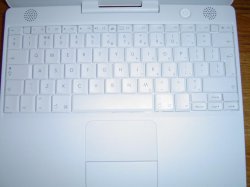
The spacebar on the white 12" and 14" G4 iBooks appears a little unresponsive, at first. It seems to take more effort to "smack" it compared with the rest of the keyboard. I put up with this for a while, but it was irritating. Upon further examination, I discovered it was only the RIGHT SIDE of the spacebar which was troublesome.
This explains why some people don't notice! They're left-handed!
You probably also have to touch-type to care.
The problem is the thin ribbon cable which is folded underneath the keyboard. You become familiar with this if you perform a memory upgrade yourself. The cable doesn't fold flat enough, and interferes with the operation of three keys on the right side: space, command, and "enter" (which I guess is for the numeric keypad. Couldn't they've given us another CTRL instead??).
The spacebar is where it counts. It's the most frequently used key! If you have to smack the spacebar, you end up smacking ALL they keys harder! Try it! It makes you an angry typist! It's bad for world peace!
I've tried everything. I squished the cable between my fingers as hard as I dared. I fiddled. I cursed. I carefully cut a slice of a playing card and insert it to add some stiffness right where that cable interferes. This was a failure. I searched for third-party keyboards online. I also hoped that simply using the iBook for a few months would soften it up with wear. No such luck.
I EVEN tried getting used to hitting the spacebar with my left thumb. I can't do it. 20 years of touch-typing is too big a habit to change. I've sort of gotten used to moving my right thumb an inch to the left. That helps because you start to reach the "active" portion of the spacebar on its left side.
This all sounds crazy, but it makes me not want to use my iBook! I have to get rid of this thing and buy a 12" Powerbook. Or turn my 12" iBook into an expensive "mini" by closing it and attaching an external keyboard, mouse, and monitor. (But it doesn't even support resolution over 1024x768 externally! Useless.)
Warning to right-handed iBook shoppers who can type! Find a couple hundred extra bucks and get a 12" Powerbook instead. Its keyboard is more solid and doesn't have this problem.
MacRhythmGuy
I'm a new 12" iBook owner and I'm posting this after doing way too much research on my one complaint: the spacebar.
The spacebar on the white 12" and 14" G4 iBooks appears a little unresponsive, at first. It seems to take more effort to "smack" it compared with the rest of the keyboard. I put up with this for a while, but it was irritating. Upon further examination, I discovered it was only the RIGHT SIDE of the spacebar which was troublesome.
This explains why some people don't notice! They're left-handed!
You probably also have to touch-type to care.
The problem is the thin ribbon cable which is folded underneath the keyboard. You become familiar with this if you perform a memory upgrade yourself. The cable doesn't fold flat enough, and interferes with the operation of three keys on the right side: space, command, and "enter" (which I guess is for the numeric keypad. Couldn't they've given us another CTRL instead??).
The spacebar is where it counts. It's the most frequently used key! If you have to smack the spacebar, you end up smacking ALL they keys harder! Try it! It makes you an angry typist! It's bad for world peace!
I've tried everything. I squished the cable between my fingers as hard as I dared. I fiddled. I cursed. I carefully cut a slice of a playing card and insert it to add some stiffness right where that cable interferes. This was a failure. I searched for third-party keyboards online. I also hoped that simply using the iBook for a few months would soften it up with wear. No such luck.
I EVEN tried getting used to hitting the spacebar with my left thumb. I can't do it. 20 years of touch-typing is too big a habit to change. I've sort of gotten used to moving my right thumb an inch to the left. That helps because you start to reach the "active" portion of the spacebar on its left side.
This all sounds crazy, but it makes me not want to use my iBook! I have to get rid of this thing and buy a 12" Powerbook. Or turn my 12" iBook into an expensive "mini" by closing it and attaching an external keyboard, mouse, and monitor.
(But it doesn't even support resolution over 1024x768 externally! Useless.)Warning to right-handed iBook shoppers who can type! Find a couple hundred extra bucks and get a 12" Powerbook instead. Its keyboard is more solid and doesn't have this problem.
MacRhythmGuy