Become a MacRumors Supporter for $50/year with no ads, ability to filter front page stories, and private forums.

one1

macrumors 65816
Original poster
Jun 17, 2007
1,182
31
Chattanooga, TN
My 2020 MBP is somehow linked to someone else's ID in FINDMY. I have not only signed in and out of iCloud, but I booted in recovery and erased the hard drive then recovered Sequoia and started over. It still said FINDMY will be associated with this other ID that I do not know. Then it proceeded to set up and allow me to sign in to iCloud (there is no activation lock nor otherwise associated id).

I know I have corruption in this HD somehow because it will mount USB drives but not read nor write them. (it also says there is no recovery drive even though I can see it in terminal).

The fix for both issues should be the same since one is causing the other. Can anyone help?

TIA.
 
Screenshot 2025-12-26 at 5.11.57 PM.png
 
In your OP, you said that you could sign in to iCloud, so, that means that you could replace any login with yours, and you can then successfully sign in to YOUR Apple Account.
Can I assume that you are presented an incorrect Apple account sign-in at first (then you manually change THAT to your correct Apple Account info, and the system lets you log in to that correct login.
OR, you are forced to log in with the "wrong" Apple Account, and you are able to login (meaning that you know the password for that Apple Account. Am I accurate with that assessment?
(I would urge you to NOT turn on Find My Mac again, for ANY reason, until you get this sorted out.)
"Sorted out", I think, means that the "wrong" Apple Account no longer interferes with the operation of your MBP.
And, that means trying Find My Mac at that point. That would also mean that you need to watch some settings as you move ahead, particularly the NAME of the account in your Settings/Apple Account. When you see the Apple Account has suddenly changed, does the Settings app/Apple Account also show that change.
What did you do immediately prior to that name change?
Try to answer these questions... When do you first notice that something about your Apple Account is not right?
Do you EVER get a login time delay (won't allow attempted login, forcing you to wait some amount of time
 
Last edited:
fyou're not listening. its signed out.

i5

View attachment 2591126

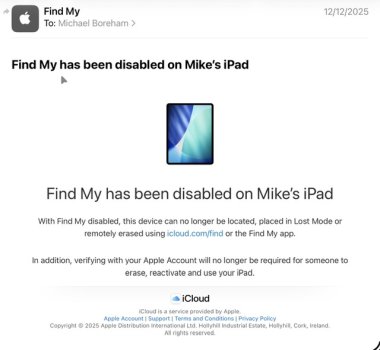
I am not sure I fully understand your situation, but I sold my iPad recently, so signed out of my account and turned off Find My. After doing this I immediately received an email (attached) from Apple, confirming that Find my had been turned off for Mike’s iPad.
The important words in the email were:
“In addition, verifying with your Apple Account will no longer be required for someone to erase, reactivate and use your iPad”.

Your screenshot seems to say the opposite, that “your mac cannot be erased and reactivated without a password”.

However in your OP you said you were able to erase and reactivate which implies it was properly signed out by previous owner, which seems inconsistent.

I also don’t understand why you are getting message implying there isn’t a Recovery Partition and yet you could boot into Recovery.

You haven’t said how long you have owned the machine or what the history was. Any chance an MDM was involved? Have you had this machine for a decent period without these issues?…or is it new to you.

I would be tempted to use Apple Configurator to restore the firmware and start over. Normal erasing does not remove the firmware, but even Apple Configurator will not get round an MDM.

IMG_1285.jpeg
 
Last edited:
What you guys are saying is assuming everything is working correctly. If someone hasn't ran into this issue I'm afraid you won't be able to help. I've ran every Mac since 2004. The only time I have seen something like this is when there was corruption and it wouldn't release the previous cached info to allow the new info in.

I can sign completely in and out of iCloud whenever I please. I can erase the MBP HD and HD data leaving only the boot sector and recovery. I feel like recovery is holding the FINDMY key that is not letting go of the last time iCloud was signed in by another person.

The key here is that when setting back up the MBP from recovery it thinks ONLY FINDMY is still signed in by the iCloud that is not mine. No matter how many times I sign in or out of iCloud. Because of this it turns FINDMY OFF in setup and refuses to turn it ON with my iCloud.

Additionally I get the no recovery partition error yet I can clearly see and use it with Terminal.

It is corrupted.

PS- this was much easier when we could remove the HD and it wasn't soldered to the MOBO.

EDIT: I will make a video or screen caps showing the process from erased to setup.
 
Last edited:
What you guys are saying is assuming everything is working correctly. If someone hasn't ran into this issue I'm afraid you won't be able to help. I've ran every Mac since 2004. The only time I have seen something like this is when there was corruption and it wouldn't release the previous cached info to allow the new info in.

I can sign completely in and out of iCloud whenever I please. I can erase the MBP HD and HD data leaving only the boot sector and recovery. I feel like recovery is holding the FINDMY key that is not letting go of the last time iCloud was signed in by another person.

The key here is that when setting back up the MBP from recovery it thinks ONLY FINDMY is still signed in by the iCloud that is not mine. No matter how many times I sign in or out of iCloud. Because of this it turns FINDMY OFF in setup and refuses to turn it ON with my iCloud.

Additionally I get the no recovery partition error yet I can clearly see and use it with Terminal.

It is corrupted.

PS- this was much easier when we could remove the HD and it wasn't soldered to the MOBO.

EDIT: I will make a video or screen caps showing the process from erased to setup.
OK. Just two questions:-

- have you tried Restoring Firmware with Apple Configurator? Could be firmware corruption with such issues. Normal erase and install does not touch the firmware.

- has this machine ever been OK for you? If so when did this behaviour start?

PS. If you try the Configurator route I suggest going straight for Restore not Revive. Also it is a frustrating process to get timing of key presses and releases right. I have done it four times and never succeeded first try.
 
Last edited:
I will give it a shot Mike. It's pretty much my last shot. Aside of 2 iMacs not pictured here I have no issues with my iCloud on anything.

As you can see the MacBook is showing in iCloud just fine.

img_2813_31061ca427dd00862b6dd60f9ebf22dadaa208ae.jpeg
Screenshot 2025-12-27 at 7.22.17 PM.png
 
Hi Brian, Good luck, please let us know how it goes.

You haven’t answered my other question about whether this mac was ever OK for you? ie is the mac new to you, or have you have it a long time and this problem only recently appeared?

The other suggestion I should have made earlier (if you haven’t already) was to go to https://appleid.apple.com/ and check what devices are shown…any unknown ones?

PS have you contacted Apple or an Apple Store about this?
 
Last edited:
  • Like
Reactions: throAU
Register on MacRumors! This sidebar will go away, and you'll see fewer ads.