Become a MacRumors Supporter for $50/year with no ads, ability to filter front page stories, and private forums.

o0giehead

macrumors newbie
Original poster
Feb 9, 2010
3
0
Los Angeles
Hi. I was just dragging some items around the desktop into some folders in the Finder and I guess something got messed up. When I was finished moving things around, a small square icon appeared in the left hand corner of the screen that cannot be dragged to another location or deleted. Whenever I click, it a small screen pops up momentarily, saying that it's going to open a file (I deleted the file) and nothing happens. After I deleted the file, the small square box just contains a picture of a question mark. I'm trying to get rid of it, but I don't know how to.

Any help would be appreciated!
 
Can you right click on it and select GET INFO and tell us what it is?

Do you mean the icon is on your Desktop, in a Finder window, the Dock or the Menu Bar?

Can you make a screen shot via CMD+SHIFT+4 and upload it to Flicker and embed it here?
 
4345348988


The icon will float over any other window in its way. It is on the desktop and cannot be right clicked nor minimized.

edit: So I don't know how to embed the image correctly in here, but the link is:

http://www.flickr.com/photos/47472304@N08/4345348988/
 
4345348988


The icon will float over any other window in its way. It is on the desktop and cannot be right clicked nor minimized.

edit: So I don't know how to embed the image correctly in here, but the link is:

http://www.flickr.com/photos/47472304@N08/4345348988/
You need to use the image address of the image, by right clicking on the image in the maximum image size (all sizes) Flickr gives you, and then select Copy Image Address.
The address looks like this: http://farm5.static.flickr.com/4072/4345348988_f4a8e46d5f_b.jpg
What you did was copying the URL of the Flickr site and embedding it in IMG tags.


4345348988_f4a8e46d5f_b.jpg


Do you see any open applications in the Dock?

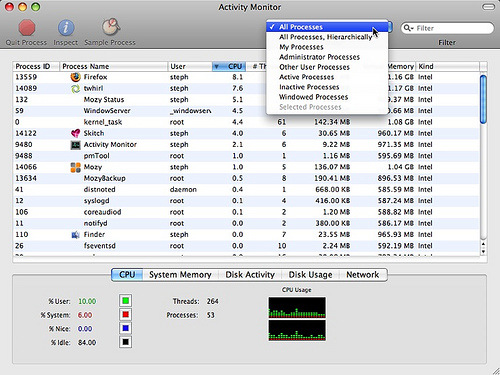
Can you also post a screen shot of Activity Monitor, with all processes shown and sorted by Process Name?
Maybe we can figure out which process that is.

3433908356_932c4b0e97.jpg
 
I restarted the computer and made sure no other applications were running. Since it had Dropbox in the filename, I tried uninstalling/reinstalling the app to see if it would do anything.

Here are the pictures of the Activity Monitor:

4345410886_42b3b44e9b_b.jpg


4344670019_b4148cff62_b.jpg
 
You have a "Docklet" configured in Butler for a file that no longer exists. Go to your Butler Configuration pane and you'll see the errant Docklet item there. Delete it and the box will go away.
 
Register on MacRumors! This sidebar will go away, and you'll see fewer ads.