


I have the internet set up so that the router sends the information to an Airport Express which wirelessly sends the internet data to my iMac. Usually this works fine. But every so often it just slows to a crawl. I don't know why. I have asked many people and no one so far can give me answers to some quite simple questions. These questions are:
1.
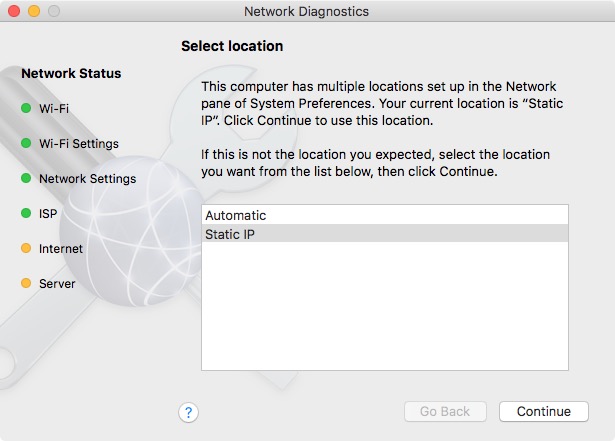
What does this even mean when the bottom two dots are yellow?
Also when you click on continue it thinks for a while, asks you to access the keychain, I click always allow but it does not always allow though as I have to click that every time. Then the two yellow dots go green and it says "your internet connection appears to be working correctly". I know this is a lie because I straight away quit the network diagnostics app and restart it, the two yellow dots are back.
What is going on here? My wi-fi is fine, no issue there. SO what does it mean when these two dots are yellow.
2.
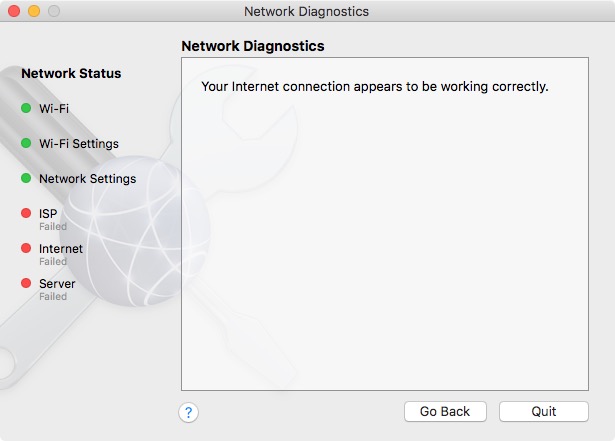
A couple of times it said this. How is that working correctly when there is 3 red dots there? I closed the app and reopened it and then I got the two yellow dots as in point 1.
3.
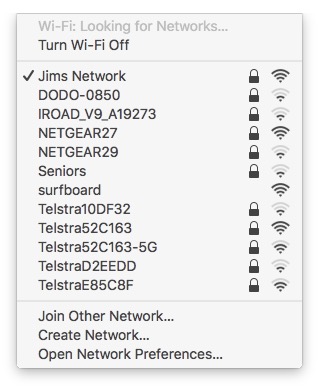
Why is it always looking for networks? I have my one selected. It should not need to look for more. Also would that many networks in the area affect anything?
1.
What does this even mean when the bottom two dots are yellow?
Also when you click on continue it thinks for a while, asks you to access the keychain, I click always allow but it does not always allow though as I have to click that every time. Then the two yellow dots go green and it says "your internet connection appears to be working correctly". I know this is a lie because I straight away quit the network diagnostics app and restart it, the two yellow dots are back.
What is going on here? My wi-fi is fine, no issue there. SO what does it mean when these two dots are yellow.
2.
A couple of times it said this. How is that working correctly when there is 3 red dots there? I closed the app and reopened it and then I got the two yellow dots as in point 1.
3.
Why is it always looking for networks? I have my one selected. It should not need to look for more. Also would that many networks in the area affect anything?