


Become a MacRumors Supporter for $50/year with no ads, ability to filter front page stories, and private forums.

MacRumors

macrumors bot
Original poster
Apr 12, 2001
70,267
41,867


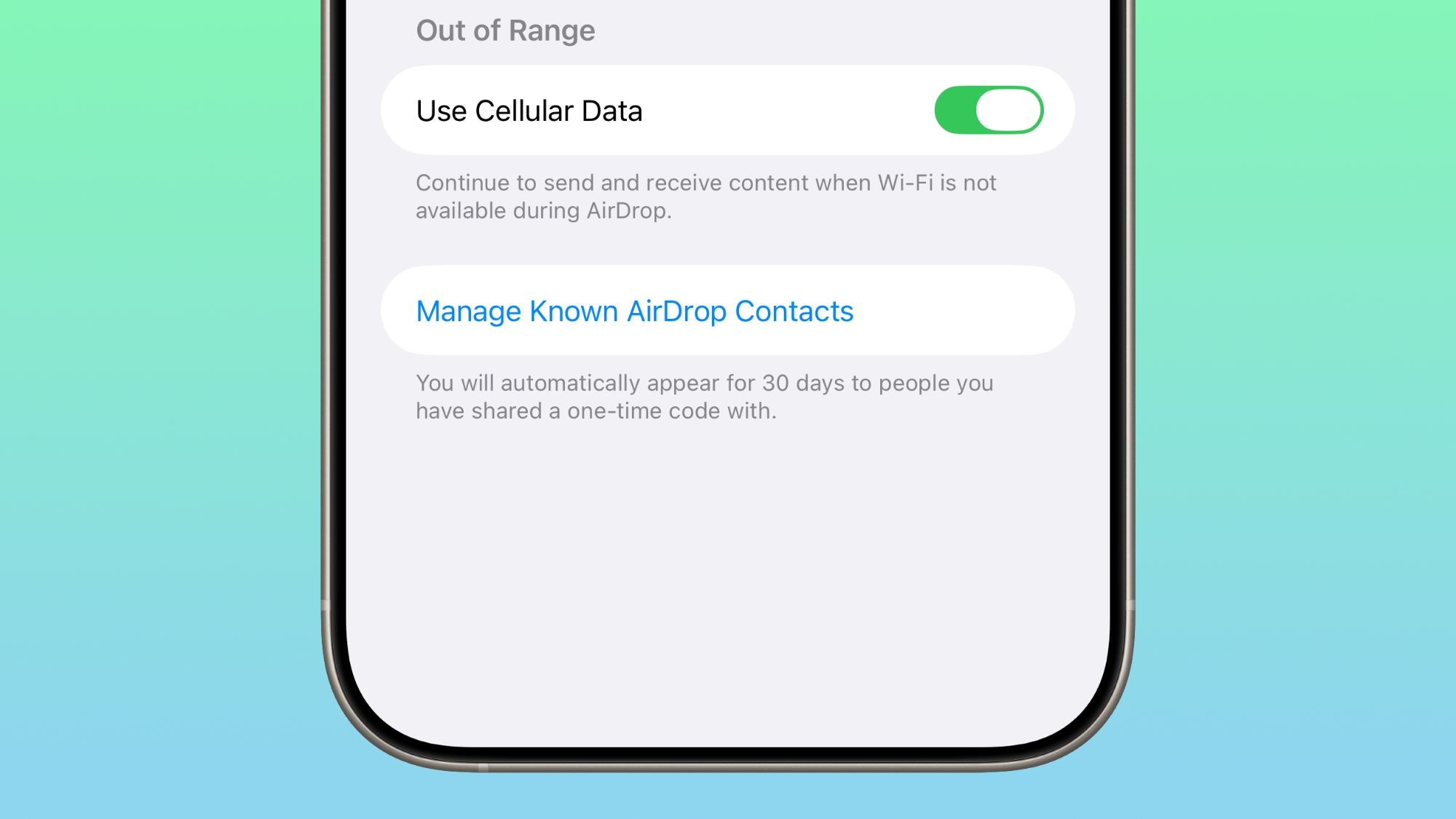
iOS 26.2 beta 3 includes new iPhone AirDrop functionality, providing a way for two people to share files temporarily without having to add each other as contacts.
ios-26-2-airdrop.jpg

There is a new option to get an AirDrop code, which can then be shared with someone who is not in your contacts list. The code provides AirDrop access for a 30-day period, with options to remove access in the Settings app.
Share a secure code with people not in your contacts to use AirDrop. You will be able to find each other for the next 30 days. You can manage access in Settings.
When you generate a code, the person that you're planning to use AirDrop with can input that code so that your devices can communicate with one another.

There are already options to turn AirDrop off entirely, limit AirDrop to contacts only, or turn AirDrop on for everyone for 10 minutes. The code-based option provides a way to create a connection with someone you don't want to create a contact card for, while avoiding having to turn AirDrop on for all people nearby.

People you have shared a one-time code with can be managed by opening up the Settings app, selecting the General section, choosing AirDrop, and tapping on "Manage Known AirDrop Contacts."

Article Link: iOS 26.2 Adds Temporary AirDrop Access With Shareable Codes
 
  • Like
Reactions: Starfia
Cool feature. I’m trying to think of a situation where I would want to send/receive airdrop, but wouldn’t want to add them to my contacts, but also want to be able to airdrop with them for up to 30 days. If I’m with someone for longer than that one airdrop I probably know them well enough to add them to my contacts.
 
I accidentally sent a freaking NSFW video to a family member because the stupid way Airdrop does not ask you if you are sure to send something to someone even if contacts because sometimes you could have multiple people close by and if they move around their icons goes away and the other persons icon right away takes over the spot the other people’s icon was at 😤 and if you use your phone too fast you would accidentally send something not meant for the other person close by.
I still to this day not sure if the thing went through 100% but I am scared.
So angry how Apple does not make us take extra steps for clicking the wrong thing.
One person moves out of the range the other person takes its place in the quick share thing.
 
I have no idea what the real-world use case for this is. There's no way this is faster than NameDrop then Airdrop (contacts only) would be.
 
AirDrop is only for nearby devices. Is this for non-proximity AirDrop? Not really seeing a use for this feature

Edit: Okay I looked into it. AirDrop can only be initiated with a device nearby, but can continue the transfer via cellular once out of range.

As far as the new feature, it basically creates a temporary 30 day link with a non-contact for sharing. Everything else stays the same.
 
Last edited:
I have no idea what the real-world use case for this is. There's no way this is faster than NameDrop then Airdrop (contacts only) would be.

This is a welcome addition for me working with my music students and not wanting to add contacts or another app. Setting up a temp code would help 'manage the transfer' of shared music files privately in a busy (and sometimes 'nosy') public studio space.
 
AirDrop is only for nearby devices. Is this for non-proximity AirDrop? Not really seeing a use for this feature
Exactly and I rather just use it for contacts only. This option makes me feel like even if i have contacts only on, ppl not in my contacts will now be able to air drop, sounds like invasion of privacy if u ask me.
 
Those options are already available. Contacts only, everyone for 10 minutes, RECEIVING OFF meaning air drop is OFF
Make it everyone until turned off and in the UI if its an unknown contact, in the receiving UI, have "Decline and set to Contacts Only" button. The 10 minute limit butchered airdrop and now its almost useless unless you transfer files to your own devices. People dont know about the bumping phones thing, and in my experience, its very buggy too.
 
Exactly and I rather just use it for contacts only. This option makes me feel like even if i have contacts only on, ppl not in my contacts will now be able to air drop, sounds like invasion of privacy if u ask me.
using Airdrop both parties must "accept/decline" the transfer.
so even someone you've "previously sent a file to" cannot just automatically send you a file. You MUST accept it.

Also, I doubt any 'addition of this feature' will remove previous working AirDrop options. (as someone else lamented)
 
  • Like
Reactions: Lizzard899
Exactly and I rather just use it for contacts only. This option makes me feel like even if i have contacts only on, ppl not in my contacts will now be able to air drop, sounds like invasion of privacy if u ask me.
No it's not, the original options don't change. AirDrop is still contacts only. Looks like what this is doing is replicating sharing via AirDrop with a non-contacts for 30 days. It's not an automatic thing.
 
I’m not sure if it was this update or app updates but when I’m using my phone even normally it tends to get warmer than I would expect and I just randomly thought wow I’ve been using my phone for like 30 minutes and it’s ice cold.
 
  • Love
Reactions: sleeptodream
No it's not, the original options don't change. AirDrop is still contacts only. Looks like what this is doing is replicating sharing via AirDrop with a non-contacts for 30 days. It's not an automatic thing.
So ru saying if I have it set to contacts only then this new option wont work? That would be good.
 
using Airdrop both parties must "accept/decline" the transfer.
so even someone you've "previously sent a file to" cannot just automatically send you a file. You MUST accept it.

Also, I doubt any 'addition of this feature' will remove previous working AirDrop options. (as someone else lamented)
Well good news is it only works if phones are brought together. If we're in different rooms of the house it wont work.
 
This is a welcome addition for me working with my music students and not wanting to add contacts or another app. Setting up a temp code would help 'manage the transfer' of shared music files privately in a busy (and sometimes 'nosy') public studio space.
I can think of a couple other situations off the top of my head.
 
Instead of bringing back the Everyone option without a time limit, they're adding this?

I really hate the Everyone for 10 minutes option they introduced since iOS 16.1.1 (China) and iOS 16.2 (rest of the world). And not being able to downgrade to iOS 15.x when you own an iPhone 14 series, I really hated it. How I wish I purchased an iPhone 13 series instead of going with the latest at the time.
 
So ru saying if I have it set to contacts only then this new option wont work? That would be good.
The new option is basically like creating a temporary contact for 30 days to continue sharing. It needs to be manually setup. No one can invade your privacy or AirDrop you without your permission.
 
  • Like
Reactions: Lizzard899
Isn’t it possible to just hold the top of the phones close to each other to do this?
Had this once with a stranger to share some pics at a tourist spot.
Worked fine without changing contact infos or numbers.
 
Or idk... how about just make airdrop for everyone and in the actual airdrop receiving UI, have an option to turn it off?
iOS 16.2 butchered airdrop and now no one uses it.

Airdrop open to everyone by default was a bad idea from the beginning. I don’t want my phone’s name, and/or my name broadcast to everyone, by default.

I remember a year or so after AirDrop appeared and opening it up at the airport, just to see pages and pages of people. I randomly sent about a dozen people that pic of a sloth astronaut at LAX.

..and I remember creeps sending junk pics to random people. Yea, you might not have accepted it, but you still saw the thumbnail….

51SBakPw7JL._AC_UF894,1000_QL80_.jpg
 
Last edited:
Isn’t it possible to just hold the top of the phones close to each other to do this?
Had this once with a stranger to share some pics at a tourist spot.
Worked fine without changing contact infos or numbers.
Yea you prob had the option everyone for 10 min. turned on to do this
 
Airdrop open to everyone by default was a bad idea from the beginning. I don’t want my phone’s name, and/or my name broadcast to everyone, by default.

I remember a year or so after it appeared and opening it up at the airport, just to see pages and pages of people. I randomly sent about a dozen people that pic of a sloth astronaut at LAX.

..and I remember creeps sending junk pics to random people. Yea, you might not have accepted it, but you still saw the thumbnail….
Yea they need to roll this back asap. No one wants this. Ppl are saying its not working right anyways. Even ppl in the contacts are being sent codes. This is supposed to be for ppl not in contacts. Clearly thats a bug.
 
Last edited:
I accidentally sent a freaking NSFW video to a family member because the stupid way Airdrop does not ask you if you are sure to send something to someone even if contacts because sometimes you could have multiple people close by and if they move around their icons goes away and the other persons icon right away takes over the spot the other people’s icon was at 😤 and if you use your phone too fast you would accidentally send something not meant for the other person close by.
I still to this day not sure if the thing went through 100% but I am scared.
So angry how Apple does not make us take extra steps for clicking the wrong thing.
One person moves out of the range the other person takes its place in the quick share thing.
Something similar happens with notifications and alerts. You go to tap something near the top of your screen and an alert pops up underneath your finger just as you press, taking you away from what you were doing, and making you do something you didn't want to do.
I think alerts and any button that pops up or shifts over suddenly should not be pressable for half a second.
 
  • Love
Reactions: Parowdy
Register on MacRumors! This sidebar will go away, and you'll see fewer ads.