Become a MacRumors Supporter for $50/year with no ads, ability to filter front page stories, and private forums.

golfnut1982

macrumors 6502a
Original poster
Oct 12, 2014
579
1,415
Chicago, IL
After I updated my 15 Pro to 26.2 the UI margins and safe areas seem more cramped, and "smaller" phones feel “shrunk in” and content doesn’t take full advantage of the display. There also seems no way to reclaim that space, which seems unfair. iOS 18.7.2 at least seemed to take the background elements and go edge to edge of the screen. Am I imagining this? Anyone else feel their screen real estate is not being fully utilized, or am I over blowing this? I'm sure this is no issue on the 6.3" and up phones.
 
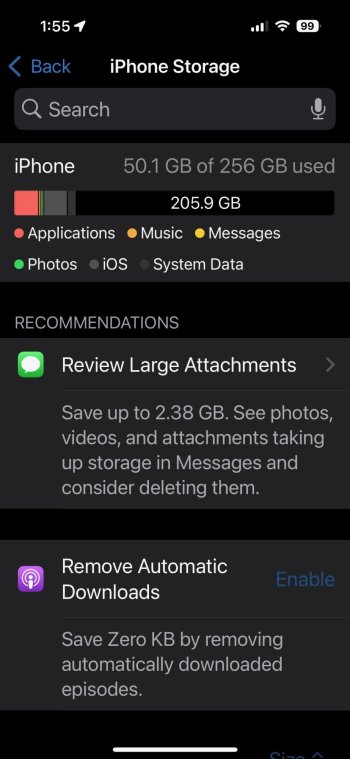
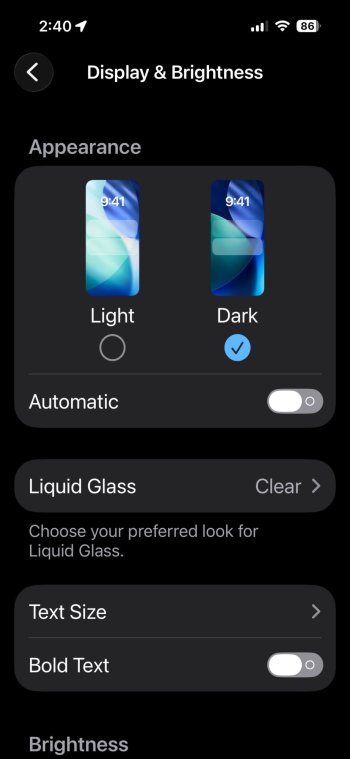
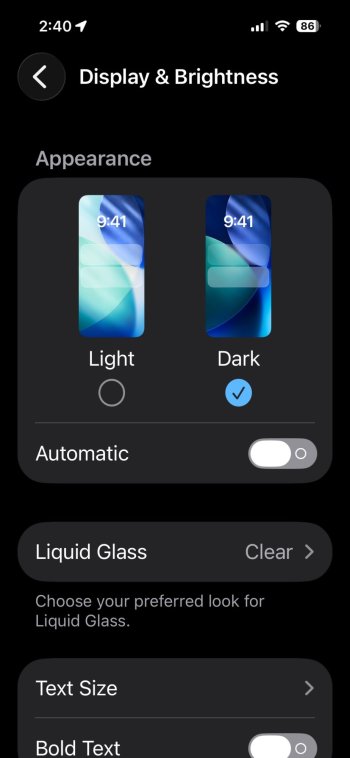
Found some screenshots I had. There is a difference between iOS 18 and 26 regarding the edges. The following settings are under Display and Brightness. These pics shows the new software is now optimized for looks and uniformity and may exhibit why it seems cramped on smaller screens. Screenshots from a 15 Pro.
Photo 1: iOS 18.7.2 Zoom at 135%, edge to edge. I don't have a 100% screenshot, but I remember the edges shrinking
Photo 2: iOS 26.2 Display - Zoom Default
Photo 3: iOS 26.2 Display - Zoom Larger Text
IMG_1344.jpegIMG_1351.jpegIMG_1350.jpeg
 
Register on MacRumors! This sidebar will go away, and you'll see fewer ads.