Become a MacRumors Supporter for $50/year with no ads, ability to filter front page stories, and private forums.

crazydreaming

macrumors 6502a
Original poster
My iBook G4 is usually under a big load, as in I do a lot of multitasking, all those browser windows open at once especially kill me... Anyway, it finally occured to me that my computer is quite zippy when I only have say one program open. Like night and day.

My sluggishness when doing a lot is probably mostly the fault of the 512MB ram, not the processor or anything. May seem like a stupid question, but here goes;

Will I benefit from more ram?
 
More RAM should help, especially if you're running Tiger. What are the specs of your system and what do you run besides a browser?

D
 
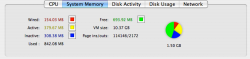
One thing you can check is to run Activity Monitor from the Applications\Utilities folder and check to see how much memory is free. You should also check the page-ins/page-outs. If you have very little free memory and your page-outs are high it means that your system would like to have more RAM.
 
Oh boy, that's an embarrasing thing to answer. I'm probably not using the greatest system for my work:

1.0 GHZ iBook G4. 512MB Ram.

Usually Running many safari windows (gotta cut back on that), Word, Entourage, Macromedia Contribute, sometimes Photoshop, itunes, ichat, stickies...
 
crazydreaming said:
1.0 GHZ iBook G4. 512MB Ram.

Usually Running many safari windows (gotta cut back on that), Word, Entourage, Macromedia Contribute, sometimes Photoshop, itunes, ichat, stickies...

With those apps, and even just Photoshop by itself, more RAM will definitely help.

D
 
Another thing that might help a little is using Firefox instead of Safari. Safari is a memory hog. In a couple tests that I did Safari uses twice as much RAM as Firefox - sometimes a bit more than double. I know browsers are very personal things so if you like Safari you might not want to swtich, but if you haven't given Firefox a try yet I'd recommend taking it for a spin. I've not used Camino or other OS X browsers so all I have is Safari and FF to compare.

Still, for running that many apps more RAM will definitely make a difference.
 
Having at least 5GB+ spare on your HD will also help, OSX likes virtual memory as well as real memory.

Your Acitivity Monitor (located in your applications/utilities folder) is also a good indicator. Look at 'System Memory', a high 'page outs' number tells you that more RAM would be nice. Amount of free RAM available is not always a good indicator, as OSX likes to allocate RAM even if it's not currently being used.

But basically if you can afford more RAM, it's always a good way to go :)
 
crazydreaming said:
Oooh, Yea, I don't have that. more like 2GB at the most. 30GB was a big mistake. :(
Yea, I think this can be a huge problem. Right now I'm running Tiger on a Dual 2Ghz G5 with 1.5 GB of RAM. With about half my RAM used, I have 10GB of swap file on disk. Screenshot attached. So yea, get an external FW HD and dump all the stuff you can on there.
 

Attachments

  • Picture 1.png
    Picture 1.png
    27.3 KB · Views: 132
Register on MacRumors! This sidebar will go away, and you'll see fewer ads.