Become a MacRumors Supporter for $50/year with no ads, ability to filter front page stories, and private forums.

Oldmopars

macrumors member
Original poster
Aug 5, 2025
70
14
I bought this computer from Goodwill, it was shipped to me. It got damaged in shipping. The glass for the screen was destroyed and the lower left corner of the frame was damaged.
I contacted them, and they gave me a full refund and they don't want the iMac returned (Shipping costs I am sure).
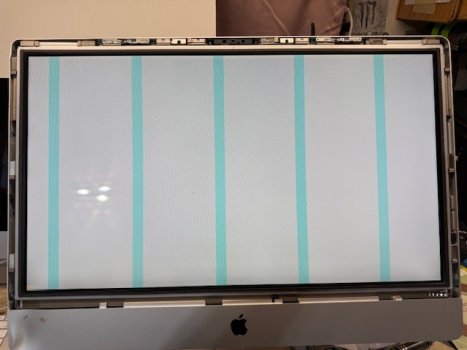
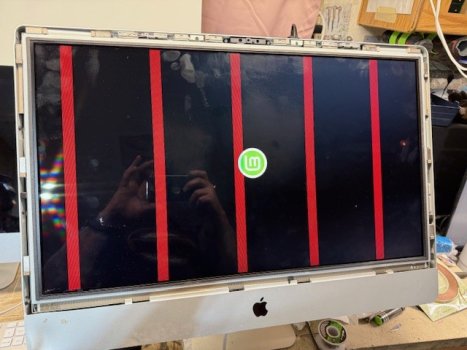
So, as it came with no HDD, I put in a drive with Linux Mint just to see if it would boot. It does, but I get these vertical lines.
I got it cheap, then due to the damage, I got that refunded. I had planned to put a drive in it, clean it up and resell it. I didn't plan to make much, just a project to play with and then sell.
Now, I need to decide what to do with it. It "works", so I hate to just E-cycle it. But if I have to put too much into it, I just won't be able to sell it at a reasonable cost.
So, knowing if this is a screen issue, or a GPU issue will help me decide what direction I need to go with it and if I part it out, what parts are still good.
The screen has a small blemish in it from the glass breaking, so it is not worth much.
 

Attachments

  • screen lines2.jpg
    screen lines2.jpg
    76.1 KB · Views: 23
  • screen lines1.jpg
    screen lines1.jpg
    57.1 KB · Views: 16
At a glance (and without any real knowledge) I'd be tempted to suggest that it could be a wiring issue. The repeating blemish across the screen just has that feel, of a specific set of wires not carrying the signal correctly. Of course, that's probably moot with the broken glass... and for that matter, that broken corner is likely where the interrupted wires in question live. Chances are, the screen replacement is all it needs.

If I may ask: what year is this unit? The age of the model affects both the potential resale value and the cost to bring it back to full functionality.
 
A repeated pattern is usually the sign of a failing gpu. Display or cable failure usually affect an area of the display.
 
A repeated pattern is usually the sign of a failing gpu. Display or cable failure usually affect an area of the display.
Huh. As I alluded, I'm no expert... but the one time I was pretty sure I had a failing GPU, it started out as random colors marring the display and eventually ended up displaying a scattered black-and-white non-patterned image on boot, which caused my 2006 iMac to become entirely unusable.

So is it safe to say that not all GPU failures exhibit the same symptoms? Or did I just misdiagnose that failure?
 
Huh. As I alluded, I'm no expert... but the one time I was pretty sure I had a failing GPU, it started out as random colors marring the display and eventually ended up displaying a scattered black-and-white non-patterned image on boot, which caused my 2006 iMac to become entirely unusable.

So is it safe to say that not all GPU failures exhibit the same symptoms? Or did I just misdiagnose that failure?
Your symptoms are very weird. The red bands means that the red subpixels on those lines are stuck on, but the cyan bands means that green and blue are on and red is off! This screams GPU/memory problem. But it can also be the display's internal board.
Testing with an external monitor may help, but it may not give a definitive answer because the logic/memory chip used to drive a second display may be not affected.
 
Your symptoms are very weird. The red bands means that the red subpixels on those lines are stuck on, but the cyan bands means that green and blue are on and red is off! This screams GPU/memory problem. But it can also be the display's internal board.
Testing with an external monitor may help, but it may not give a definitive answer because the logic/memory chip used to drive a second display may be not affected.
Well, I'm afraid I cannot offer you any meaningful closure on my symptoms, as that iMac was discarded years ago -- but I can offer you a pithy anecdote: My point was that not all symptoms necessarily mean what people assume they mean.

My dad was sent to a Apple Certified Technician class by his employer, oh-so-so-many-years-ago, (back when Macs were almost all beige) and one of the tasks that the instructor threw at the class was to debug an issue with a computer that he set in front of them. All manner of responses ensued about this failed component or that failed component... after which, the instructor informed them that none of those answers were correct, and the failure had actually been caused by software.

Noting of course that you had very reasonably used the word "usually"... It's important to remember that "usually" still has exceptions that sometimes need to be explored.
 
So, the damage to the main frame/outer housing cause in shipping was fairly bad. So, I wanted to fix the damage, but the damage was so bad, it would require a lot of hammering and sanding. So, the original finish would be destroyed. I decided that this would be a fun case to try to paint. I completely stripped everything out down to bare metal inside and out. I wanted to paint the inside as well so that it would look like a factory job. Of course I had to cover all of the spots that are ground/static points. I repaired the damage, sanded, hit it with some automotive self etching primer to be sure the final paint would stick. Then some sandable primer. Final sanding with 600 grit and then several coats of color.
I say all that because, I did bake the GPU, but I have the computer all apart right now waiting for the paint to cure. I have learned the hard way that with Rustoleum paint, you need to let it cure for a good long time. I want to lightly sand and buff the case before I put it all back together. I don't want it to look like a cheap rattle can spray job, so I am spending a lot of time to get it right before I put it back together.
It is an i7, but a first gen, so it will never be a super powerful or valuable computer, but more of a fun project.
One of the issues that comes with my mental disorders is time blindness. I have to set alarms for everything, wake up, start work, lunch, stop work, etc. I never know what day, or even month it is sometimes. I am thinking of turning this into a large wall mounted display that will run a custom clock with date display. Yes, I know, complete overkill for most people, but it is something I need to help me through the day.
 
  • Like
Reactions: biffuz and zarmanto
Hi Oldmopars,
You have a 2011 iMac i7 3.4 Ghz which is worth less than AUD $100. It is slow and uses TB 2.0. With OCLP upgrading it can run up to OSX Ventura.

I spent AUD $200 inserting a 2GB SATA SSD to run old software which made a huge improvement to my 2011 model 12.2. Then the GPU failed and I spent another $50.00 replacing that. Then the power board failed and I have replaced that also. To me it was all worthwhile as I have software, an excellent scanner and printer which all rely on that vintage OSX 10,10.

However in your case, replacing screen and glass is very expensive. Better to get another working used computer, same model 12.2 and cannibalise it.

A useful alternative is to convert the computer to a freestanding display. Used Apple displays are still relatively expensive at around $500.00, and the 5K screen remains desirable. Check out eBay price variations.

Then look at these threads:


You may prefare to undertake the renovation as a personal challenge and the monitor is probably more salable option if you are good with your hands and can find a neat way of exiting cables out of the back of the aluminium case.

If you own another computer, especially a laptop, the display will be a useful complement.

You will never make any money out of this exercise whether Computer or Monitor. If it is about money take it all to waste disposal.

Good Luck.
 
Last edited:
You have a 2011 iMac i7 3.4 Ghz which is worth less than AUD $100. It is slow and uses TB 2.0. With OCLP upgrading it can run up to OSX Ventura.
It can go a bit further, even Sequoia at a pinch with a Metal GPU, but it depends on your use cases and what instructions you really need to call in your applications. Mine is still running on the stock GPU but I had to replace the power board recently. That one somehow failed when the machine was turned off and left unused for a few weeks. No obvious sign of damage on the board anywhere and with the myriad tightly packed resistors on the back of the PCB, I had no appetite to go hunting, especially when replacement boards are cheap and reasonably plentiful.

Sadly, the 2011 only has a 2k screen so if you want to run it in TB mode it probably isn't the most power efficient monitor if energy prices are an issue and for the cost of gutting it and turning it into a freestanding display, there are plenty of lighter and more efficient 2k monitors out there for less if you don't need the Apple aesthetic.
 
Get yourself a display port to HDMI connector. I don't know how much they cost but I'm betting about $10
Connect it to a TV
If the TV works perfectly, it's the screen, if you still get lines it's the GPU
 
It can go a bit further, even Sequoia at a pinch with a Metal GPU, but it depends on your use cases and what instructions you really need to call in your applications. Mine is still running on the stock GPU but I had to replace the power board recently. That one somehow failed when the machine was turned off and left unused for a few weeks. No obvious sign of damage on the board anywhere and with the myriad tightly packed resistors on the back of the PCB, I had no appetite to go hunting, especially when replacement boards are cheap and reasonably plentiful.

Sadly, the 2011 only has a 2k screen so if you want to run it in TB mode it probably isn't the most power efficient monitor if energy prices are an issue and for the cost of gutting it and turning it into a freestanding display, there are plenty of lighter and more efficient 2k monitors out there for less if you don't need the Apple aesthetic.
Fair comment. Good points which I overlooked Weckart. 2K Display is 32 bit depth and is not the best candidate for a costly upgrade with 64 bit 5K available on the market. However the default resolution for a 5K monitor is the the same as the 2K, (2560 x 1440), so you see no screen difference in general use at default settings.

Oldmpars, There is no point messing with a computer of that age unless you have a specifically need to run old software. In my opinion your energy is better directed at upgrading 2017-2019 27" models where there is scope for real improvement in drive speed (NVME PCIE 3.0), and capacity (SSD) and the promise of a longer working life.

If you go for a custom clock that will be one very large clock!
 
Last edited:
However the default resolution for a 5K monitor is the the same as the 2K, (2560 x 1440), so you see no screen difference in general use at default settings.

Yes, except that everything will be much sharper, and you can choose even higher scaled resolutions that still look sharper than an old 2.5K...
Come on guys, Retina has been around for almost 15 years, you should know how it works by now :)
 
Register on MacRumors! This sidebar will go away, and you'll see fewer ads.