Become a MacRumors Supporter for $50/year with no ads, ability to filter front page stories, and private forums.

John234

macrumors newbie
Original poster
Oct 31, 2011
5
0
Just Got My First Mac. What do I do?

Any settings that you recommend for me to change? Any bloatware that I should remove?

Any guides on important security tweaks? (After having a PC I'm over paranoid about viruses).
 
Actually, just enjoy it

No viruses, so no AntiVirus needed (please, we don't need that discussion again)

No bloatware in the OS, no security tweaks

Just use it and relax

Oh, turn on Time Machine and make sure you back up
 
The only things I would do is to turn on the Firewall

System Preferences > Security and Privacy > Firewall

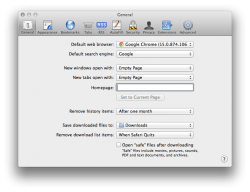
I would also turn off automatic opening of downloaded files with Safari Preferences (no real need, but just to make sure).

Screen Shot 2011-11-08 at 21.50.00.png

and enjoy :)
 
Just Got My First Mac. What do I do?
Turn it on and start using it. It's that simple!
Any settings that you recommend for me to change?
System Preferences > Security > Firewall > enable (it's disabled by default)
Safari > Preferences > Security > Enable Java (uncheck)
Safari > Preferences > General > Open "safe" files after downloading (uncheck)
Any bloatware that I should remove?
None. Welcome to Mac!
Any guides on important security tweaks?
See above. If you set up a WiFi network, make sure it's secured by a complex WPA2 password. (Upper and lower case letters, numbers & special characters)
(After having a PC I'm over paranoid about viruses).

You don't need any 3rd party antivirus software to protect Mac OS X from malware. Macs are not immune to malware, but no true viruses exist in the wild that can run on Mac OS X, and there never have been any since it was released 10 years ago. The only malware in the wild that can affect Mac OS X is a handful of trojans, which can be easily avoided with some basic education, common sense and care in what software you install. Also, Mac OS X Snow Leopard and Lion have anti-malware protection built in, further reducing the need for 3rd party antivirus apps.

Helpful Information for Any Mac User
 
Register on MacRumors! This sidebar will go away, and you'll see fewer ads.