Become a MacRumors Supporter for $50/year with no ads, ability to filter front page stories, and private forums.

ghanwani

macrumors 603
Original poster
Dec 8, 2008
5,173
6,737
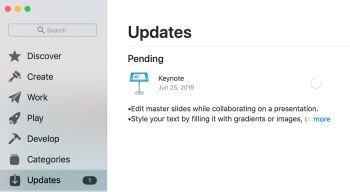
I got a notification for a Keynote update. I started it, then noticed I wasn't signed in. I signed in, but the update has not yet completed (several hours later). All I see is what is in the attached pic. I tried quitting the App Store app and restarting, but that didn't help. Would a reboot potentially help?

In the pic, I cannot click the link for "more", and it has just been sitting there.
 

Attachments

  • Screen Shot 2019-09-30 at 10.04.23 PM.png
    Screen Shot 2019-09-30 at 10.04.23 PM.png
    520.6 KB · Views: 172
Delete Keynote, then go to the App Store and let it download again. I've had to do that with both Pages and Keynote when the updates were not working. You won't lose any of your Keynote documents.
 
  • Like
Reactions: ghanwani
I deleted the app and then tried, but still had the same issue--it aborted the original download, but when I tried to download again, it ended up in the same state. I rebooted and was then able to get the process restarted, but it is hung in a different way at about 75% of completion. If I try to hit "Stop" it does nothing.

Edit: It completed successfully.
 

Attachments

  • Screen Shot 2019-09-30 at 11.08.00 PM.png
    Screen Shot 2019-09-30 at 11.08.00 PM.png
    29 KB · Views: 87
Register on MacRumors! This sidebar will go away, and you'll see fewer ads.