Become a MacRumors Supporter for $50/year with no ads, ability to filter front page stories, and private forums.

cebarnwell

macrumors newbie
Original poster
Dec 21, 2025
2
0
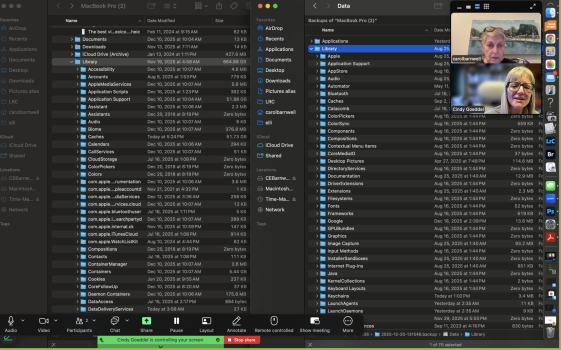
I bought a mac book pro last spring to process photos on. the Apple guys migrated my old files to the new laptop, but now the time machine says the library is 15.3GB, while the operating system on the laptop says it's 664 GB. When I try to copy the library to an external harddrive to reset the laptop, it says it cannot copy until it is downloaded, but gives me no option for this. I don't know what most of the stuff is in the library and so I'm stuck with a 2T harddrive, only half of which i can use. The part you can't see behond our photos is the Time Machine library listing, which is 15.3GB. Thoughts? TIA, CEB

 

Attachments

  • Screenshot 2025-12-20 at 5.26.06 PM.png
    Screenshot 2025-12-20 at 5.26.06 PM.png
    1.3 MB · Views: 1
Isn't the "Library" folder on the left located in your home folder,
i.e. /Users/<user-short-nam>/Library
while the "Library" folder on the right is located at the root of your internal storage,
i.e. /Library

These are different "Library" folders.
 
The larger one is on my laptop, the smaller is on an external hard drive That is the Time Machine copy of the laptop. They should be the same
 
The larger one is on my laptop, the smaller is on an external hard drive That is the Time Machine copy of the laptop. They should be the same
Hmm... still not convinced.. the "Library" folder on the right in screenshot .. the Time Machine backup... is the backup of the "Library" folder located at /Library on your Mac, not the backup of the folder /User/<user-short-name>/Library, which is the folder displayed on the left in the screenshot. There are two different "Library" folders on your Mac, /Library and /Users/<user-short-name>/Library ... I think you are confusing the two. At least, that is the way it looks to me from your screenshot.
 
If you copy those files that appear to be very small - the ones that report that the files have to download before copying... You just need to start the copy process. The files, stored on iCloud, will (eventually) download as fullsize downloads. You just have to allow for that, as it will be somewhat slower than a local file copy.
 
Register on MacRumors! This sidebar will go away, and you'll see fewer ads.