Become a MacRumors Supporter for $50/year with no ads, ability to filter front page stories, and private forums.

marysville

macrumors member
Original poster
Jun 22, 2009
83
0
2 months ago upgraded from 5s to 6s, purchased at Verison. Agent there transfered all data from old to new.
5s was 35gb, 6s 64gb. 5s was at about 32gb used when changed fones. I did not look at storage in 6s for a month, last week I got a warning that I was about to run out of storage. It showed 400mb left. I dumped some apps and got to 3.2gb. Since switching to the 6s I have not added any apps nor photos.
Question is, how have I used over 40gb in the change of phones?
 
Your 5s cannot be 35 GB. It should be 32 GB total and used space would be less than 32 GB. Nevertheless, did you add any songs/videos? Also, did you install absolutely no apps at all after getting a new phone?
 
2 months ago upgraded from 5s to 6s, purchased at Verison. Agent there transfered all data from old to new.
5s was 35gb, 6s 64gb. 5s was at about 32gb used when changed fones. I did not look at storage in 6s for a month, last week I got a warning that I was about to run out of storage. It showed 400mb left. I dumped some apps and got to 3.2gb. Since switching to the 6s I have not added any apps nor photos.
Question is, how have I used over 40gb in the change of phones?
I would check in Settings, General, Usage, internal Storage. And see what's taking up all that space.
 
Your 5s cannot be 35 GB. It should be 32 GB total and used space would be less than 32 GB. Nevertheless, did you add any songs/videos? Also, did you install absolutely no apps at all after getting a new phone?
Right, I miss typed, it was 32gb.
No added videos or music. I don't think I added an app. If so it was not a game or anything any where near large.
Thanks for replying
 
Last edited by a moderator:
Right, I miss typed, it was 32gb.
No added videos or music. I don't think I added an app. If so it was not a game or anything any where near large.
Thanks for replying

Doing the following, as suggested in the earlier post would give a better idea:
I would check in Settings, General, Usage, internal Storage. And see what's taking up all that space.

Post a screenshot of your internal storage if possible.
 
Doing the following, as suggested in the earlier post would give a better idea:


Post a screenshot of your internal storage if possible.

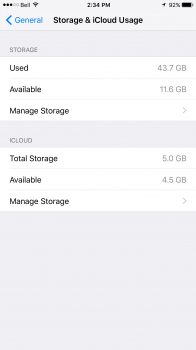
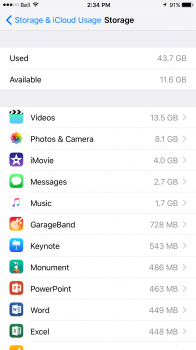
Here. I have a 64GB 6 Plus
 

Attachments

  • image.png
    image.png
    126.1 KB · Views: 76
  • image.png
    image.png
    241 KB · Views: 70
Register on MacRumors! This sidebar will go away, and you'll see fewer ads.