
Become a MacRumors Supporter for $50/year with no ads, ability to filter front page stories, and private forums.

appuru

macrumors newbie
Original poster
Feb 17, 2015
4
0
I have a Mac mini 2007 and Apple DVI to S-Video/Composite adapter which I am trying to connect to an old TV.

However upon connection, OS X chooses 480i by default and other resolutions just show garbages. It shows NTSC/PAL (see screenshot) so I imagine it's doing something for traditional TV.

The TV works with 1080i when Apple TV is connected via a component cable.

What am I missing?
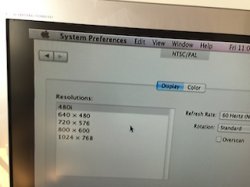
 

Attachments

  • IMG_9851.JPG
    IMG_9851.JPG
    24.6 KB · Views: 430
Is the TV 1920x1080i or 1440x1080i (widescreen vs letterbox). Also have you tried messing with the refresh rate on the right?
 
Connection

S-Video/Composite adapter can't handle more than 480i.

That's why we have component and now HDMI cables.

What are you thinking should happen here?
 
S-Video/Composite adapter can't handle more than 480i.

That's why we have component and now HDMI cables.

Correct. S-Video/Composite is "standard definition" only.

Edit: Whoops, missed that the TV doesn't have HDMI. You may be out of luck. Some video cards have the ability to use a component adapter, but it is very much specific to each video card, and I know of no such adapter for the Mac Mini.
 
Last edited:
As the others have said, 480i is all that s-video or composite video supports. Use s-video if your TV has it, that will be better quality than composite.

Have you considered just buying a new monitor/TV? The smaller ones are really cheap, they have boxes of 32" LCD's stacked at the end of the aisle in the grocery store here. 😀
 
I was in a similar situation with an early Samsung rear projection HD set. It actually had a really nice picture and was a 47", but just didn't have HDMI, only component. I had a DVI to component converter, which worked, but I suspect you're trying to hook up both without having to swap the wires every time you want to switch. You can't. Eventually, the Samsung died and I bought a new one. The replacement was $1,000. Kind of like a bee sting; created a memory longer lasting than you might even expect. Fortunately, you have cheaper options these days.
 
Many thanks guys. So I tried DVI/component converter ($10) but it didn't work at all as Anonymous Freak suspected.
Boyd01's comment to buy a new TV makes sense after all 🙂
 
Many thanks guys. So I tried DVI/component converter ($10) but it didn't work at all as Anonymous Freak suspected.
Boyd01's comment to buy a new TV makes sense after all 🙂

The only other thing you could do is:

DVI to HDMI cable -> HDMI to Component box -> TV

Granted that's going to cost you about $50 and with the costs of televisions these days one has to question spending that kind of money on an old tube tv....

http://www.amazon.com/Portta-PETHRS...d=1425906417&sr=8-5&keywords=dvi+to+component
 
As an Amazon Associate, MacRumors earns a commission from qualifying purchases made through links in this post.
with the costs of televisions these days one has to question spending that kind of money on an old tube tv....

You certainly do. Guess it depends on how big a TV you want though. Last Christmas I gave my daughter's family and Apple TV, but their 12 year old 37" Plasma screen only had one HDMI input and that was needed for a cable box.

I just couldn't bring myself to buy some kind of converter to use with an ancient TV, so I got them a new 42" TV on sale at Best Buy as an "accessory" for the AppleTV. 🙂

Now that was for a Plasma screen. For a CRT TV, I wouldn't spend another penny on that. A new LCD will also be a lot more energy efficient.
 
Register on MacRumors! This sidebar will go away, and you'll see fewer ads.