Become a MacRumors Supporter for $50/year with no ads, ability to filter front page stories, and private forums.

NateC1955

macrumors newbie
Original poster
Mar 21, 2015
9
3
Texas
What I am seeing - when I startup the MB Pro the progress bar goes to about halfway then a message comes up saying something about it restarting the restarts and progress bar goes to halfway and restarts.

Next, I shutdown then tried starting in Safe Mode and the MB Pro does does not get that far before the above restart cycle begins again.

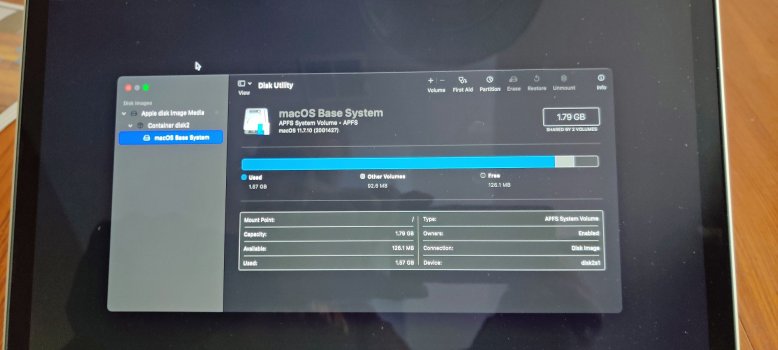
Finally, I try going into Recovery Mode, but when I do I find Disk Utility only sees the 1.79GB Reserve partition. Nothing more.

I think the MB Pro is toast.

Thoughts?
 
Here is the photo of All Devices that Disk Utliity sees.
 

Attachments

  • Macbook Pro 2013 = DU All Devices.jpg
    Macbook Pro 2013 = DU All Devices.jpg
    255.3 KB · Views: 20
That (the macOS Base System) is just the image that your MBPro boots to, when you are booting to the internet recovery system.
Your Disk Utility does not see your internal drive, which is where you have the normal boot system installed, AND whatever else you have stored there, your own apps and documents, etc.
So, your system is not seeing or booting to that system, likely because the internal drive has failed.

That internal drive can be replaced (it is NOT soldered in), you would look for a PCIe drive, with an Apple proprietary connector, or a standard M2 card, with an adapter that allows that standard drive card to plug in to the Apple card connector.
You will need to discover if your MBPro is an Early 2013, or a Late 2013, as the internal drives are different. Early 2013 takes an SATA M.2 card version (a bit harder to find now), and a Late 2013 will take a PCIe version, still an M.2 card, but the electronics are different.
 
The partition (or volume, technically) isn't the issue. The STORAGE is gone.

That indicates a hardware problem for sure.
 
Yes, the internal drive is not showing at all in Disk Utility, so it's not accessible. But, that storage/boot drive can be replaced fairly easily, not soldered in, also not part of the CPU. All one needs is to remove the bottom cover, and swap out that flash memory / m.2 card. An Apple OEM card is OK, but a standard m.2 PCIe will be easier to find (and probably cheaper), all that is usually needed is an adapter for the card connector.
 
Thanks DeltaMac. I have a new SSD M.2 stick ordered. I checked it for compatibility and so I should be good. Now just need to install and restore.

Thanks FreakinEurekan. Love the avatar. May River be kind to you.
 
  • Love
Reactions: FreakinEurekan
Register on MacRumors! This sidebar will go away, and you'll see fewer ads.