

Got a tip for us?
Let us know
Become a MacRumors Supporter for $50/year with no ads, ability to filter front page stories, and private forums.
Macbook pro a1708 2017 keyboard not working (pictures)
- Thread starter panchoskywalker
- Start date
- Sort by reaction score
You are using an out of date browser. It may not display this or other websites correctly.
You should upgrade or use an alternative browser.
You should upgrade or use an alternative browser.
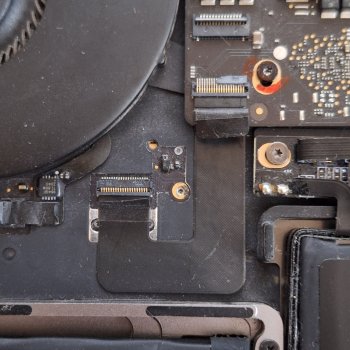

The internal keyboard, and an external USB keyboard would both ultimately connect through the USB bus. Sounds like you were unlucky enough to damage a connector that would also be part of the USB bus, and that part of the bus that "talks" to any attached keyboard.
Is it "fixable"?
Sure... Probably will need a replacement logic board... Or, repairing that connector on the logic board. Sometimes you get lucky when you can see where the problem is, and it's accessible/repairable. If the damaged part is broken off, then you may not have any choice, except to replace the logic board.
Is it "fixable"?
Sure... Probably will need a replacement logic board... Or, repairing that connector on the logic board. Sometimes you get lucky when you can see where the problem is, and it's accessible/repairable. If the damaged part is broken off, then you may not have any choice, except to replace the logic board.


What if I just buy a new one , can I access what's on the desk of this one by plugging the ssd into an external case?
It's hard to draw complete conclusions from your pictures. It looks like you damaged the receiving socket end of the ZIF connector. With these connectors, I actually believe it would work the way it is right now. I am not 100% positive you have it fully inserted based on the pictures. Can you upload pictures with it disconnected?
For the external, are you using a USB Hub to then plug in a USB A keyboard? Often times hubs need permission granted to be functional. Try using a direct USB C keyboard.
My biggest concern here would be if at any time you disconnected anything on the logic board with the computer still on. If you did that, then yes your keyboard is almost certainly fried.
For the external, are you using a USB Hub to then plug in a USB A keyboard? Often times hubs need permission granted to be functional. Try using a direct USB C keyboard.
My biggest concern here would be if at any time you disconnected anything on the logic board with the computer still on. If you did that, then yes your keyboard is almost certainly fried.
It's hard to draw complete conclusions from your pictures. It looks like you damaged the receiving socket end of the ZIF connector. With these connectors, I actually believe it would work the way it is right now. I am not 100% positive you have it fully inserted based on the pictures. Can you upload pictures with it disconnected?
For the external, are you using a USB Hub to then plug in a USB A keyboard? Often times hubs need permission granted to be functional. Try using a direct USB C keyboard.
My biggest concern here would be if at any time you disconnected anything on the logic board with the computer still on. If you did that, then yes your keyboard is almost certainly fried.
Man it work again!, I removdd the remaining socket end and tried again
Deletd key is failing though, like there's too much pressure maybe?
Attachments
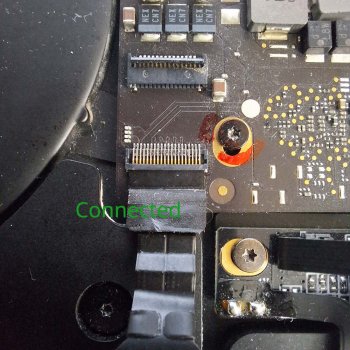
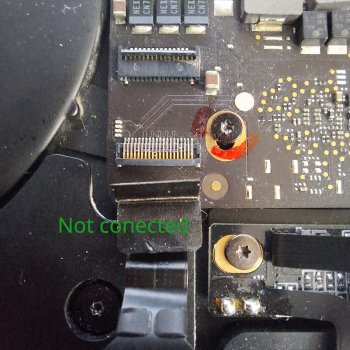
Great! Glad it was just a disconnected keyboard.
This 2017 model has the notorious butterfly keyboard. Keys eventually feel spongy and fail. There's nothing you can do about that aside from replacing the whole top case. At the age of the laptop I'd say that isn't worth it.
This 2017 model has the notorious butterfly keyboard. Keys eventually feel spongy and fail. There's nothing you can do about that aside from replacing the whole top case. At the age of the laptop I'd say that isn't worth it.
Yes I know, there are a few letters that almost doesn't work anymore.Great! Glad it was just a disconnected keyboard.
This 2017 model has the notorious butterfly keyboard. Keys eventually feel spongy and fail. There's nothing you can do about that aside from replacing the whole top case. At the age of the laptop I'd say that isn't worth it.
I'll upgrade this ****** mb as soon as I can, you have any recommendation? I believe this kind of keaybord stopped in 2020 o 2022?
The Butterfly Keyboard was from
2016-2019 15 inch MacBook pros
2016-2019 13 inch MacBook pros
2018-2019 Macbook Airs
2015-2017 MacBooks
Obviously you want to get Apple Silicon. If budget allows it, just get a new M4 MacBook Air. I think they still the M1 through Walmart brand new for $600 or $650 though if you are tight on cash.
2016-2019 15 inch MacBook pros
2016-2019 13 inch MacBook pros
2018-2019 Macbook Airs
2015-2017 MacBooks
Obviously you want to get Apple Silicon. If budget allows it, just get a new M4 MacBook Air. I think they still the M1 through Walmart brand new for $600 or $650 though if you are tight on cash.
Obviously you want to get Apple Silicon. If budget allows it, just get a new M4 MacBook Air. I think they still the M1 through Walmart brand new for $600 or $650 though if you are tight on cash.
It keep failing every morning so I have to "fix" it again each time. Is there any newer mb pro that I can just install the SSD from this one so I can upgrade without having to re install each software?
Register on MacRumors! This sidebar will go away, and you'll see fewer ads.