Is there any possible way to fit more than 4 GB of RAM into a MacBook Pro? Even with a modification of some sort?


Got a tip for us?
Let us know
Become a MacRumors Supporter for $50/year with no ads, ability to filter front page stories, and private forums.
MacBook Pro RAM
- Thread starter funkfunkitup!
- Start date
- Sort by reaction score
You are using an out of date browser. It may not display this or other websites correctly.
You should upgrade or use an alternative browser.
You should upgrade or use an alternative browser.

2x4GB dimms can be installed however there are stability issues with the 15" MacBook Pro (Unibody) where it may cause lockups and crashes when/if you approach or go beyond 4GB memory utilisation during usage of the operating system.
The 17" Unibody MacBook Pro is the only official Mac Notebook to support 8GB of RAM.
Some users have been able to utilise 6GB of RAM in 15" Unibody Macs but user testimonials seem to be a tad inconsistent with some users claiming rock solid stability while others reporting crashes and lockups under certain conditions.
Bottom Line: You can install the RAM physically but you may come in to difficulty. Also there are many different versions of the MacBook Pro (They have been on sale since 2006) So you may wish to indicate now which exact model you have.
The 17" Unibody MacBook Pro is the only official Mac Notebook to support 8GB of RAM.
Some users have been able to utilise 6GB of RAM in 15" Unibody Macs but user testimonials seem to be a tad inconsistent with some users claiming rock solid stability while others reporting crashes and lockups under certain conditions.
Bottom Line: You can install the RAM physically but you may come in to difficulty. Also there are many different versions of the MacBook Pro (They have been on sale since 2006) So you may wish to indicate now which exact model you have.
Why do you feel like you need more than 4gb in the first place...It's really kind of silly at this time.
Why do you feel like you need more than 4gb in the first place...It's really kind of silly at this time.
Seriously. I get by easily on 2GB. Extra RAM doesn't speed up systems as much as some people think. It's not like, say, putting a 100-gallon fuel tank on your car will let you go farther. Most of the bottlenecks I see on iStat are from the network (download speed) and the processor being maxed out.
If you've got 4GB of RAM in your computer, you are A-OK on that front. If you want to just throw money at your MBP, buy an SSD. That will actually speed you up.
the price difference between a 4gig module and a 2 gig module is ridiculous, if you can afford it and require that much ram you should be buying a mac/pc known to be (advertised as) capable of supporting more

I agree. Some people tend to have the mentality of more is better. throwing away money on unnecessary RAM to think it'll make browsing ny times faster is just so silly. and if you truly have the need for 8GB or more RAM, then the mbp isn't really for you in the first place. get a desktop.
Well, this is what I'm talking about:Seriously. I get by easily on 2GB. Extra RAM doesn't speed up systems as much as some people think. It's not like, say, putting a 100-gallon fuel tank on your car will let you go farther. Most of the bottlenecks I see on iStat are from the network (download speed) and the processor being maxed out.
If you've got 4GB of RAM in your computer, you are A-OK on that front. If you want to just throw money at your MBP, buy an SSD. That will actually speed you up.
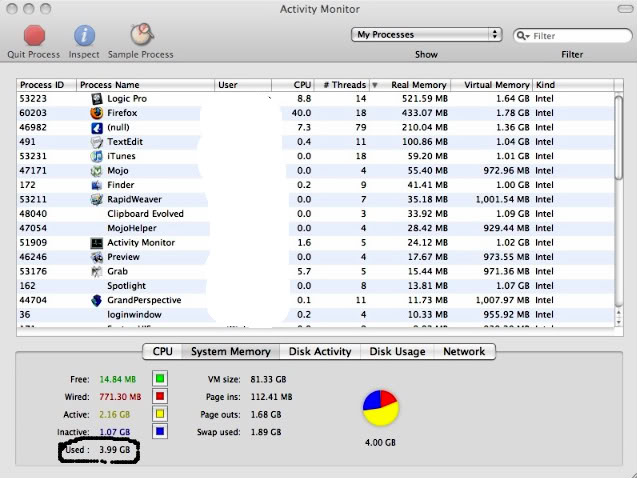
If you look where it's circled, under 'used', it's at 3.99 GB a lot of the time. I've been checking my memory usage a lot lately in Activity Monitor.
So am I not pretty much maxing out my RAM? Or does that mean that my system is just 'utilizing' all the RAM I have?

I ordered the 4GB memory upgrade for my 2.6ghz early 2008 macbook pro. I ordered the Corsair low latency(with actual rebates they seemed to be a good deal)
I really do not see any real difference in performance. The start up seems to take longer.
The performance gain is there using photoshop. I used one of those test to measure photoshop performance, and it took 48 seconds with the 2GB, and 40 seconds with the 4GB low latency. (not very accurate so I would say +- 2 seconds). I have not used much the computer.
Therefore if you look to get performance increase in startup time or "interneting" etc, then I think a ram upgrade is not needed. I would spend the money getting a hardshell case or something else.
By the way the computer came with 2 Hynix 1GB modules, is that coming from apple, or did the reseller change them?
I really do not see any real difference in performance. The start up seems to take longer.
The performance gain is there using photoshop. I used one of those test to measure photoshop performance, and it took 48 seconds with the 2GB, and 40 seconds with the 4GB low latency. (not very accurate so I would say +- 2 seconds). I have not used much the computer.
Therefore if you look to get performance increase in startup time or "interneting" etc, then I think a ram upgrade is not needed. I would spend the money getting a hardshell case or something else.
By the way the computer came with 2 Hynix 1GB modules, is that coming from apple, or did the reseller change them?
funk, you could definitely use more RAM. Aside from your 3.99 GB in use, you have 1.89 GB that has been swapped out to disk. I'd say you are regularly using around the 6 GB mark. Anytime you have to swap memory out to disk, there is a large performance penalty. I, too, regularly use over 4 GB of RAM -- mostly with VMWare images or through the use of Aperture or Final Cut. However, I think the cost to go from 4 GB to 8 GB is just too expensive for me right now. The 4 GB modules would have to go below $200 each before I'll make the plunge.
I have the same problem with not enough RAM at 4gb. Whenever I open up VMWare Fusion, a lot of times I have to wait while stuff is swapped out. I thought inactive ram was supposed to be freed up when something needs it?
To start with, you can try freeing up as much of the RAM you have as possible since that is a lot cheaper than buying a 4gb stick for $200.
You need to close some tabs in Firefox. Based on the CPU and RAM usage, I would guess you have around 100 tabs open. If you haven't upgraded to Firefox 3 yet, do that--it uses less RAM than Firefox 2. Upgrading to Flash Player 10 may help, as will installing FlashBlock.
You might also try to find a lighter-weight bittorrent client. Azereus/Vuze uses a ton of memory. Utorrent for mac is still beta, but you could try it. I can understand not using Transmission since it lacks a lot of features of other bittorrent clients.
I see TextEdit is using 100mb! Do you have a 100mb text file open or something?
To start with, you can try freeing up as much of the RAM you have as possible since that is a lot cheaper than buying a 4gb stick for $200.
You need to close some tabs in Firefox. Based on the CPU and RAM usage, I would guess you have around 100 tabs open. If you haven't upgraded to Firefox 3 yet, do that--it uses less RAM than Firefox 2. Upgrading to Flash Player 10 may help, as will installing FlashBlock.
You might also try to find a lighter-weight bittorrent client. Azereus/Vuze uses a ton of memory. Utorrent for mac is still beta, but you could try it. I can understand not using Transmission since it lacks a lot of features of other bittorrent clients.
I see TextEdit is using 100mb! Do you have a 100mb text file open or something?

Why do you feel like you need more than 4gb in the first place...It's really kind of silly at this time.
Seriously. I get by easily on 2GB. Extra RAM doesn't speed up systems as much as some people think. It's not like, say, putting a 100-gallon fuel tank on your car will let you go farther. Most of the bottlenecks I see on iStat are from the network (download speed) and the processor being maxed out.
If you've got 4GB of RAM in your computer, you are A-OK on that front. If you want to just throw money at your MBP, buy an SSD. That will actually speed you up.
I agree. Some people tend to have the mentality of more is better. throwing away money on unnecessary RAM to think it'll make browsing ny times faster is just so silly. and if you truly have the need for 8GB or more RAM, then the mbp isn't really for you in the first place. get a desktop.
Why do so many people have to question the need for, or insist the need for more RAM is non-existent? That's lame, and ill-informed. I think most people asking about huge ram upgrades that are ridiculously expensive are actually using their 'books for professional tasks which push the machine to its limit.
I want 8gigs of Ram because I know my photoshop, fcs, and vmware usage could use as much ram as I can throw at it. 4 Gigs will still page out with this stuff.
I look at it like this - for my needs, 8Gigs would currently be adequate, but not even 'future proofing' it. In the next few years I think 16 Gigs might be the new wall that we're frustrated with.
Please stop insisting we don't need the specs we are discussing.

There are plenty of valid reasons for needing > 4 GB. My question is, why is Ff using 40% of your processor?
There are plenty of valid reasons for needing > 4 GB. My question is, why is Ff using 40% of your processor?
Probably too many tabs open. I regularly have over a hundred tabs open (I never really bookmark stuff), and I have the same problem. When there is any kind of dynamic content in the background, Firefox eats CPU time. Flash is one of the worst offenders, which is why I recommend upgrading to Flash 10 and installing Flashblock. I had to reduce the number of tabs I keep open when I started using battery power more often because the CPU time was killing my battery life.
I know! The file that was open in TextEdit was less than 1 MB! I don't understand why it always uses so much RAM on my Mac??I see TextEdit is using 100mb! Do you have a 100mb text file open or something?
FireFox is my the worst for me. It's always eating up so much RAM. But I'm one of those people who always has 25+ tabs open at a time (plus 10+ extensions), so it makes sense I guess.Probably too many tabs open. I regularly have over a hundred tabs open (I never really bookmark stuff), and I have the same problem. When there is any kind of dynamic content in the background, Firefox eats CPU time. Flash is one of the worst offenders, which is why I recommend upgrading to Flash 10 and installing Flashblock. I had to reduce the number of tabs I keep open when I started using battery power more often because the CPU time was killing my battery life.
Exactly! Good idea, I'm gonna upgrade Flash and install Flashblock right now. Thanks for the advice!Probably too many tabs open. I regularly have over a hundred tabs open (I never really bookmark stuff), and I have the same problem. When there is any kind of dynamic content in the background, Firefox eats CPU time. Flash is one of the worst offenders, which is why I recommend upgrading to Flash 10 and installing Flashblock. I had to reduce the number of tabs I keep open when I started using battery power more often because the CPU time was killing my battery life.

dude, not everybody has MBPs just to browse the web... OMG, still can't believe some of these statements
I'd put 32GB of RAM in a heartbeat on a MBP if possible, and believe me, I'd use all of it. No need to have a separate desktop.
I'd put 32GB of RAM in a heartbeat on a MBP if possible, and believe me, I'd use all of it. No need to have a separate desktop.
I agree. Some people tend to have the mentality of more is better. throwing away money on unnecessary RAM to think it'll make browsing ny times faster is just so silly. and if you truly have the need for 8GB or more RAM, then the mbp isn't really for you in the first place. get a desktop.
I'm not saying anyone here doesnt use more than 4gig of ram, i on occasion could have done with a little more than 4gig
my point is there are computers capable of utilising more ram so that is the computer you should be buying, regardless of whether or not its, pc, mac, os x, windows, linux, unix, OR wait until the macbook pro supports more. I agree that for the price it should be able to
seems pointless to cause a possible negative performance issue of installing more than the recommended ram
my point is there are computers capable of utilising more ram so that is the computer you should be buying, regardless of whether or not its, pc, mac, os x, windows, linux, unix, OR wait until the macbook pro supports more. I agree that for the price it should be able to
seems pointless to cause a possible negative performance issue of installing more than the recommended ram
possible negative performance issue of installing more than the recommended ram
As they say, "FUD." There are plenty of published reports out there of 6 GB working just fine, including in my own experience. 8 GB is "recognized" (but not functional) and no real understanding about why that might be, exactly. There are assumptions and likely candidates, but those are far from concrete proof.
Register on MacRumors! This sidebar will go away, and you'll see fewer ads.