Become a MacRumors Supporter for $50/year with no ads, ability to filter front page stories, and private forums.

dandeco

macrumors 65816
Original poster
Dec 5, 2008
1,380
1,172
Brockton, MA
For the past four years I have been using an MthsTec external USB-C Blu-ray burner, hooked up to my CalDigit TS3 Plus dock connected to my M1 MacBook Air. But since I upgraded to MacOS 26 Tahoe, it's starting to have problems. Half the time I pop a disc in, be it a DVD or Blu-ray, the drive just acts neutral and then ejects the disc after a minute or two. I tried this with my older LG external Blu-ray drive, and I get the same problem. I tried gently cleaning the laser on the MthsTec Blu-ray burner with isopropyl alcohol and a cotton swab, and I still have this issue. If I try playing the same DVDs on one of my older MacBook Pros with a built-in DVD drive, then it works. So therefore it has to be a compatibility issue my external Blu-ray drives have with MacOS 26. Anyone else have similar experiences or advice?
 
Last edited:
For the past four years I have been using an MthsTec external USB-C Blu-ray burner, hooked up to my CalDigit TS3 Plus dock connected to my M1 MacBook Air. But since I upgraded to MacOS 26 Tahoe, it's starting to have problems. Half the time I pop a disc in, be it a DVD or Blu-ray, the drive just acts neutral and then ejects the disc after a minute or two. I tried this with my older LG external Blu-ray drive, and I get the same problem. I tried gently cleaning the laser on the MthsTec Blu-ray burner with isopropyl alcohol and a cotton swab, and I still have this issue. If I try playing the same DVDs on one of my older MacBook Pros with a built-in DVD drive, then it works. So therefore it has to be a compatibility issue my external Blu-ray drives have with MacOS 26. Anyone else have similar experiences or advice?
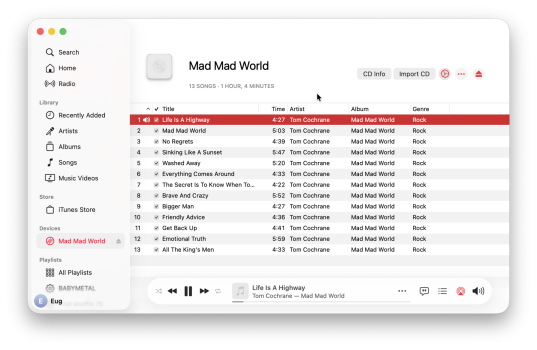
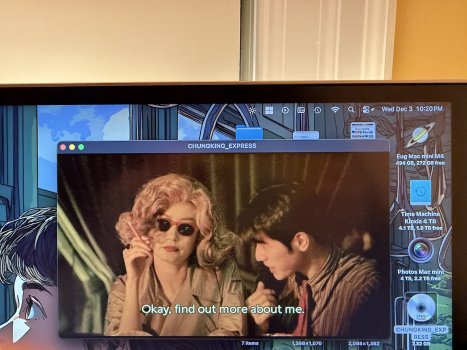
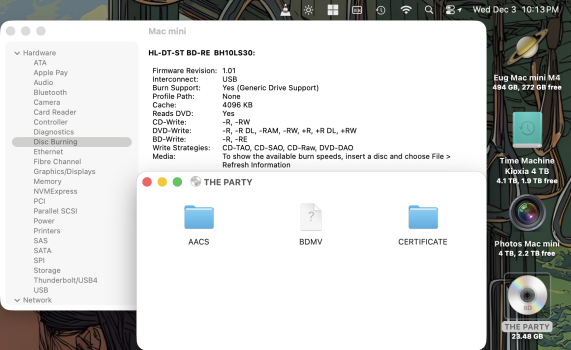
I just tried this. CD, DVD, and Blu-ray all load fine. My Tom Cochrane CD and Chungking Express DVD play normally. I have no software to play my Blu-ray of The Party, but the I can see the directory. M4 Mac mini with USB 2.0 enclosure. Drive model is listed in the System Report screen grab.

Screenshot 2025-12-03 at 10.06.28 PM.png

IMG_0875.jpeg

Screenshot 2025-12-03 at 10.13.53 PM.png
 
OP:

You said the Bluray drive is connected via a hub, is this right?

Have you tried a direct connection to the Mac (no hub)?
Does that change anything?
 
OP:

You said the Bluray drive is connected via a hub, is this right?

Have you tried a direct connection to the Mac (no hub)?
Does that change anything?
It didn't.
I also tried it with a couple other Macs, and I got the same results. So I concluded it's an issue with the Blu-ray drive, and ordered a new model from a different manufacturer, one that apparently performs better.
 
I also tried it with a couple other Macs, and I got the same results. So I concluded it's an issue with the Blu-ray drive, and ordered a new model from a different manufacturer, one that apparently performs better.
Are these recordable discs or commercial stamped discs? Because recordable discs do have a finite shelf life.
 
It didn't.
I also tried it with a couple other Macs, and I got the same results. So I concluded it's an issue with the Blu-ray drive, and ordered a new model from a different manufacturer, one that apparently performs better.
Your lens is dirty and just needs cleaning
 
Your lens is dirty and just needs cleaning
I tried wiping the lens clean with a cotton swab dipped in the isopropyl alcohol, but it didn't make much of a difference. Is there another method I should try?

Also, these are stamped mass-produced discs.
 
  • Like
Reactions: VaZ
That's exactly the same method i used to bring back a glitchy PS3.
That sucks that didn't fix it :/
 
You can try, but this probably wont work, keeping it unplugged and powered down for a while, possibly running it on another machine to test if its not software related, or I dont know, it could be defective, broken, or something could be jammed or rattled in it. Do you have a video you can put on YouTube? You can always get another one delivered within 30 minutes from DoorDash+Best Buy, or next day from Amazon Prime
 
OP:

Reading your first post, something was unclear.
Did you try this BD drive on another Mac? Or even a PC?
And it worked ok, or...?

Might be time for a new drive...
 
OP:

Reading your first post, something was unclear.
Did you try this BD drive on another Mac? Or even a PC?
And it worked ok, or...?

Might be time for a new drive...
Yeah, I tried the Blu-ray drive on a couple other Macs and I had the same problems, so I ordered a new drive.
 
My new drive came, made by Matshita and Aelrosch, and all the discs are working properly! Therefore, my MthsTec and LG drives I mentioned in the original post are just wearing out.
 
  • Like
Reactions: EugW
Register on MacRumors! This sidebar will go away, and you'll see fewer ads.