Become a MacRumors Supporter for $50/year with no ads, ability to filter front page stories, and private forums.
Status
The first post of this thread is a WikiPost and can be edited by anyone with the appropiate permissions. Your edits will be public.

WilliApple

macrumors 65816
Original poster
Feb 19, 2022
1,367
2,685
Colorado
macOS 26 banners2.png

Release Date ― 12 January 2025
Build Number ― 25D5101c
Apple Silicon System Firmware Version ― 13822.80.406
T2 BridgeOS System Firmware Version ― 23.16.13102.5.2

New Features & Changes (Found something new? Please press "Edit" on the bottom of this post and add it here)
Resolved Issues
New Issues
(If you are encountering any issues, please press "Edit" on the bottom of this post and add it here)
Remaining Issues
Untested Issues

  • Dictionary toolbar does not have the blur effect for content that scrolls (FB20961118; present since 26.0)
  • On non notched devices, the volume indicator may have excessive padding in full screen (Present since 26.2 Beta 3)
  • Alarms may not play when your display is asleep for a long period of time (FB10086690)
    • Workaround: Make your display not fall asleep in Settings > Lock Screen > Turn display off on ____ when inactive. You can turn your brightness off.
    • Issue present since macOS 13.0
Additional Notes
  • Please know, Memory Management has always been an issue on any OS (not just Apple's). If you believe there is a Memory Leak, please go to the Apple Menu > Restart > Restart to fix it.
  • When a new macOS release comes out, all issues automatically go to "Untested Issues" until they are moved by someone. Issues that stay in Untested for 3 releases (beta or smooth) will be removed from all future threads. When there is a new macOS release, please be sure to let us know about the issue's status by moving it to either "Remaining Issues" or "Resolved Issues"
  • macOS 26 Tahoe will be installed via a Delta Update in System Settings. Please be aware about this, as the update won’t install with an installer.
  • macOS 26 is officially supported on the following devices. If your device is not listed below, it has unfortunately been dropped by Apple. Any efforts of trying to get your Mac running macOS 26, including bugs should be discussed in this thread.
    • MacBook Air: M1, M2, M3, M4
    • MacBook Pro: 2019 (16 Inch only), Intel 2020 (4 thunderbolt port only), M1, M1 Pro/M1 Max, M2, M2 Pro/M2 Max, M3/M3 Pro/M3 Max, M4/M4 Pro/M4 Max, M5
    • Mac mini: M1, M2/M2 Pro, M4/M4 Pro
    • iMac: 5K 2020, M1, M3, M4
    • Mac Pro: 2019, M2 Ultra
    • Mac Studio: M1 Max/Ultra, M2 Max/Ultra, M3 Ultra, M4 Max
  • macOS Tahoe 26.3 Release Notes
  • macOS Tahoe Overview
  • Apple Security Updates
  • Become an Apple Beta Tester
  • Full Installer (Direct Download)
 
Last edited:
  • Love
  • Like
Reactions: pothi and Adora
using one's mac as one uses it, and reporting issues when they crop up seems like perfectly-sound beta testing (to me)..
Until you discover that they have changed some obscure network parameter that is important for an application you rarely use and that now no longer works. Now that you notice it, you fill out the feedback form and pray that they fix it... This reasoning is fine in the very early beta versions, but later on, being clear and precise about the changes made could be much more effective.
 
Until you discover that they have changed some obscure network parameter that is important for an application you rarely use and that now no longer works. Now that you notice it, you fill out the feedback form and pray that they fix it... This reasoning is fine in the very early beta versions, but later on, being clear and precise about the changes made could be much more effective.
the internet is your friend, then. with every new beta, you can find 'what's new' simply by doing a search.

i find that if i need help with something specific, i can look it up. simple.
 
  • Haha
Reactions: Sniper08
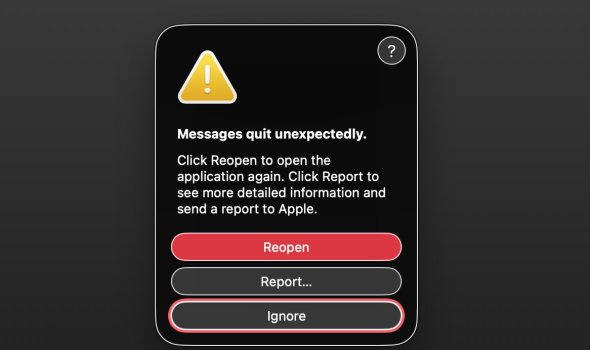
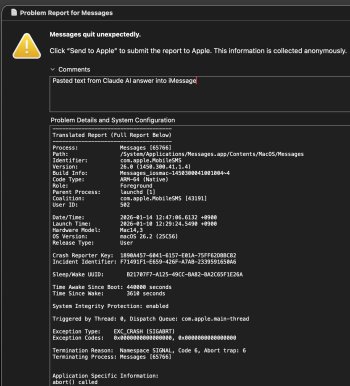
Is the iMessages crash (100% reproducible) when pasting in text fixed in the latest MacOS 26.3 beta?

what's the bug, exactly? i paste text into messages on my mac all the time... what are you experiencing?

No problems here too with iMessage and pasting text. I even tried a long text with several paragraphs.

The only iMessage "bug" I noticed a while ago is a missing read receipt, when the receiver is in airplane mode and/or jus busy and is reading it some hours later. It just says “delivered” all the time, after a while or immediately. But on my phone (also 26.3) I can see the delivered timestamp.

It has to be be an issue on the other side. That guy is still using an iPhone 6 with iOS 12 or even older. Although a while back it still worked. I think it started in some 26.2 or 26.1 Beta.

I only have three contacts using iMessage and the other two have an 8 Plus with iOS 16, there seems to be no issue.
 
Copy some text from a Claude AI reply, paste it into iMessages and it crashes immediately 100% of time. Notified Apple about a dozen times.
 

Attachments

  • Screenshot 2026-01-14 at 12.47.28.jpg
    Screenshot 2026-01-14 at 12.47.28.jpg
    79.7 KB · Views: 4
  • Screenshot 2026-01-14 at 12.48.14.jpg
    Screenshot 2026-01-14 at 12.48.14.jpg
    316 KB · Views: 5
  • Haha
Reactions: UpsideDownEclair
Seriously, am I the only one who does not like have the 12:00PM displayed as 00:00PM? I report it with every single release, and nothing.
 
Strictly, there is no PM or AM appended to a 24-hour time display so the problem with 12:00 (no AM or PM) is that it means midday/noon. Since the last second before midnight is 23:59:59 and the first second after midnight is 00:00:01, should midnight be 24:00 or 00:00?
Got me but I'd bet there is an international rule.
And here it is:
In standard 24-hour clock notation, midnight is designated as 00:00.
However, there's a nuance: 24:00 can also be used to represent the end of a day, which is technically the same moment as 00:00 of the following day. So:
  • 00:00 = midnight at the start of a day (e.g., 00:00 Monday means the very beginning of Monday)
  • 24:00 = midnight at the end of a day (e.g., 24:00 Sunday means the end of Sunday, which is the same moment as 00:00 Monday)
In practice, 00:00 is far more commonly used and is the standard in most contexts, including digital clocks, timetables, and ISO 8601 (the international standard for date and time). The 24:00 notation is typically only seen in specialized contexts like transportation schedules where it's important to clarify that something happens at the end of a particular day rather than the beginning of the next.
 
Until you discover that they have changed some obscure network parameter that is important for an application you rarely use and that now no longer works. Now that you notice it, you fill out the feedback form and pray that they fix it... This reasoning is fine in the very early beta versions, but later on, being clear and precise about the changes made could be much more effective.

I'm not sure if Beta 2 is better, but Tahoe screwed up Moonlight streaming with microstutter.
 
  • Like
Reactions: hieubui
Register on MacRumors! This sidebar will go away, and you'll see fewer ads.