*I worked with ChatGPT on tracking this issue and then writing up a report based on it. So it sounds AI because it helped a lot.
I wanted to sanity-check something I’ve been tracking for a couple of weeks now, because at this point I’m pretty sure I’m seeing a real behavioral change in macOS Tahoe rather than a one-off bug. What I am seeing is Tahoe fundamentally does not tolerate long-lived, browser-heavy, always-on workflows at 32 GB anymore.
Machine:
M1 Max MacBook Pro
32 GB RAM
2 TB SSD
OS:
Tahoe 26.x (currently 26.2 — which is better than 26.0, but not a full fix)
Workload (important context):
This is a very browser-centric, long-uptime machine. Safari is effectively my workspace. Typical day includes:
• Multiple Google Docs
• Google Drive
• HubSpot (several tabs)
• X / Facebook / occasional YouTube
• AI web apps (ChatGPT, Gemini, Grok, Claude)
• Mail, Messages, Numbers, Music
• Signal, Slack, WhatsApp in the background
Nothing exotic, but a lot of long-lived tabs that never really go idle.
⸻
What I started noticing
After moving to Tahoe, the machine just felt “thicker” over time. Not immediately after boot, but after a day or two:
• UI responsiveness degraded
• Window switching felt heavier
• Typing latency crept in
• Reboots restored things temporarily
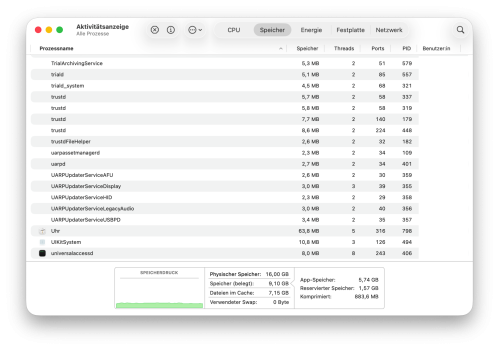
Activity Monitor showed:
• WindowServer frequently sitting at 40–50% CPU
• WindowServer memory growing into the 3–3.5 GB range
• Memory pressure still “green,” but compressed memory climbing fast
• Swap starting to engage even with 32 GB RAM
This wasn’t happening to me in the same way on pre-Tahoe macOS with the same usage pattern.
⸻
Experiment: reduce transparency & motion
On advice I’d seen elsewhere, I turned on:
• Reduce Transparency
• Reduce Motion
Then I tracked Activity Monitor over time instead of just spot-checking.
Immediate effect (post-reboot):
• WindowServer CPU dropped roughly in half
• Compressed memory much lower (3–4 GB range)
• Swap at 0
• System felt genuinely snappier
So far, so good.
⸻
What happened over time (this is the interesting part)
~11 hours uptime:
• Compression climbed, but stayed under ~9 GB
• Swap still 0
• WindowServer elevated but not pegged
• System felt usable
~1.5 days:
• Compression back in the ~12–13 GB range
• Swap still mostly avoided
• WindowServer ~30% CPU
• Heavier, but not collapsing
~3–4 days:
• Compression plateaued around 10–12 GB
• Small amounts of swap (single-digit MBs)
• WindowServer memory back near ~3 GB
• Still stable, but clearly strained
~7 days uptime (current):
• Swap now ~1.5 GB
• Compression lower (~4–5 GB), but only because pages have moved to disk
• WindowServer still ~30–40% CPU
• This is where latency becomes unavoidable again until reboot
At this point it’s clear that:
• The UI tweaks delay the problem
• They do not change the long-term steady state
• Tahoe eventually converges to compression → swap under this workload, even on 32 GB
⸻
My takeaway so far
This doesn’t feel like a classic memory leak. It feels like a policy/architecture shift in Tahoe:
• WindowServer holds onto more composited state
• WebKit/Safari tabs behave more like resident apps
• macOS favors correctness/isolation over aggressive reclamation
• Compression is leaned on harder, and swap comes sooner over long uptimes
Reducing transparency lowers the multiplier, but not the destination.
The system doesn’t “explode” anymore — but it still degrades predictably over days unless I reboot or close whole classes of tabs.
⸻
Why I’m posting
I’m trying to figure out whether this is:
• Just the reality of Tahoe for long-uptime, browser-heavy workflows
• Something specific to M1 Max / 32 GB
• Or something others are also seeing but chalking up to “Safari is heavy”
If you’re on Tahoe and:
• Run long uptimes
• Use Safari or Chromium browsers as a primary workspace
• Have noticed WindowServer CPU/memory creeping over time
…I’d really like to hear what you’re seeing:
• How much RAM?
• How long before swap shows up?
• Does rebooting “fix” it temporarily for you too?
Not looking to argue or blame Apple — just trying to understand whether this is the new normal or something still rough around the edges.
I wanted to sanity-check something I’ve been tracking for a couple of weeks now, because at this point I’m pretty sure I’m seeing a real behavioral change in macOS Tahoe rather than a one-off bug. What I am seeing is Tahoe fundamentally does not tolerate long-lived, browser-heavy, always-on workflows at 32 GB anymore.
Machine:
M1 Max MacBook Pro
32 GB RAM
2 TB SSD
OS:
Tahoe 26.x (currently 26.2 — which is better than 26.0, but not a full fix)
Workload (important context):
This is a very browser-centric, long-uptime machine. Safari is effectively my workspace. Typical day includes:
• Multiple Google Docs
• Google Drive
• HubSpot (several tabs)
• X / Facebook / occasional YouTube
• AI web apps (ChatGPT, Gemini, Grok, Claude)
• Mail, Messages, Numbers, Music
• Signal, Slack, WhatsApp in the background
Nothing exotic, but a lot of long-lived tabs that never really go idle.
⸻
What I started noticing
After moving to Tahoe, the machine just felt “thicker” over time. Not immediately after boot, but after a day or two:
• UI responsiveness degraded
• Window switching felt heavier
• Typing latency crept in
• Reboots restored things temporarily
Activity Monitor showed:
• WindowServer frequently sitting at 40–50% CPU
• WindowServer memory growing into the 3–3.5 GB range
• Memory pressure still “green,” but compressed memory climbing fast
• Swap starting to engage even with 32 GB RAM
This wasn’t happening to me in the same way on pre-Tahoe macOS with the same usage pattern.
⸻
Experiment: reduce transparency & motion
On advice I’d seen elsewhere, I turned on:
• Reduce Transparency
• Reduce Motion
Then I tracked Activity Monitor over time instead of just spot-checking.
Immediate effect (post-reboot):
• WindowServer CPU dropped roughly in half
• Compressed memory much lower (3–4 GB range)
• Swap at 0
• System felt genuinely snappier
So far, so good.
⸻
What happened over time (this is the interesting part)
~11 hours uptime:
• Compression climbed, but stayed under ~9 GB
• Swap still 0
• WindowServer elevated but not pegged
• System felt usable
~1.5 days:
• Compression back in the ~12–13 GB range
• Swap still mostly avoided
• WindowServer ~30% CPU
• Heavier, but not collapsing
~3–4 days:
• Compression plateaued around 10–12 GB
• Small amounts of swap (single-digit MBs)
• WindowServer memory back near ~3 GB
• Still stable, but clearly strained
~7 days uptime (current):
• Swap now ~1.5 GB
• Compression lower (~4–5 GB), but only because pages have moved to disk
• WindowServer still ~30–40% CPU
• This is where latency becomes unavoidable again until reboot
At this point it’s clear that:
• The UI tweaks delay the problem
• They do not change the long-term steady state
• Tahoe eventually converges to compression → swap under this workload, even on 32 GB
⸻
My takeaway so far
This doesn’t feel like a classic memory leak. It feels like a policy/architecture shift in Tahoe:
• WindowServer holds onto more composited state
• WebKit/Safari tabs behave more like resident apps
• macOS favors correctness/isolation over aggressive reclamation
• Compression is leaned on harder, and swap comes sooner over long uptimes
Reducing transparency lowers the multiplier, but not the destination.
The system doesn’t “explode” anymore — but it still degrades predictably over days unless I reboot or close whole classes of tabs.
⸻
Why I’m posting
I’m trying to figure out whether this is:
• Just the reality of Tahoe for long-uptime, browser-heavy workflows
• Something specific to M1 Max / 32 GB
• Or something others are also seeing but chalking up to “Safari is heavy”
If you’re on Tahoe and:
• Run long uptimes
• Use Safari or Chromium browsers as a primary workspace
• Have noticed WindowServer CPU/memory creeping over time
…I’d really like to hear what you’re seeing:
• How much RAM?
• How long before swap shows up?
• Does rebooting “fix” it temporarily for you too?
Not looking to argue or blame Apple — just trying to understand whether this is the new normal or something still rough around the edges.