Left as an exercise/experiment: a Shortcut for this?
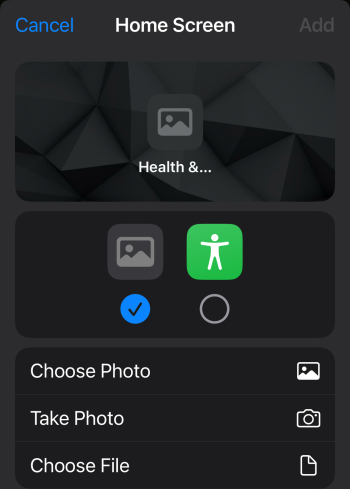
Simple Shortcut to open the webpage. Then dropdown next to SC name, "Add to Home Screen". Tap on the Photo icon/radio-button, "Choose File". "Choose" a download of the dark icon from the site.
View attachment 2453356
Actually, I found another way.
I’m not sure if this is because of how iOS 26 is capable of making a web app out of most websites, although I suspect that in the case of MacRumors Forums this would also be possible to do on previous iOS versions.
Basically, this is how you make a shortcut (with its custom icon) out of a web app, or PWA:
The first thing you need to do, is to create the WebApp from the website, like usual, share and “add to the Home Screen”. Only this time, on iOS 26, just leave the toggle on by default, to let it create a web app.
Once you have your PWA on your Home Screen, it comes the interesting part: open the Shortcuts App. Then, tap on the plus sign to create a new shortcut.
Now, I’ve seen lots of shared shortcuts on forums, on Reddit and such… most of them including scripts and complex processes that we might not trust. But trust me, this method is way, way easier, as you won’t need an extremely long chain of commands, only ONE.
View attachment 2596738
Select “Internet” below the actions search.
Now you’ll have a screen like this one:
View attachment 2596739
Sorry, I’m a Spaniard, so my iPhone is in Spanish, but basically: choose the second entry, the one that should say “Open URL addresses”
Then, you’ll be presented with this screen:
View attachment 2596748
Tap on URL, and type
webapp:// instead.
View attachment 2597463
And now, follow by typing the URL of the site you want to create the webapp shortcut, right after the webapp://
But BEWARE!!! You must remove the HTTPS:// from the address, just like this:
View attachment 2596744
And voila, you can now select the icon, the glyph, or even the picture you want for this shortcut, and save it on the Homescreen. Now, every time you tap this shortcut’s icon, you’ll open the webapp you’ve saved.
View attachment 2596745
Here, both the train icon and the one with 8 little red circles, are shortcuts for the MacRumors Forum WebApp.
Just be sure to hide the WebApp so that it’s white background color doesn’t blind you in the dark of the night… DON’T DELETE IT though, as the moment you delete the WebApp, the shortcut won’t work anymore.
You can do this for any WebApp you wish to: Gmail, Gemini, ChatGPT, XformerlyknownasTWITTER, etc. As long as you don’t want to install the app because you’re suspicious of what it might do on your iPhone, you can now create a Progressive Web App and assign a shortcut to it with the icon you want. An icon that, unlike the default favicon, it will change between dark and light modes.
Unrelated: Now looking back at the gorgeously minimalistic Home Screen I had back in iOS 18, I kinda miss it. Especially not having those edges on the icons…