

Become a MacRumors Supporter for $50/year with no ads, ability to filter front page stories, and private forums.

Plymouthbreezer

macrumors 601
Original poster
Feb 27, 2005
4,337
253
Massachusetts
Okay, so... I currently have 512 MB RAM in my trusty 1GHz 17" iMac G4, but I want 1GB. Here's the thing I'm not sure about. I know that from Apple, this computer was to have 256 MB RAM. When we purchased it, it was a special order that had 512 MB. I understand that there are two slots, an upper and a lower slot. My question is, if I have 512 now, where is that located? All in the upper slot, or 256 in the upper, and 256 in the lower? If there's 256 in the lower, replacing it with a 512 will still give me more (768) but not 1056 MB which is what I want.

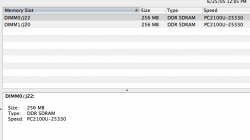
Weah... That's confusing. Attached is a screenshot from System Profiler that might help you understand.
 

Attachments

  • Picture 1.png
    Picture 1.png
    22.5 KB · Views: 232
Just get a 1GB stick and switch it with the 256 on top. I think that is the easiest, I'm not sure if you can remove the bottom one.
 
wwooden said:
Just get a 1GB stick and switch it with the 256 on top. I think that is the easiest, I'm not sure if you can remove the bottom one.
It's the other way around... The "Upper" slot is not user serviceable.
 
I always think of it as the bottom because when you flip over the computer to remove the RAM, it's the bottom one you can't remove. But you are right that is technically the top one.
 
CanadaRAM said:
Order a DM50 155-1 1 Gb SODIMM from Data Memory Systems for US$149

http://www.datamem.com/viewcat.asp_Q_C_E_1127

Remove the existing 256 Mb SODIMM, replace with the 1 Gb SODIMM.

Done - 1.25 Gb total RAM
Yikes! That was more than I wanted to spend... And it's over the max RAM limit of this computer - how much harm can that really do? And, my RAM is PC2100, not PC2700, doesn't that make a difference?

So, assuming I did do this, I would only be removing the "lower" slot which (I think, this is the part I'm not sure about) contains a 256 MB SODIMM??
 
Plymouthbreezer said:
Yikes! That was more than I wanted to spend... And it's over the max RAM limit of this computer - how much harm can that really do?

So, assuming I did do this, I would only be removing the "lower" slot which (I think, this is the part I'm not sure about) contains a 256 MB SODIMM??
It's not over the RAM limit for the machine, the Apple specs are incorrect on the iMac G4 DDR models and haven't been updated. (You're new here, right? Like, I'm going to tell you to put in RAM that will damage your machine?? Gimme some credit for being in the business for 16 years... ;) )

The lower slot of your machine has 256 Mb in it now (look at the screen shot, clearly there is 256 Mb in each slot), you will remove that.

You're not going to find good quality, Mac-guaranteed compatible RAM for much less than US$150 -- and compared to any time in history that's an outrageously good deal for 1024 Mb of RAM...
 
CanadaRAM said:
It's not over the RAM limit for the machine, the Apple specs are incorrect on the iMac G4 DDR models and haven't been updated. (You're new here, right? Like, I'm going to tell you to put in RAM that will damage your machine?? Gimme some credit for being in the business for 16 years... ;) )

The lower slot of your machine has 256 Mb in it now (look at the screen shot, clearly there is 256 Mb in each slot), you will remove that.

You're not going to find good quality, Mac-guaranteed compatible RAM for much less than US$150 -- and compared to any time in history that's an outrageously good deal for 1024 Mb of RAM...
No, not new here...

Sorry if I seemed doubtful, I should have guessed by your username that you're the in-house RAM authority. :cool:

Sounds good, I guess this is what I'll do. :)

Many thanks,

Ryan.
 
http://www.newegg.com/Product/Product.asp?Item=N82E16820155110

That should work just fine. It is the speed of your iMac's RAM (PC2100) and is 200 pin, which your iMac will take. (in the lower slot only)

I've got a 512 stick of Kingmax PC4000 RAM kickin in my Athlon rig. It's rated at 250 MHz 3-4-4-8, but I've got it running at 265 MHz 3-4-3-8 easily, so I would recommend Kingmax brand RAM. A steal at $64. (bought from newegg, of course)
 
musicpyrite said:
http://www.newegg.com/Product/Product.asp?Item=N82E16820155110

That should work just fine. It is the speed of your iMac's RAM (PC2100) and is 200 pin, which your iMac will take. (in the lower slot only)

I've got a 512 stick of Kingmax PC4000 RAM kickin in my Athlon rig. It's rated at 250 MHz 3-4-4-8, but I've got it running at 265 MHz 3-4-3-8 easily, so I would recommend Kingmax brand RAM. A steal at $64. (bought from newegg, of course)
I'll look into that too, thanks.

Where on the Cape are your from? We have a house in Yarmouth.
 
Register on MacRumors! This sidebar will go away, and you'll see fewer ads.