Become a MacRumors Supporter for $50/year with no ads, ability to filter front page stories, and private forums.

olzak

macrumors newbie
Original poster
Aug 14, 2011
7
2
Hi,

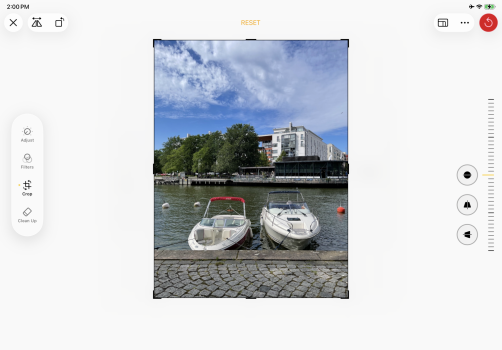
On my iPad Air M1 with iPadOS 26.2, the vertical and horizontal perspective adjustment controls in the Photos crop tool are missing. I’ve tried a hard reset and reinstalling the app, but they still don’t appear.
I’m not sure if this is device-specific, so I’m asking if anyone else has seen the same issue. Any insights or workarounds would be appreciated.

Thanks!
 

Attachments

  • IMG_0156.jpeg
    IMG_0156.jpeg
    588.4 KB · Views: 13
Hi,

On my iPad Air M1 with iPadOS 26.2, the vertical and horizontal perspective adjustment controls in the Photos crop tool are missing. I’ve tried a hard reset and reinstalling the app, but they still don’t appear.
I’m not sure if this is device-specific, so I’m asking if anyone else has seen the same issue. Any insights or workarounds would be appreciated.

Thanks!
Same here. I checked on my iPhone and they are available there
 
  • Like
Reactions: olzak
Same here. I checked on my iPhone and they are

Same here. I checked on my iPhone and they are available there
Same here on iPhone. The vertical and horizontal perspective controls are available on my iPhone 17 as well as on my iPhone 13. A friend of mine has the same issue on an iPad Air M3, so this doesn’t seem to be limited to a single iPad model. I’ve also submitted feedback to Apple about this.
 
I have an iPad Pro M4 so I think all the iPads compatible with the new features of Photos have the same problem. I’ll f-just edit my photos on the iPhone before using them on the iPad 🤷‍♂️ Let’s wait for the update.
 
  • Like
Reactions: olzak
Hi,

On my iPad Air M1 with iPadOS 26.2, the vertical and horizontal perspective adjustment controls in the Photos crop tool are missing. I’ve tried a hard reset and reinstalling the app, but they still don’t appear.
I’m not sure if this is device-specific, so I’m asking if anyone else has seen the same issue. Any insights or workarounds would be appreciated.

Thanks!

Same issue with my iPad Air M3 11”. Turns out if you swipe to the left on the rotation icon it will cycle through the other perspective tools. Clearly a bug. But the functionality is there.
 
  • Like
Reactions: chabig
Weird. I have them in the upper left corner. iPadOS 26.2. iPad Pro (11-inch) (3rd generation).

Edit: Never mind. Those are flip and rotate. I do not have perspective adjustments.

IMG_0573.PNG
 
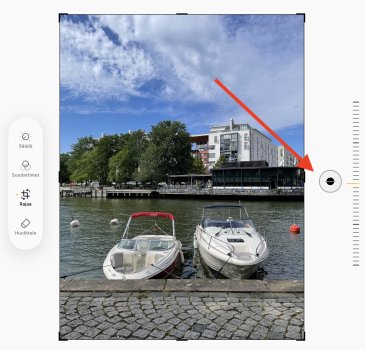
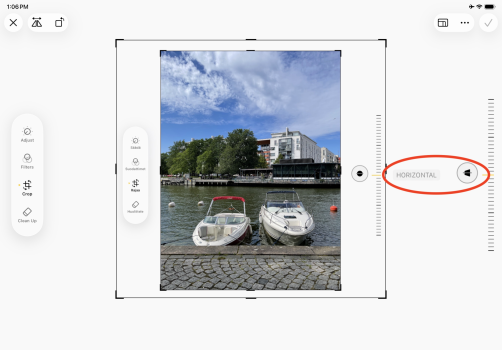
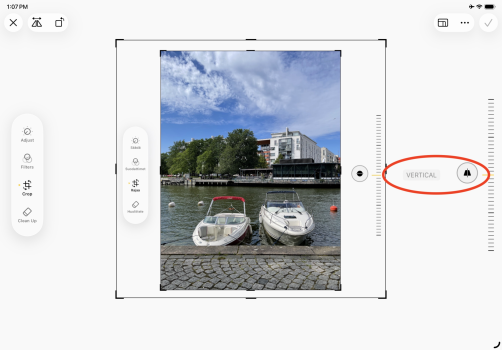
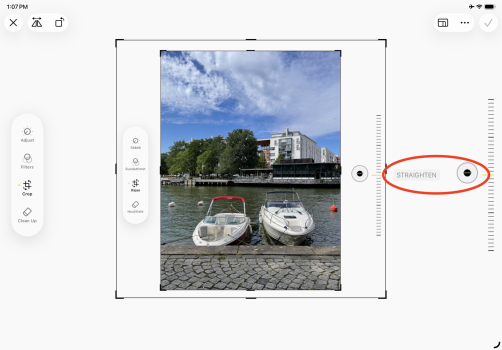
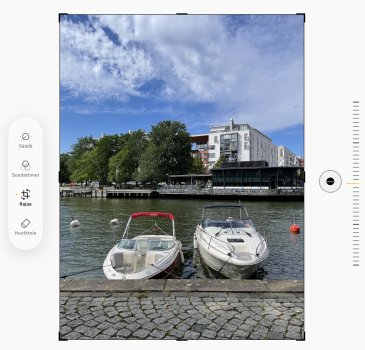
Found them! They are hidden. Swipe on the adjustment icon in a direction perpendicular to the direction that makes the adjustment. In this example picture, swiping up and down adjusts rotation. Swipe left and right to cycle between straighten, vertical perspective, and horizontal perspective. This is a terrible UI.

IMG_0156.jpeg

IMG_0578.PNG

IMG_0579.PNG

IMG_0580.PNG
 
  • Like
Reactions: olzak
Found them! They are hidden. Swipe on the adjustment icon in a direction perpendicular to the direction that makes the adjustment. In this example picture, swiping up and down adjusts rotation. Swipe left and right to cycle between straighten, vertical perspective, and horizontal perspective. This is a terrible UI.
Thank you! This works. I wonder whether this is intentionally hidden or if it’s a bug? Apple hasn’t mentioned anything about this, though. Anyway, the main thing is that it works.
 
I’m not running any betas, but if I were I’d report it as a bug via feedback. This UI faux pax is pretty bad.
 
I’m not running any betas, but if I were I’d report it as a bug via feedback. This UI faux pax is pretty bad.
I’m not on a beta either. I’ve already sent feedback to Apple via applefeedback://, pointing out that this is a UI design problem and that there’s no guidance explaining how these controls work.
 
I’m seeing some confusing behavior with the perspective adjustment controls in the Photos app on iPadOS 26

In full-screen mode, the perspective controls don’t appear at all.

When using windowed mode (Slide Over / Split View / Organizer) and you shrink the window slightly, the perspective icons appear below the photo.

If you then expand the window back to full screen, the controls remain visible, but they shift to the right side of the photo.


This behavior makes it very hard to find and use the perspective controls, and combined with Apple’s instructions (“swipe under the photo”), it’s very confusing. It looks like a UX issue rather than a bug, but it definitely affects usability.
 
I put beta 3 on my iPad. This is fixed.
Great, thanks for testing it! Apple responded to my feedback saying they had fixed this in build 23D5089e, but until now I hadn’t seen anyone actually confirm it on iPad. Good to know it’s really fixed in beta 3.
 
  • Like
Reactions: I7guy and chabig
I have an iPad Air with 26.2 and even though I found the “hidden” horizontal and vertical crop tools, I’m unable to save changes after using (for example) the horizontal tool and then try to change to the vertical tool. Each time I try to change, the adjustment reverts back to the original image.

Is there any way of using the tools or do I have to either download a beta or wait until Apple fixes this problem.
 
Register on MacRumors! This sidebar will go away, and you'll see fewer ads.