

Become a MacRumors Supporter for $50/year with no ads, ability to filter front page stories, and private forums.

zuma022

macrumors regular
Original poster
May 18, 2008
129
0
Can someone help me with some settings. I have an mkv file that I want to watch on the AppleTV. I've converted them many times with handbrake and it works just fine. (I know I technically only need to change the container, but handbrake only worked so I haven't messed with any other software).

The mkv file in question plays perfectly on vlc. But once re encoded the audio has a weird little skip every so often. It's like it's skipping a word or two. I don't know how to fix that. I don't really know what I'm doing to be honest, I just use the preset and it usually turns out fine. Can anyone point in the right direction of what I might need to change? I'll attach the settings I use.
 
Last edited:
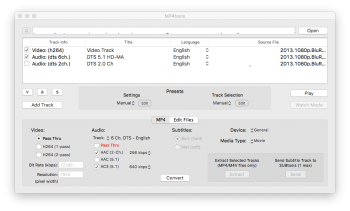
Can you select the base DTS track for transcoding (instead of DTS-ES), so that it has 5.1 channel layout and lower bitrate? To be honest, I have no idea, how does HB deal with this excessive channel.
PS HB always converts the video track. If your video is already in AVC and with suitable bitrate, you could use e.g. emmgunn's MP4Tool to repack it into MP4 and transcode audio only. I've had very good results with it and it only takes a fraction of time. I've really not noticed any audio problems with it either.
 
Last edited:
No, I just have this and none to choose from. I've downloaded MP4Tools it does work with the stereo setting. Which is much better than the skip. Thanks
 
No, I just have this and none to choose from. I've downloaded MP4Tools it does work with the stereo setting. Which is much better than the skip. Thanks
AFAIK it can also convert DTS track to AC3 5.1 You just select 2 checkboxes - one for AAC and the other for AC3:
Untitled.png
 
AFAIK it can also convert DTS track to AC3 5.1 You just select 2 checkboxes - one for AAC and the other for AC3
I'll give it a try thanks. It didn't work with just AC3, but maybe when both are selected.
 
Try iFFMpeg 5.7.2. It's fully updated to be compatible with El Capitan, and after you get over the slight learning curve, it features one-click set it and forget it MKV to MP4 transcoding, ~6 minutes for a 7 gb file. Can't be beat, imho.
 
Register on MacRumors! This sidebar will go away, and you'll see fewer ads.