Become a MacRumors Supporter for $50/year with no ads, ability to filter front page stories, and private forums.

Harmush

macrumors 6502a
Original poster
Sep 21, 2008
557
3
Liverpool
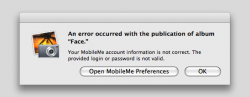
hey guys i have a problem. i changed my mobile me password the other day and everyone works fine, all the syncing is back up and my computers and iphone is working fine with the sync. but the iphoto mobile me galleries are just showing an error. i can't work out why. this is the error.


please help.
 

Attachments

  • error.png
    error.png
    31.2 KB · Views: 190
MobileMe Password Change

I have the same problem and started a thread about it on Apple's discussion board, see http://discussions.apple.com/thread.jspa?threadID=1904914&start=0&tstart=0

First, I'd suggest sending Apple feedback on it (select "Provide iPhoto Feedback" from the iPhoto menu).

When you change your MM password, you need to enter the new password in MobileMe in System Preferences. When you select MobileMe in System Preferences, it will (correctly) say that your password has changed and ask for the new one.

It looks like the problem with iPhoto is that when you enter the new password in MobileMe preferences, the keychain entry for it isn't being updated. Look for publish.me.com in Keychain Access. It will probably have the old password. Changing it there and then signing out/in in MM System Preferences seems to fix the problem with iPhoto. If not, try deleting publish.me.com in Keychain Access and then sign out/in to MobileMe in System Preferences.

Give it a try and post what happens.

Jay
 
Great help.

I love the plethora of helpful information available online, especially clear, simple, yet invaluable, hints like the Keychain Access one. I had the same prob with changing MM password and iPhoto not syncing. Now it works perfectly. Thank you.
 
I have the same problem and started a thread about it on Apple's discussion board, see http://discussions.apple.com/thread.jspa?threadID=1904914&start=0&tstart=0

<Snip>

It looks like the problem with iPhoto is that when you enter the new password in MobileMe preferences, the keychain entry for it isn't being updated. Look for publish.me.com in Keychain Access. It will probably have the old password. Changing it there and then signing out/in in MM System Preferences seems to fix the problem with iPhoto. If not, try deleting publish.me.com in Keychain Access and then sign out/in to MobileMe in System Preferences.

Give it a try and post what happens.

Jay

You, sir, are a steely-eyed missile man! Your suggestion was the answer and perfect fix. Hopefully Apple has noted the issue. Thank you!
 
Solution

Just signing out/in of MobileMe from System Preferences without deleting any files worked me :)
 
Register on MacRumors! This sidebar will go away, and you'll see fewer ads.